
Otter Browser
Otter Browser: A configurable, open-source desktop browser with classic tools but no sync or extensions. Ranked #103 of 145 in Web Browsers by our editors (3.0/10); pricing: Free plan; best for open-source desktop users wanting classic browser tools.
At a glance
- Editor score3.0 / 10
- PricingFree plan
- Best forOpen-source desktop users wanting classic browser tools
- Free planYes
- Paid fromFree
- Browser engineOther
- Facts checked23 Sep 2026
Where it wins
- Free and open source across Linux, Windows, and macOS
- Includes feeds, notes, gestures, content blocking, and private browsing
- Customizable toolbars, menus, tabs, sessions, and bookmarks
Where it doesn't
- No synchronization across devices
- No extension support
- Desktop-focused rather than a broader platform ecosystem
Our verdict on Otter Browser
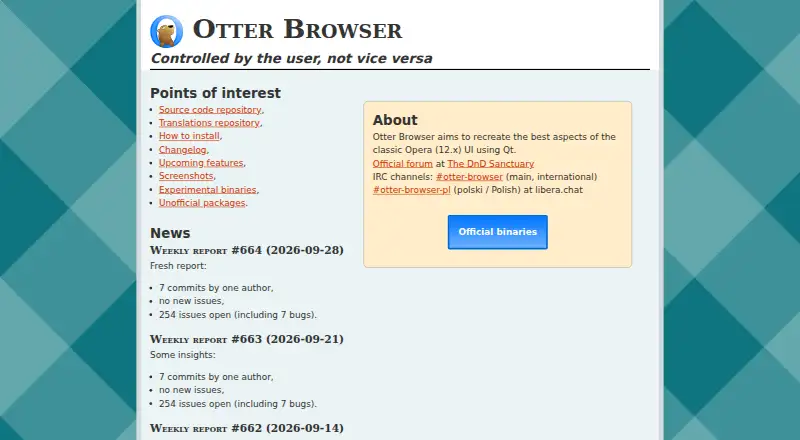
Otter Browser is a free, open-source desktop web browser designed around key aspects of the classic Opera 12 user interface. It is aimed at users who want a configurable browser with built-in tools rather than a minimal browsing shell. The feature set includes tab and session management, bookmarks and bookmark-bar support, RSS and Atom feed reading, content blocking compatible with Adblock Plus, customizable toolbars and menus, mouse gestures, page screenshots, notes, password storage, and private browsing. Otter is available for Linux, Windows, and macOS, with the project written primarily in C++ using the Qt framework.
Its main strength is breadth within a focused desktop experience. Users can manage browsing sessions, organize bookmarks, read feeds, capture screenshots, keep notes, store passwords, and adjust the interface without relying on extensions for these functions. The project also publishes weekly reports on its official website, while its repository and changelog reference both QtWebKit and QtWebEngine backends. That makes Otter a fit for people who value configurable browser controls and an open-source project structure, especially those seeking a familiar classic-browser style.
The trade-off is ecosystem reach. Otter has no synchronization and no extension support, so it is less suited to people who expect browsing data to follow them across devices or who depend on add-ons to expand browser capabilities. Its strengths are concentrated in local desktop customization and built-in utilities rather than account-based continuity or a large extension ecosystem. Choose Otter if classic interface controls, open-source availability, and integrated browsing tools matter most. Choose another browser if cross-device sync or extensions are central to your workflow.
Your product? Our editors can test Otter Browser in depth and publish a review, labelled as paid · from $149/mo →
Otter Browser pricing
Otter Browser fact sheet
| Free plan | Yes |
|---|---|
| Paid from | Free |
| Supported platforms | Desktop |
| Browser engine | Other |
| Built-in ad blocking | Yes |
| Tracking protection | Not verified |
| Extension support | Not verified |
| Cross-device sync | Not verified |
| Open source | Yes |
| Deployment | Desktop |
| Platforms | Windows, Linux |
| Support | Community |
| Built for | Solo (editorial estimate) |
| Pricing | Free plan |
| Website | otter-browser.org |
| Facts checked | 23 Sep 2026 |
Alternatives to Otter Browser
- Google ChromeA complete free browser with broad platform coverage, sync, extensions, and built-in security.9.3
- Microsoft EdgeA free, cross-platform browser suited to Microsoft users who want broad compatibility.9.2
- Mozilla FirefoxA mature, privacy-focused browser for everyday browsing across desktop and mobile.9.1


See all Otter Browser alternatives →
Also Ranked In
Otter Browser is ranked in 2 of our directories.
Used Otter Browser? Be the first to review it
The editor score above is our own research. What this page doesn't have yet is a reader's view — what you used Otter Browser for, what worked and what didn't. No stars are seeded and no review is paid for; an editor reads every one before it appears.
Write a reviewTwo minutes · verified accounts only · read by an editor before it appears
Featured on iTechGuides

Otter Browser is listed in our Web Browsers directory. Add the badge to your site — it links back to this page.
<a href="https://www.itechguides.com/products/otter-browser/"><img src="https://www.itechguides.com/best/badge/otter-browser.svg" alt="Featured on iTechGuides" width="230" height="46"></a>
Reviewed by iTechGuides Editors · Editorial team · Updated Oct 2026
Advertiser disclosure: iTechGuides is reader-supported. Vendors can pay for top positions in our rankings and for a place on other products' pages, and we may earn a commission when you click some links. Bought places stand at the number bought; this page and our disclosure say so. Paying vendors may get a fuller, more detailed review from our editors, and that review can change their score. How we rank.
Last updated · How we research and update