Optimizationmaxxing
Optimizationmaxxing: A measurement-led Windows tuning utility with rollback, diagnostics, and a $115 lifetime tier. Ranked #30 of 34 in Game Graphics Optimization Software by our editors (6.2/10); pricing: Free plan; best for advanced Windows latency and tweak management.
At a glance
- Editor score6.2 / 10
- PricingFree plan
- Best forAdvanced Windows latency and tweak management
- Free planYes
- Paid from$115 one-time
- Facts checked20 Sep 2026
Where it wins
- Audited tweak catalog with citations and hardware-aware filtering
- Snapshot-backed rollback plus before-and-after measurement tools
- DPC, bufferbloat, driver, PCIe, and NVIDIA Reflex diagnostics
Where it doesn't
- Windows only, with no listed support for other platforms
- No in-game overlay or game library scan
- VIP Lifetime costs $115 as a one-time purchase
Our verdict on Optimizationmaxxing
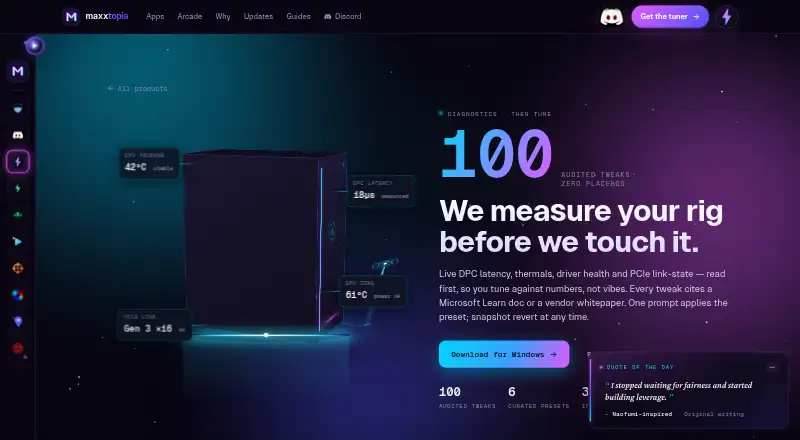
Optimizationmaxxing is a Windows desktop utility for competitive gaming PCs that applies documented system, network, display, timer, registry, and power tweaks. Players can choose guided tuning presets or select individual changes, then review hardware, thermals, driver health, PCIe link state, DPC latency, and related measurements. It is aimed at users who want system-level tuning with documented citations and rollback support, rather than a general game launcher or graphics-settings manager.
The pricing structure starts with a Free plan that includes 70 of 100 catalog tweaks, before-and-after measurement tools, restore support, and the Free Tune Now lane. The VIP Lifetime plan costs $115 one time and adds full catalog access, Match Scan, Asta Mode, full presets, and future packs. That makes the free tier a practical way to access core tuning and measurement features, while the paid tier is for users who want the complete catalog and expanded preset and scanning features.
Its strongest fit is for advanced Windows users focused on latency diagnostics and controlled changes. Hardware-aware filtering helps identify applicable tweaks, while snapshot-backed rollback provides a defined path for reversing applied changes. DPC and interrupt-time diagnostics, latency and bufferbloat probing, PCIe link-state and driver-health checks, and per-game NVIDIA Reflex profiles where supported extend the utility beyond basic tweak lists. It is less suitable for users seeking cross-platform support, an in-game overlay, game library scanning, or cloud synchronization. Choose it for documented, measurable Windows tuning; choose another category tool for broader game-management features.
Your product? Our editors can test Optimizationmaxxing in depth and publish a review, labelled as paid · from $149/mo →
Optimizationmaxxing pricing
All 2 Optimizationmaxxing plans and prices →
Optimizationmaxxing fact sheet
| Free plan | Yes |
|---|---|
| Paid from | $115 one-time |
| Auto recommendations | Not verified |
| Per-game profiles | Yes |
| In-game overlay | No |
| Game library scanning | No |
| Supported platforms | Windows |
| Cloud profile sync | No |
| Deployment | Desktop |
| Platforms | Windows |
| Support | Community |
| Built for | Solo, Small business (editorial estimate) |
| Pricing | Free plan (source) |
| Website | maxxtopia.com |
| Facts checked | 20 Sep 2026 |
Alternatives to Optimizationmaxxing
- HoneA broad Windows optimizer with presets, overlays, and a usable free tier.9.4
- GameShiftA free, open-source Windows optimizer with broad game detection and system controls.9.3
- PULSEA deep Windows tuning suite with broad free monitoring and paid optimization controls.9.2


See all Optimizationmaxxing alternatives →
Used Optimizationmaxxing? Be the first to review it
The editor score above is our own research. What this page doesn't have yet is a reader's view — what you used Optimizationmaxxing for, what worked and what didn't. No stars are seeded and no review is paid for; an editor reads every one before it appears.
Write a reviewTwo minutes · verified accounts only · read by an editor before it appears
Featured on iTechGuides

Optimizationmaxxing is listed in our Game Graphics Optimization Software directory. Add the badge to your site — it links back to this page.
<a href="https://www.itechguides.com/products/optimizationmaxxing/"><img src="https://www.itechguides.com/best/badge/optimizationmaxxing.svg" alt="Featured on iTechGuides" width="230" height="46"></a>
Reviewed by iTechGuides Editors · Editorial team · Updated Oct 2026
Advertiser disclosure: iTechGuides is reader-supported. Vendors can pay for top positions in our rankings and for a place on other products' pages, and we may earn a commission when you click some links. Bought places stand at the number bought; this page and our disclosure say so. Paying vendors may get a fuller, more detailed review from our editors, and that review can change their score. How we rank.
Last updated · How we research and update