
Opsler
Opsler: A capable small-shop option with free dispatch, offline work, and limited integrations. Ranked #18 of 33 in Plumbing Software by our editors (7.6/10); pricing: Free plan · 14-day trial; best for small shops wanting free dispatch and offline mobile.
At a glance
- Editor score7.6 / 10
- PricingFree plan · 14-day trial
- Best forSmall shops wanting free dispatch and offline mobile
- Free planYes
- Paid from$25/seat/mo
- Dispatch boardYes
- Facts checked20 Sep 2026
Where it wins
- Permanent free plan includes two seats and 50 jobs per month
- Offline technician app supports updates, photos, signatures, and invoices
- Dispatch, booking, estimates, payments, inventory, and routing are included
Where it doesn't
- Integrations are limited to QuickBooks- and Xero-formatted CSV exports
- The free plan is capped at two seats, 50 jobs, 100 inventory items, and one location
- Payment features provide links and record payments; money does not pass through Opsler
Our verdict on Opsler
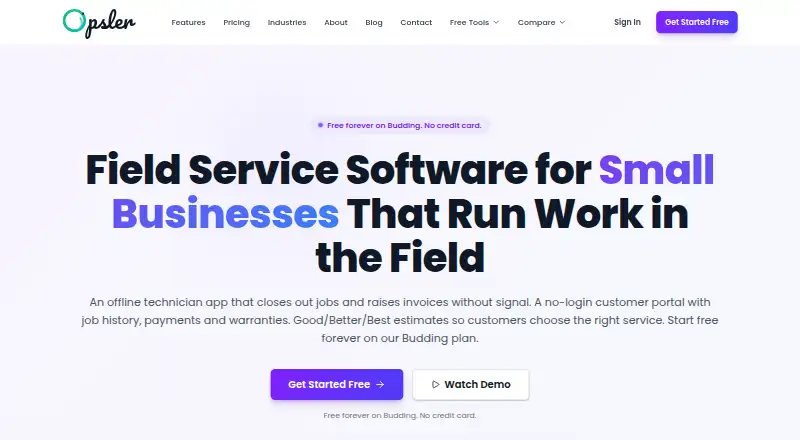
Opsler is field service management software for plumbing contractors and other small trade businesses. It brings together customer records, service history, online booking requests, scheduling, dispatch, work orders, estimates, invoicing, payments, inventory, warranties, and reporting. Its browser-based field app supports phones and offline work after job data is synced, making it suited to small teams that need to coordinate office and technician activity without requiring constant connectivity.
The pricing structure is accessible for small shops. Budding is free and includes two seats—one admin and one technician—plus 50 jobs per month, unlimited customers, 100 inventory items, one inventory location, and 21 core features. Pro costs $25 per seat per month, has no seat minimum, adds all 42 features, removes caps on jobs, inventory items, and locations, and includes priority support and setup assistance. Lifetime costs $499 one time for five lifetime seats, all 42 features, future features, and 25 GB of storage. A 14-day free trial is also available.
Opsler’s strongest operational breadth covers dispatch, online booking, estimates, work orders, invoices, payment links, inventory across trucks and warehouses, route optimization, and technician location capture. The offline app can handle job updates, photos, signatures, and invoices in the field. The main trade-off is ecosystem depth: the listed accounting connections are QuickBooks- and Xero-formatted CSV exports rather than direct integrations. Payment functionality records payments and provides links, but money does not pass through the platform. Choose Opsler if free dispatch and offline mobile work matter most; consider an alternative if direct integrations or built-in payment processing are priorities.
Your product? Our editors can test Opsler in depth and publish a review, labelled as paid · from $149/mo →
Opsler pricing
All 3 Opsler plans and prices →
Opsler fact sheet
| Free plan | Yes |
|---|---|
| Paid from | $25/seat/mo |
| Mobile app | Yes |
| Dispatch board | Yes |
| Online booking | Yes |
| Estimate builder | Yes |
| Work orders | Yes |
| Invoice payments | Yes |
| GPS or route tracking | Yes |
| Free trial | 14 days · no card needed |
| Deployment | Cloud, Mobile |
| Platforms | Web, iOS, Android |
| Support | Docs |
| Built for | Solo, Small business, Mid-market (editorial estimate) |
| Integrations | 2 integrations: QuickBooks-formatted CSV export, Xero-formatted CSV export |
| Pricing | Free plan · 14-day trial (source) |
| Website | opsler.com |
| Facts checked | 20 Sep 2026 |
Opsler integrations
Opsler lists 2 integrations on its own site.
- QuickBooks-formatted CSV export
- Xero-formatted CSV export
Alternatives to Opsler
- simPROA broad field-service system for plumbing contractors that need office-to-field control.9.4
- CommusoftA broad field-service suite for coordinating technicians, customers, payments, and profitability.9.3
- ServiceTradeA broad field service platform for commercial teams managing complex service operations.9.2


Used Opsler? Be the first to review it
The editor score above is our own research. What this page doesn't have yet is a reader's view — what you used Opsler for, what worked and what didn't. No stars are seeded and no review is paid for; an editor reads every one before it appears.
Write a reviewTwo minutes · verified accounts only · read by an editor before it appears
Featured on iTechGuides

Opsler is listed in our Plumbing Software directory. Add the badge to your site — it links back to this page.
<a href="https://www.itechguides.com/products/opsler/"><img src="https://www.itechguides.com/best/badge/opsler.svg" alt="Featured on iTechGuides" width="230" height="46"></a>
Reviewed by iTechGuides Editors · Editorial team · Updated Oct 2026
Advertiser disclosure: iTechGuides is reader-supported. Vendors can pay for top positions in our rankings and for a place on other products' pages, and we may earn a commission when you click some links. Bought places stand at the number bought; this page and our disclosure say so. Paying vendors may get a fuller, more detailed review from our editors, and that review can change their score. How we rank.
Last updated · How we research and update