
OpenNAS
OpenNAS: A free, open-source NAS for storage, containers, virtual machines and self-hosted apps. Ranked #13 of 21 in NAS Software by our editors (6.9/10); pricing: Free plan; best for free NAS with apps and VMs.
At a glance
- Editor score6.9 / 10
- PricingFree plan
- Best forFree NAS with apps and VMs
- Free planYes
- Paid fromFree
- Storage poolsYes
- Facts checked21 Sep 2026
Where it wins
- ZFS pools, software RAID, snapshots and scheduled S.M.A.R.T. monitoring
- Docker, Compose and KVM/QEMU virtual machines with browser consoles
- Permissions, passkeys, OIDC SSO and a signed-package app center
Where it doesn't
- Currently offered as a beta release for x86_64 hardware
- Requires compatible hardware and self-hosted administration
- Its scope may exceed the needs of users seeking basic file sharing
Our verdict on OpenNAS
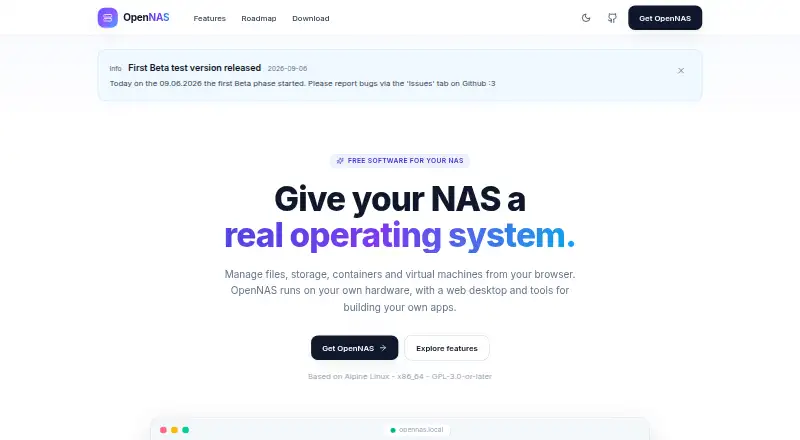
OpenNAS is a free, open-source NAS operating system for self-hosters and homelabs running compatible x86_64 hardware. It combines storage management, file access, applications and virtualization in a browser-based desktop with windows, a launcher and notifications. The file manager includes previews, ZIP tools, a recycle bin and share links, while network sharing covers SMB, NFS and AFP. For administrators, the system brings together ZFS storage pools, software RAID, S.M.A.R.T. monitoring, scheduled scrubs and snapshots in one platform.
The published product details show a broad self-hosted stack rather than a basic file server. Docker container and Compose stack management sit alongside KVM/QEMU virtual machines with a browser-based noVNC console. Package Center provides one-click access to services including Jellyfin, Nextcloud, Pi-hole, Vaultwarden, Gitea, Home Assistant, Portainer and Immich. The app SDK and signed application packages also give the platform an ecosystem path beyond its built-in tools. User and group permissions, passkeys and OIDC single sign-on add identity controls for shared environments.
OpenNAS is currently distributed as beta release 0.9.0-beta.1, so it is a better fit for self-hosters comfortable evaluating a developing platform than for organizations seeking a settled NAS operating system. Its free, open-source model removes license cost and supports a wide range of workloads, but the breadth also brings more administration than a storage-only appliance. Choose it for a single system that can host files, containers, virtual machines and services. Choose an alternative if beta software or x86_64 hardware is not appropriate for your deployment.
Your product? Our editors can test OpenNAS in depth and publish a review, labelled as paid · from $149/mo →
OpenNAS pricing
OpenNAS fact sheet
| Free plan | Yes |
|---|---|
| Paid from | Free |
| Storage pools | Yes |
| User management | Yes |
| Snapshots | Yes |
| App catalog | Yes |
| Container support | Yes |
| Virtual machines | Yes |
| Cloud sync | Not verified |
| Deployment | Self-hosted, Browser extension |
| Platforms | Web, Linux |
| Compliance & security | 2FA, SSO/SAML |
| Support | Docs, Community |
| Built for | Solo, Small business (editorial estimate) |
| Integrations | 14 integrations: Docker, Docker Compose, Jellyfin, Nextcloud, Pi-hole, Vaultwarden … |
| Pricing | Free plan |
| Website | opennas.eu |
| Facts checked | 21 Sep 2026 |
OpenNAS integrations
OpenNAS lists 14 integrations on its own site.
- Docker
- Docker Compose
- Jellyfin
- Nextcloud
- Pi-hole
- Vaultwarden
- Gitea
- Home Assistant
- Portainer
- Immich
- SMB
- NFS
- AFP
- OIDC
Alternatives to OpenNAS
- TrueNASA free, full-featured ZFS NAS for labs, businesses, and enterprise environments.9.2
- openmediavaultA capable, extensible Linux NAS for self-hosters who want control over services and storage.8.8
- XigmaNASA free ZFS NAS operating system with virtualization and extensive file services.8.6



See all OpenNAS alternatives →
Used OpenNAS? Be the first to review it
The editor score above is our own research. What this page doesn't have yet is a reader's view — what you used OpenNAS for, what worked and what didn't. No stars are seeded and no review is paid for; an editor reads every one before it appears.
Write a reviewTwo minutes · verified accounts only · read by an editor before it appears
Featured on iTechGuides

OpenNAS is listed in our NAS Software directory. Add the badge to your site — it links back to this page.
<a href="https://www.itechguides.com/products/opennas/"><img src="https://www.itechguides.com/best/badge/opennas.svg" alt="Featured on iTechGuides" width="230" height="46"></a>
Reviewed by iTechGuides Editors · Editorial team · Updated Oct 2026
Advertiser disclosure: iTechGuides is reader-supported. Vendors can pay for top positions in our rankings and for a place on other products' pages, and we may earn a commission when you click some links. Bought places stand at the number bought; this page and our disclosure say so. Paying vendors may get a fuller, more detailed review from our editors, and that review can change their score. How we rank.
Last updated · How we research and update