
Onita AI Notetaker
Onita AI Notetaker: Automates meeting capture and follow-up across Google Meet, Zoom, and Teams. Ranked #64 of 81 in AI Meeting Assistants by our editors (6.0/10); pricing: Pricing on request; best for teams wanting automated notes across major meeting tools.
At a glance
- Editor score6.0 / 10
- PricingPricing on request
- Best forTeams wanting automated notes across major meeting tools
- TranscriptionYes
- Facts checked20 Sep 2026
Where it wins
- Captures meetings and creates searchable transcripts and notes
- Summarizes decisions and action items, then tracks follow-up tasks
- Connects calendars with Google Meet, Zoom, and Microsoft Teams
Where it doesn't
- Pricing requires a sales conversation rather than published plans
- The listed delivery platform is web
- Meeting capture uses a bot joining video calls
Our verdict on Onita AI Notetaker
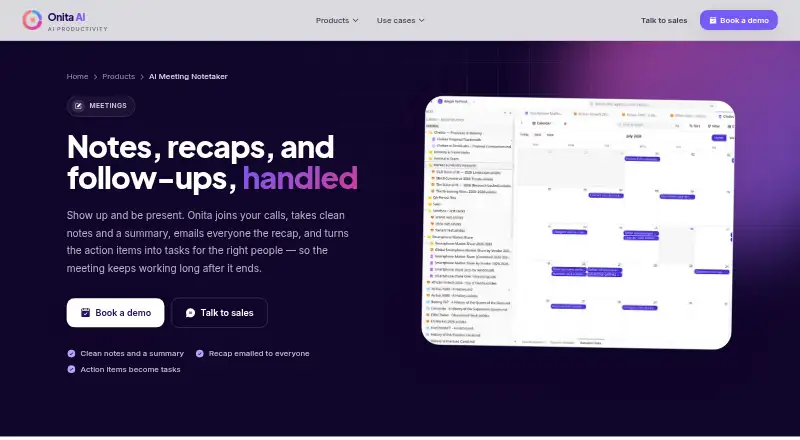
Onita AI Notetaker is a web-based meeting assistant for individuals, teams, and sales or client-facing groups. It joins video calls through a bot, captures conversations, and turns them into searchable notes and transcripts. Its output includes summaries, decisions, action items, and email recaps for participants. Follow-ups can become tracked tasks with owners, making Onita a fit for teams that want meeting documentation connected to ongoing work rather than a transcript alone.
The commercial model is contact-sales. Prospects are directed to book a demo, and pricing is designed around the customer’s budget rather than presented as a fixed public plan structure. That approach may suit organizations seeking a managed arrangement, including cloud deployment or a dedicated private instance managed for the customer. It gives buyers room to discuss their operating model, but teams comparing meeting assistants by published tiers will need to start with a sales conversation before evaluating cost.
Onita’s strongest ecosystem fit is its combination of calendar and meeting-tool connections: Google Calendar, Outlook Calendar, Zoho Bookings, Google Meet, Zoom, and Microsoft Teams. The workflow spans scheduling, automated capture, recap emails, searchable records, and task tracking. Teams that already coordinate meetings across these tools may find the coverage relevant. Onita is less suitable for buyers who want a narrowly priced self-serve product, a desktop or mobile delivery option, or manual note-taking without a bot joining calls. Choose it when automated documentation and owned follow-ups matter; consider an alternative when transparent plan comparison or a web-only workflow is a priority.
Your product? Our editors can test Onita AI Notetaker in depth and publish a review, labelled as paid · from $149/mo →
Onita AI Notetaker pricing
Onita AI Notetaker fact sheet
| Free plan | Not verified |
|---|---|
| Paid from | Not verified |
| Transcription | Yes |
| Summaries and action items | Yes |
| Meeting capture | Bot |
| Meeting platforms | Google Meet, Zoom, Microsoft Teams |
| Transcription languages | Not verified |
| Calendar integrations | Yes |
| Deployment | Cloud, Self-hosted |
| Platforms | Web |
| Compliance & security | GDPR |
| Support | Email · 24/7 |
| Built for | Solo, Small business, Mid-market, Enterprise (editorial estimate) |
| Integrations | 6 integrations: Google Calendar, Outlook Calendar, Zoho Bookings, Google Meet, Zoom, Microsoft Teams See all → |
| Pricing | Pricing on request |
| Website | onitaapp.com |
| Facts checked | 20 Sep 2026 |
Onita AI Notetaker integrations
Onita AI Notetaker lists 6 integrations on its own site.
- Google Calendar
- Outlook Calendar
- Zoho Bookings
- Google Meet
- Zoom
- Microsoft Teams
See all Onita AI Notetaker integrations →
Alternatives to Onita AI Notetaker
- FellowA broad meeting assistant combining capture, search, action items, governance, and integrations.9.4
- Fireflies.aiA broad AI meeting assistant for multilingual teams and conversation analysis.9.3
- MeetGeekA broad meeting workspace with a useful free tier and flexible paid plans.9.1



See all Onita AI Notetaker alternatives →
Also Ranked In
Onita AI Notetaker is ranked in 2 of our directories.
Used Onita AI Notetaker? Be the first to review it
The editor score above is our own research. What this page doesn't have yet is a reader's view — what you used Onita AI Notetaker for, what worked and what didn't. No stars are seeded and no review is paid for; an editor reads every one before it appears.
Write a reviewTwo minutes · verified accounts only · read by an editor before it appears
Featured on iTechGuides

Onita AI Notetaker is listed in our AI Meeting Assistants directory. Add the badge to your site — it links back to this page.
<a href="https://www.itechguides.com/products/onita-ai-notetaker/"><img src="https://www.itechguides.com/best/badge/onita-ai-notetaker.svg" alt="Featured on iTechGuides" width="230" height="46"></a>
Reviewed by iTechGuides Editors · Editorial team · Updated Oct 2026
Advertiser disclosure: iTechGuides is reader-supported. Vendors can pay for top positions in our rankings and for a place on other products' pages, and we may earn a commission when you click some links. Bought places stand at the number bought; this page and our disclosure say so. Paying vendors may get a fuller, more detailed review from our editors, and that review can change their score. How we rank.
Last updated · How we research and update