
OnionOS
OnionOS: A feature-rich Miyoo Mini frontend with local library tools and built-in emulation. Ranked #20 of 25 in Emulation Frontends by our editors (7.3/10); pricing: Open source; best for miyoo Mini handheld owners.
At a glance
- Editor score7.3 / 10
- PricingOpen source
- Best forMiyoo Mini handheld owners
- Paid fromFree
- Supported platformsMiyoo Mini and Miyoo Mini+
- Facts checked22 Sep 2026
Where it wins
- Built-in and optional emulators, including PCSX and ScummVM
- GameSwitcher resumes games quickly, with search and activity tracking
- Themes, scraping, package management, and controller navigation in one system
Where it doesn't
- Verified device support is limited to Miyoo Mini and Miyoo Mini+
- Installation runs from an SD card rather than a general desktop platform
- Cloud synchronization is not part of the documented workflow
Our verdict on OnionOS
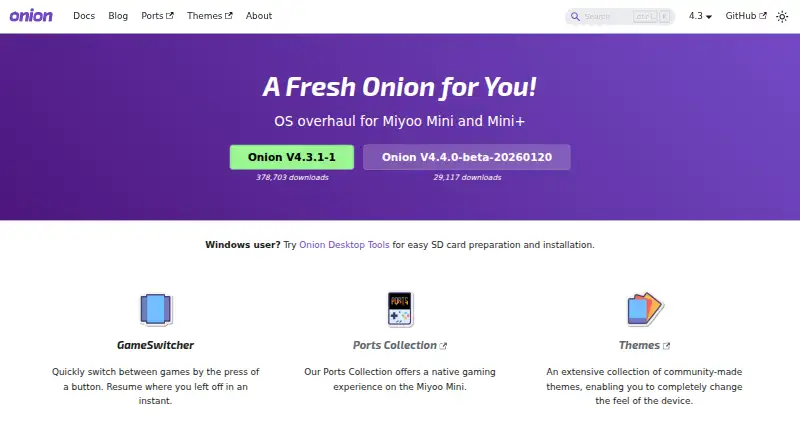
OnionOS is an open-source operating system and emulation frontend for Miyoo Mini and Miyoo Mini+ handhelds. It is designed for owners who want a structured way to manage ROMs, launch games, switch between sessions, and navigate without relying on a desktop interface. The system is installed to an SD card and distributed under the GPL-3.0 license. Its focus is narrow but clear: improving the local emulation experience on supported Miyoo hardware rather than serving as a general-purpose frontend across many devices.
Its strongest area is the combination of library management and emulation access. OnionOS includes a customized RetroArch build, built-in and optional emulators, and standalone PCSX and ScummVM options. ROM library refresh and organization use system folders, while metadata and cover scraping connect with ScreenScraper, RetroArch, and LaunchBox. The Package Manager handles emulator and app installation or removal, and controller-based navigation keeps package selection and library browsing within the handheld experience. GameSwitcher, global search, themes, and activity tracking add useful depth beyond basic game launching.
The trade-off is platform breadth. Published support centers on the Miyoo Mini and Miyoo Mini+, so owners of other handhelds should consider a frontend with wider device coverage instead. The local design also shapes the workflow: saves and preferences are backed up to the SD card, while cloud synchronization is not part of the documented feature set. Choose OnionOS if you own a supported Miyoo handheld and want open-source tools for local ROM organization, emulators, metadata, themes, and session management. Choose an alternative if cross-device deployment or cloud-based continuity matters more than handheld-focused control.
Your product? Our editors can test OnionOS in depth and publish a review, labelled as paid · from $149/mo →
OnionOS pricing
OnionOS fact sheet
| Free plan | Not verified |
|---|---|
| Paid from | Free |
| Supported platforms | Miyoo Mini and Miyoo Mini+ |
| Emulators included | Yes |
| Library import | Yes |
| Metadata scraping | Yes |
| Controller navigation | Yes |
| Portable mode | Yes |
| Cloud sync | Not verified |
| Deployment | Self-hosted |
| Support | Community, Docs |
| Built for | Solo, Small business (editorial estimate) |
| Integrations | 3 integrations: RetroArch, ScreenScraper, LaunchBox |
| Pricing | Open source |
| Website | onionui.github.io |
| Facts checked | 22 Sep 2026 |
OnionOS integrations
OnionOS lists 3 integrations on its own site.
- RetroArch
- ScreenScraper
- LaunchBox
Alternatives to OnionOS
- ES-DE FrontendA capable free desktop frontend for organizing and launching broad game collections.9.3
- LaunchBoxA flexible storefront and emulator library with free core features and one-time premium licenses.9.2
- RetroArchA broad, free frontend for organizing and running emulation across desktop, mobile, and web.9.1


See all OnionOS alternatives →
Used OnionOS? Be the first to review it
The editor score above is our own research. What this page doesn't have yet is a reader's view — what you used OnionOS for, what worked and what didn't. No stars are seeded and no review is paid for; an editor reads every one before it appears.
Write a reviewTwo minutes · verified accounts only · read by an editor before it appears
Featured on iTechGuides

OnionOS is listed in our Emulation Frontends directory. Add the badge to your site — it links back to this page.
<a href="https://www.itechguides.com/products/onionos/"><img src="https://www.itechguides.com/best/badge/onionos.svg" alt="Featured on iTechGuides" width="230" height="46"></a>
Reviewed by iTechGuides Editors · Editorial team · Updated Oct 2026
Advertiser disclosure: iTechGuides is reader-supported. Vendors can pay for top positions in our rankings and for a place on other products' pages, and we may earn a commission when you click some links. Bought places stand at the number bought; this page and our disclosure say so. Paying vendors may get a fuller, more detailed review from our editors, and that review can change their score. How we rank.
Last updated · How we research and update