OnBrio
OnBrio: A broad client portal workspace with a free tier and paid agency controls. Ranked #4 of 31 in Customer Portal Software by our editors (9.0/10); pricing: Free plan; best for freelancers and agencies wanting a free starting tier.
At a glance
- Editor score9.0 / 10
- PricingFree plan
- Best forFreelancers and agencies wanting a free starting tier
- Free planYes
- Paid from$29/mo
- Work trackingYes
- Facts checked23 Sep 2026
Where it wins
- Free Starter plan includes portals, proposals, invoicing, and time tracking
- Branded portals cover contracts, approvals, files, messages, and deliverables
- Agency and Studio plans add accounting sync, white-labeling, and API access
Where it doesn't
- Custom portal branding and domains start on the Solo plan
- QuickBooks and Xero sync starts on the Agency plan
- API access is available only on the Studio plan
Our verdict on OnBrio
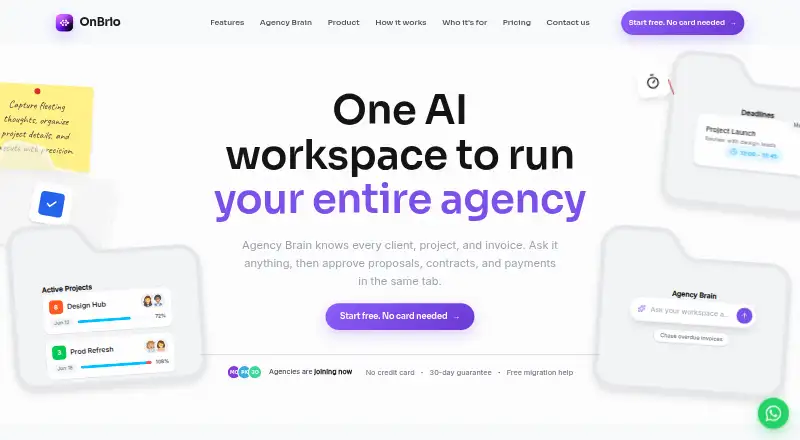
OnBrio combines client portals with CRM, proposals, e-signatures, contracts, invoicing, project management, time tracking, automation, intake forms, and AI features. It is designed for freelancers, agencies, and consulting firms that want client-facing work and internal delivery in one web-based workspace. Portals can present proposals, contracts, invoices, deliverables, approvals, files, and messages under a branded client experience.
The pricing structure starts with a free Starter plan covering clients and projects, proposals and e-signatures, Stripe payments, a client portal, and time tracking. Solo costs $29 per month with annual billing and adds unlimited clients and projects, an automation builder, custom portal branding and domain, and priority support. Agency costs $69 per month with annual billing and adds five team seats, role permissions, white-label portals, QuickBooks and Xero sync, portfolio analytics, and a dedicated onboarding call. Studio costs $149 per month with annual billing and adds unlimited seats, unlimited brands, multi-brand sub-workspaces, a white-label custom-domain portal, and API access. Enterprise adds unlimited seats, single sign-on, a custom DPA, a dedicated account manager, and SLA-backed support.
Its strongest fit is a freelancer or agency that needs more than file sharing: interactive pricing, e-signatures, linked contract templates, Stripe invoicing, Kanban, list and Gantt views, follow-up automation, intake questionnaires, and engagement tracking are all part of the product scope. The AI workspace assistant works with client, project, invoice, and message data. Choose OnBrio when branded client communication and operational breadth matter. It is less suitable for teams that need custom branding, accounting sync, or API access while staying on the free tier, since those capabilities are tied to higher plans.
Your product? Our editors can test OnBrio in depth and publish a review, labelled as paid · from $149/mo →
OnBrio pricing
All 5 OnBrio plans and prices →
OnBrio fact sheet
| Free plan | Yes |
|---|---|
| Paid from | $29/mo |
| Client user limit | Not verified |
| Request intake | Not verified |
| Work tracking | Yes |
| File sharing | Yes |
| Custom domain | Yes |
| Single sign-on | Yes |
| Money-back guarantee | 30 days |
| Deployment | Cloud |
| Platforms | Web |
| Compliance & security | GDPR, SSO/SAML |
| Support | Email, Phone |
| Built for | Solo, Small business, Mid-market (editorial estimate) |
| Integrations | 3 integrations: Stripe, QuickBooks, Xero |
| Pricing | Free plan (source) |
| Website | onbrio.com |
| Facts checked | 23 Sep 2026 |
OnBrio integrations
OnBrio lists 3 integrations on its own site.
- Stripe
- QuickBooks
- Xero
Alternatives to OnBrio
- AssemblyA broad client portal with onboarding, billing, files, workflows, and a free plan.9.4
- PlutioA broad client portal suite for small firms that want projects, billing, forms, and automation together.9.2
- SuiteDashA broad client-service suite combining portals, CRM, projects, billing, and communication.9.1



OnBrio vs the competition
- OnBrio vs Assembly
- OnBrio vs Plutio
- OnBrio vs SuiteDash
- OnBrio vs Kitchen.co
- OnBrio vs FuseBase
- OnBrio vs MyDocSafe



Compare OnBrio with any tool side by side →
Used OnBrio? Be the first to review it
The editor score above is our own research. What this page doesn't have yet is a reader's view — what you used OnBrio for, what worked and what didn't. No stars are seeded and no review is paid for; an editor reads every one before it appears.
Write a reviewTwo minutes · verified accounts only · read by an editor before it appears
Featured on iTechGuides

OnBrio is listed in our Customer Portal Software directory. Add the badge to your site — it links back to this page.
<a href="https://www.itechguides.com/products/onbrio/"><img src="https://www.itechguides.com/best/badge/onbrio.svg" alt="Featured on iTechGuides" width="230" height="46"></a>
Reviewed by iTechGuides Editors · Editorial team · Updated Oct 2026
Advertiser disclosure: iTechGuides is reader-supported. Vendors can pay for top positions in our rankings and for a place on other products' pages, and we may earn a commission when you click some links. Bought places stand at the number bought; this page and our disclosure say so. Paying vendors may get a fuller, more detailed review from our editors, and that review can change their score. How we rank.
Last updated · How we research and update