
OmniControl
OmniControl: A capable Windows mapper with strong diagnostics and paid emulation features. Ranked #6 of 29 in Controller Mapping Software by our editors (8.6/10); pricing: Free plan; best for windows users wanting diagnostics and replay.
At a glance
- Editor score8.6 / 10
- PricingFree plan
- Best forWindows users wanting diagnostics and replay
- Free planYes
- Paid from$59.99/yr
- Per-app profilesYes
- Facts checked20 Sep 2026
Where it wins
- Free plan includes mapping, tuning, diagnostics, and a 3D controller viewer
- Per-game profiles can switch automatically for different titles
- Supports virtual controller output, macros, gyro, overlays, and replay
Where it doesn't
- Available only for Windows
- Virtual controller output and automation require a paid tier
- Free plan does not include per-game profiles or recording features
Our verdict on OmniControl
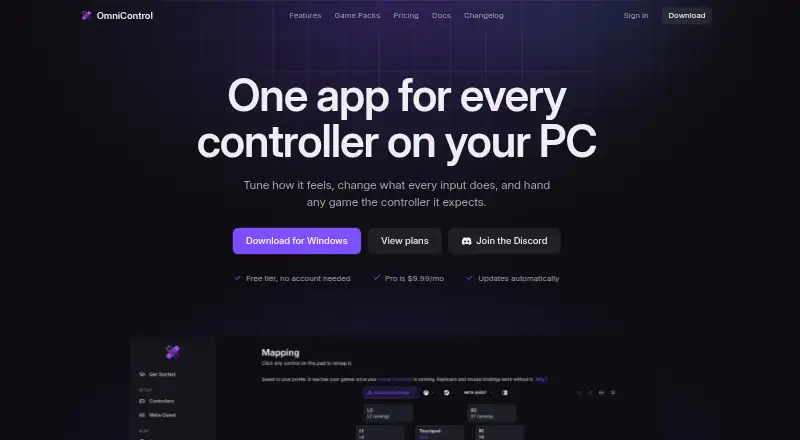
OmniControl is a Windows desktop application for remapping controller buttons, sticks, and triggers. It is aimed at PC players using PlayStation, Xbox, Nintendo, Meta Quest, and generic HID controllers who want to tune input, manage profiles, or route keyboard-and-mouse input through a controller. The free plan covers controller management, live input, diagnostics, a 3D controller viewer, keyboard-and-mouse mapping, stick and trigger tuning, and Game Pack imports. That makes it a practical starting point for basic remapping and calibration on Windows.
The main strength is its breadth of controller-focused tools. OmniControl supports response-curve tuning, automatic per-game profile switching, virtual Xbox 360 and DualShock 4 output, gyro aiming, motion input, an on-screen controller overlay, and controller session recording and replay. Diagnostics and calibration add visibility into controller behavior, while profiles help separate settings between games. Users who need only mapping and tuning can stay on Free; users who need virtual output, macros, recorder features, game automation, and per-game profiles must choose a paid plan.
Pricing is structured around two paid options. Insider costs $9.99 per month, while Pro Annual costs $59.99 per year. Both paid tiers list the same highlighted additions: virtual Xbox and DualShock output, keyboard-and-mouse input as a virtual controller, macros, recorder and game automation, and per-game profiles. OmniControl is therefore a strong fit for Windows users who want diagnostics, replay, and a wide set of input controls in one application. It is less suitable for users on another operating system or for those who need virtual output and automation without a subscription.
Questions about OmniControl
Does OmniControl have a free plan? Yes, there is a free plan; paid plans start at $59.99/yr (Pro Annual).
How much does OmniControl cost? OmniControl lists 2 paid plans; the lowest is Pro Annual at $59.99/yr.
What does OmniControl run on? Windows. It runs as a desktop app.
Who is OmniControl built for? Solo users and small businesses (our editorial estimate).
Your product? Our editors can test OmniControl in depth and publish a review, labelled as paid · from $149/mo →
OmniControl pricing
All 3 OmniControl plans and prices →
OmniControl fact sheet
| Free plan | Yes |
|---|---|
| Paid from | $59.99/yr |
| Supported platforms | Windows |
| Per-app profiles | Yes |
| Profile switching | Yes |
| Macro support | Yes |
| Keyboard and mouse remap | Yes |
| Virtual controller output | Yes |
| Simultaneous devices | Not verified |
| Deployment | Desktop |
| Platforms | Windows |
| Support | Community, Email, Docs |
| Built for | Solo, Small business (editorial estimate) |
| Pricing | Free plan (source) |
| Website | omnicontrol.me |
| Facts checked | 20 Sep 2026 |
Alternatives to OmniControl
- Steam InputA free, flexible mapping system for Steam players across Windows, macOS, and Linux.9.4
- JoyShockMapperA powerful free mapper for players who want advanced gyro and layered controller configurations.9.2
- DS4WindowsA capable free mapper for Windows users who need profiles, emulation, and advanced input controls.9.0


See all OmniControl alternatives →
OmniControl vs the competition
- OmniControl vs Steam Input
- OmniControl vs JoyShockMapper
- OmniControl vs DS4Windows
- OmniControl vs AntiMicroX
- OmniControl vs Joystick Gremlin
- OmniControl vs InputConfig

Compare OmniControl with any tool side by side →
Also Ranked In
OmniControl is ranked in 2 of our directories.
Used OmniControl? Be the first to review it
The editor score above is our own research. What this page doesn't have yet is a reader's view — what you used OmniControl for, what worked and what didn't. No stars are seeded and no review is paid for; an editor reads every one before it appears.
Write a reviewTwo minutes · verified accounts only · read by an editor before it appears
Featured on iTechGuides

OmniControl is listed in our Controller Mapping Software directory. Add the badge to your site — it links back to this page.
<a href="https://www.itechguides.com/products/omnicontrol/"><img src="https://www.itechguides.com/best/badge/omnicontrol.svg" alt="Featured on iTechGuides" width="230" height="46"></a>
Reviewed by iTechGuides Editors · Editorial team · Updated Nov 2026
Advertiser disclosure: iTechGuides is reader-supported. Vendors can pay for top positions in our rankings and for a place on other products' pages, and we may earn a commission when you click some links. Bought places stand at the number bought; this page and our disclosure say so. Paying vendors may get a fuller, more detailed review from our editors, and that review can change their score. How we rank.
Last updated · How we research and update