OfficeTime
OfficeTime: A practical tracker with offline use, billing, budgets, reports, and local or cloud sync. Ranked #59 of 77 in Time Tracking Software by our editors (3.0/10); pricing: Free plan; best for individuals wanting local desktop time tracking.
At a glance
- Editor score3.0 / 10
- PricingFree plan
- Best forIndividuals wanting local desktop time tracking
- Free planYes
- Paid from$84/yr
- Desktop appYes
- Founded2004
- Facts checked21 Sep 2026
Where it wins
- Offline tracking with timer and manual time entry
- Projects, billing, budgets, invoicing, and reports
- Local or cloud synchronization across supported devices
Where it doesn't
- Runs only on Windows, macOS, and iOS
- Apple Calendar is the listed integration
- Free iOS access is limited to two projects and three categories
Our verdict on OfficeTime
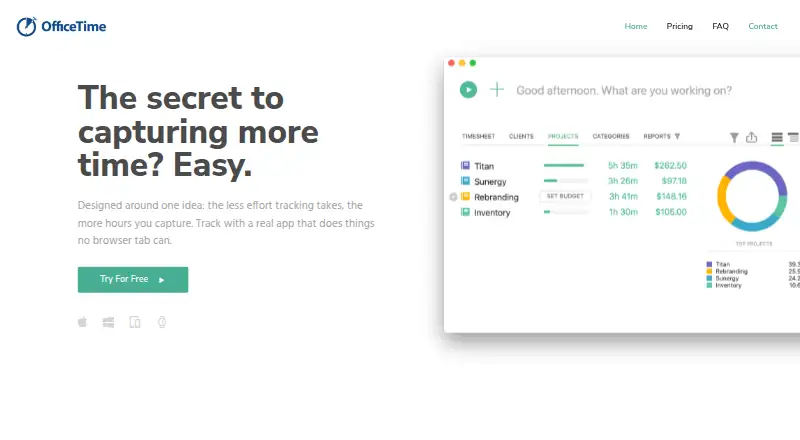
OfficeTime is a time-tracking application for individuals and teams that records time against projects and categories. It supports timer-based and manual entry, hourly rates, billable calculations, timesheets, reports, budgets, invoicing, idle tracking, and timing reminders. Desktop apps run on Windows and macOS, while the mobile app runs on iOS. Its local-first options make it a strong fit for individuals who want desktop tracking with offline use and local data storage.
Pricing is split between one-time local-sync editions and subscriptions with cloud synchronization. The Personal one-time plan costs $69 and supports private local sync on one computer at a time. The Pro one-time plan costs $99 and adds multiple-computer support, budgets, expanded reports, and priority support. Personal cloud plans cost $84 annually or $9 monthly and include sync across all devices, the mobile app, budgets, online backup, and ongoing new features. Pro cloud plans cost $144 annually or $16 monthly and add automatic team reporting, budgets, and expanded reports. The free plan is the iOS version, limited to two projects and three categories.
OfficeTime covers the core workflow from capturing time through reporting and invoicing, with exports to spreadsheet-compatible files. Pro adds team reporting and shared projects, making the product more suitable for small collaborative work than the free edition. Platform coverage remains focused on Windows, macOS, and iOS, with Apple Calendar listed as the integration. Choose OfficeTime if local storage, offline tracking, project budgets, and flexible billing matter more than a broad platform ecosystem. Teams needing wider platform coverage or more extensive integrations should consider an alternative.
Your product? Our editors can test OfficeTime in depth and publish a review, labelled as paid · from $149/mo →
OfficeTime pricing
All 2 OfficeTime plans and prices →
OfficeTime fact sheet
| Free plan | Yes |
|---|---|
| Paid from | $84/yr |
| Project tracking | Yes |
| Billable time | Yes |
| Timesheet approvals | Not verified |
| Mobile apps | Ios |
| Desktop app | Yes |
| Offline tracking | Yes |
| Data export | Yes |
| Money-back guarantee | 100 days |
| Deployment | Cloud, Desktop, Mobile |
| Platforms | Windows, macOS, iOS |
| Support | Email, Phone, Docs |
| Built for | Solo, Small business, Mid-market (editorial estimate) |
| Integrations | 1 integrations: Apple Calendar |
| Pricing | Free plan (source) |
| Website | officetime.net |
| Facts checked | 21 Sep 2026 |
OfficeTime integrations
OfficeTime lists 1 integrations on its own site.
- Apple Calendar
Alternatives to OfficeTime
- Toggl TrackA mature time tracker with strong reporting, approvals, estimates, and integrations.9.2
- RescueTimeA broad automatic tracker for productivity, billable work, focus, and team timesheets.9.0
- Deltek RepliconA broad enterprise time-tracking suite for compliance-heavy project organizations.8.9



See all OfficeTime alternatives →
Used OfficeTime? Be the first to review it
The editor score above is our own research. What this page doesn't have yet is a reader's view — what you used OfficeTime for, what worked and what didn't. No stars are seeded and no review is paid for; an editor reads every one before it appears.
Write a reviewTwo minutes · verified accounts only · read by an editor before it appears
Featured on iTechGuides

OfficeTime is listed in our Time Tracking Software directory. Add the badge to your site — it links back to this page.
<a href="https://www.itechguides.com/products/officetime/"><img src="https://www.itechguides.com/best/badge/officetime.svg" alt="Featured on iTechGuides" width="230" height="46"></a>
Reviewed by iTechGuides Editors · Editorial team · Updated Oct 2026
Advertiser disclosure: iTechGuides is reader-supported. Vendors can pay for top positions in our rankings and for a place on other products' pages, and we may earn a commission when you click some links. Bought places stand at the number bought; this page and our disclosure say so. Paying vendors may get a fuller, more detailed review from our editors, and that review can change their score. How we rank.
Last updated · How we research and update