
Octobar
Octobar: Octobar combines menu bar control, notch handling, and practical Mac utilities. Ranked #11 of 25 in Menu Bar Customization Software by our editors (7.6/10); pricing: Free plan; best for users wanting menu tools plus notch handling.
At a glance
- Editor score7.6 / 10
- PricingFree plan
- Best forUsers wanting menu tools plus notch handling
- Free planYes
- Paid from$4.99 one-time
- Hide menu itemsYes
- Facts checked20 Sep 2026
Where it wins
- Hides menu bar icons behind a chevron and covers the display notch
- Combines more than 15 utilities in one macOS menu bar app
- Adds launches, file creation, translation, QR scanning, and color tools
Where it doesn't
- The free plan limits users to five active modules
- Runs only on Apple Silicon Macs with macOS 15 Sequoia or later
- Advanced organization through submenu groups requires Octobar Pro
Our verdict on Octobar
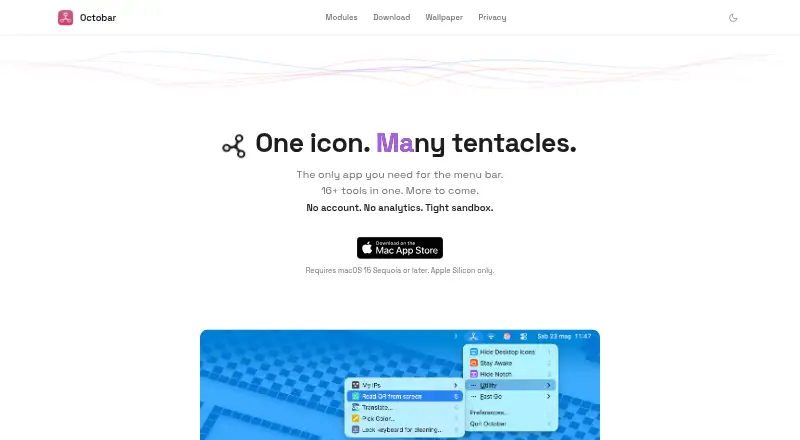
Octobar is a macOS menu bar toolkit for users who want more control over crowded menu bars and a collection of compact utilities in one app. It can hide icons behind a chevron with Pack Menu, cover the Mac display notch with a black bar, and launch folders, apps, webpages, and macOS Shortcuts. Its catalog also includes Finder file creation, on-device translation, QR scanning, color picking, IP address display, and temporary keyboard-input blocking. The app runs on Apple Silicon Macs using macOS 15 Sequoia or later.
Pricing is structured around a free tier and a one-time Pro purchase. Free includes up to five active modules, access to the full module catalog, and free updates. Octobar Pro costs $4.99 USD as a one-time purchase and adds unlimited active modules, submenu groups, future modules, Family Sharing for up to 6 people, and no subscription. This makes the free plan a practical way to select a small set of tools, while Pro is aimed at users who want the full modular setup or grouped menu organization. Local prices may vary by country, with Apple determining local pricing.
Octobar fits closely with Apple's desktop ecosystem through Apple Shortcuts, Finder, and Apple's on-device Translation framework. Its breadth is a strength for users who want menu bar customization alongside quick utilities, but the product is specifically macOS software rather than a cross-platform tool. The free five-module limit also matters for users who want many utilities active at once. Choose Octobar for Mac menu control, notch coverage, and varied utility modules; choose another option if you need a non-macOS platform or a narrower standalone utility.
Your product? Our editors can test Octobar in depth and publish a review, labelled as paid · from $149/mo →
Octobar pricing
All 2 Octobar plans and prices →
Octobar fact sheet
| Free plan | Yes |
|---|---|
| Paid from | $4.99 one-time |
| Hide menu items | Yes |
| Rearrange items | Not verified |
| Group menu items | Yes |
| Custom menu items | Yes |
| Keyboard shortcuts | Not verified |
| Multiple displays | Not verified |
| Notch support | Yes |
| Deployment | Desktop |
| Platforms | macOS |
| Compliance & security | GDPR |
| Support | |
| Built for | Solo, Small business (editorial estimate) |
| Integrations | 3 integrations: Apple Shortcuts, Finder, Apple Translation framework |
| Pricing | Free plan (source) |
| Website | octobar.app |
| Facts checked | 20 Sep 2026 |
Octobar integrations
Octobar lists 3 integrations on its own site.
- Apple Shortcuts
- Finder
- Apple Translation framework
Alternatives to Octobar
- ThawA free, highly configurable way to organize, hide, and search macOS menu bar items.9.4
- BartenderA broad Mac menu bar toolkit for users who need profiles, triggers, widgets, and layouts.9.2
- SaneBarA capable free option for organizing crowded Mac menu bars.8.9


See all Octobar alternatives →
Used Octobar? Be the first to review it
The editor score above is our own research. What this page doesn't have yet is a reader's view — what you used Octobar for, what worked and what didn't. No stars are seeded and no review is paid for; an editor reads every one before it appears.
Write a reviewTwo minutes · verified accounts only · read by an editor before it appears
Featured on iTechGuides

Octobar is listed in our Menu Bar Customization Software directory. Add the badge to your site — it links back to this page.
<a href="https://www.itechguides.com/products/octobar/"><img src="https://www.itechguides.com/best/badge/octobar.svg" alt="Featured on iTechGuides" width="230" height="46"></a>
Reviewed by iTechGuides Editors · Editorial team · Updated Oct 2026
Advertiser disclosure: iTechGuides is reader-supported. Vendors can pay for top positions in our rankings and for a place on other products' pages, and we may earn a commission when you click some links. Bought places stand at the number bought; this page and our disclosure say so. Paying vendors may get a fuller, more detailed review from our editors, and that review can change their score. How we rank.
Last updated · How we research and update