nvcontrol
nvcontrol: An open-source NVIDIA tuner for Linux users who want profiles, monitoring, and display controls. Ranked #11 of 19 in GPU Overclocking Software by our editors (7.2/10); pricing: Open source; best for linux NVIDIA power users.
At a glance
- Editor score7.2 / 10
- PricingOpen source
- Best forLinux NVIDIA power users
- Paid fromNone
- Facts checked20 Sep 2026
Where it wins
- GPU clocks, power limits, fan curves, and tuning profiles
- Terminal and graphical interfaces with live GPU monitoring
- Display controls plus CUDA and local AI/ML diagnostics
Where it doesn't
- Supports NVIDIA GPUs on Linux only
- Overclocking and voltage-related features are experimental
- Improper settings may cause instability or hardware damage
Our verdict on nvcontrol
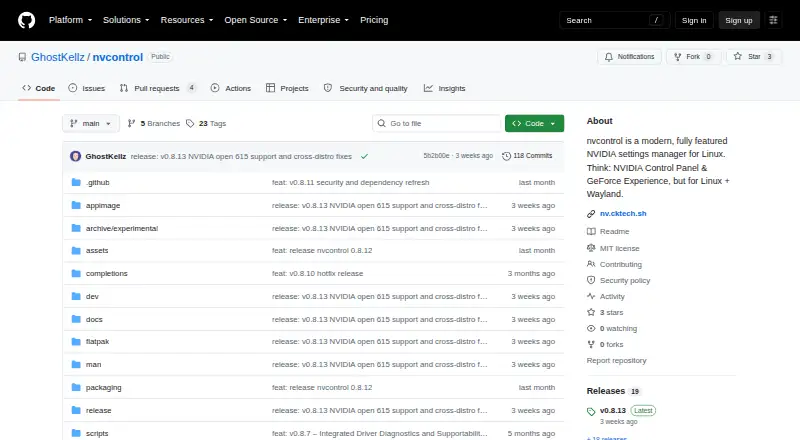
nvcontrol is an open-source GPU control and overclocking utility for Linux, with a focus on NVIDIA hardware and Wayland desktop environments. It is aimed at users who want more control than basic driver settings provide, including GPU and memory-clock offsets, power-limit adjustment, custom temperature-based fan curves, and system- or game-specific tuning profiles. The project offers both terminal and graphical interfaces, making it suitable for command-line users as well as desktop users who prefer visual controls.
Its standout strength is breadth within the NVIDIA Linux tuning workflow. Alongside live GPU monitoring and terminal dashboards, nvcontrol includes display controls for digital vibrance, color range, sharpening, VRR/G-SYNC, and HDR. It also provides diagnostics for CUDA, Ollama, and local AI/ML readiness, which gives it added relevance for Linux systems used for graphics, gaming, and local compute workloads. Packages and installation instructions are available for several Linux distributions, supporting a range of Linux setups without changing the product's NVIDIA-only focus.
The main consideration is the experimental status of overclocking and voltage-related capabilities. The project warns that improper settings can cause instability or hardware damage, so nvcontrol is better suited to experienced NVIDIA Linux users who understand the risks of tuning GPU behavior. Users on Windows, users with non-NVIDIA hardware, or buyers seeking a conservative, broadly compatible tuning utility should choose an alternative. For its intended audience, the combination of open-source access, profile management, monitoring, fan control, power limits, and display configuration makes nvcontrol a focused Linux tool with unusually broad coverage.
Your product? Our editors can test nvcontrol in depth and publish a review, labelled as paid · from $99/mo →
nvcontrol pricing
nvcontrol fact sheet
| Free plan | Not verified |
|---|---|
| Paid from | None |
| GPU vendor support | Nvidia |
| Custom voltage control | Not verified |
| Fan curve control | Yes |
| Power limit control | Yes |
| Tuning profiles | Yes |
| On-screen overlay | Yes |
| Operating systems | Linux |
| Deployment | Desktop |
| Platforms | Linux |
| Support | Docs |
| Built for | Solo, Small business (editorial estimate) |
| Pricing | Open source |
| Website | github.com |
| Facts checked | 20 Sep 2026 |
Alternatives to nvcontrol
- MSI AfterburnerA full-featured, free Windows tuner for multi-vendor GPU overclocking and monitoring.9.4
- ASUS GPU Tweak IIIA free, feature-rich Windows toolkit for guided GPU tuning, profiles, and monitoring.9.2
- Arc PowerA free Windows utility for deep Intel Arc tuning, monitoring, profiles, and overlays.8.9


See all nvcontrol alternatives →
Used nvcontrol? Be the first to review it
The editor score above is our own research. What this page doesn't have yet is a reader's view — what you used nvcontrol for, what worked and what didn't. No stars are seeded and no review is paid for; an editor reads every one before it appears.
Write a reviewTwo minutes · verified accounts only · read by an editor before it appears
Featured on iTechGuides

nvcontrol is listed in our GPU Overclocking Software directory. Add the badge to your site — it links back to this page.
<a href="https://www.itechguides.com/products/nvcontrol/"><img src="https://www.itechguides.com/best/badge/nvcontrol.svg" alt="Featured on iTechGuides" width="230" height="46"></a>
Guides on GPU overclocking software
Reviewed by iTechGuides Editors · Editorial team · Updated Oct 2026
Advertiser disclosure: iTechGuides is reader-supported. Vendors can pay for top positions in our rankings and for a place on other products' pages, and we may earn a commission when you click some links. How we rank.
Last updated · How we research and update