Novamind
Novamind: A focused desktop mapper with broad file support, presentation tools and a free Lite tier. Ranked #36 of 72 in Mind Mapping Software by our editors (5.4/10); pricing: Free plan; best for windows and Mac users wanting classic mapping.
At a glance
- Editor score5.4 / 10
- PricingFree plan
- Best forWindows and Mac users wanting classic mapping
- Free planYes
- Paid from$6/mo
- Facts checked20 Sep 2026
Where it wins
- Automatic layouts with customizable shapes, themes and color sets
- Imports and exports across major mapping and office formats
- Presentation mode, outlines, media and project-management fields
Where it doesn't
- Available only for Windows and macOS
- Lite limits maps to 25 topics
- Mac compatibility is documented for Mac OS X 10.9–10.14
Our verdict on Novamind
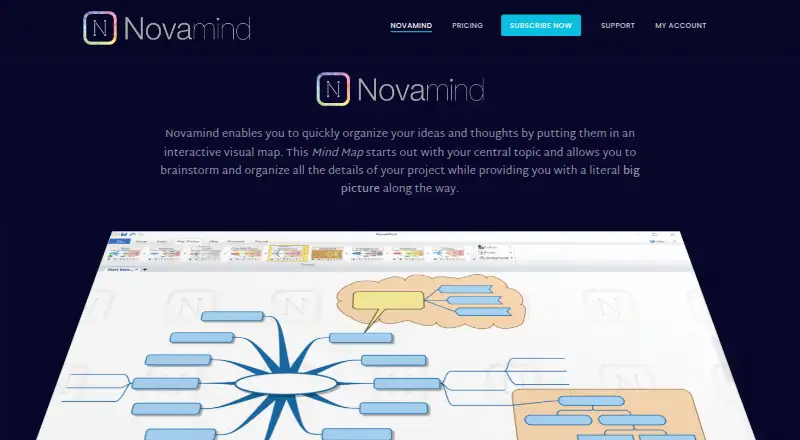
Novamind is desktop mind mapping software for organizing ideas, projects, tasks and presentations. It suits Windows and Mac users who want a traditional visual mapping workflow with automatic layout, editable outlines, media attachments and presentation tools. The feature set also supports practical project work through checkboxes and project-management fields, rather than focusing only on brainstorming.
The pricing structure is straightforward. The free Lite plan allows mind maps with up to 25 topics. The paid subscription lists all features at $6 per month when billed annually, or $7 per month with monthly billing. Paid access adds the complete feature set, including custom topic shapes, themes and color sets, the media library, outline editing with live map updates, project fields and presentation mode with animated navigation.
Novamind’s strongest fit is file-based desktop mapping. It can import MindManager, iMindMap, XMind, FreeMind, OPML and text files, then export to Microsoft Word, PowerPoint, Project, MindManager, OPML, text, PDF, PNG and Excel CSV. That breadth helps users move maps into office documents, project files and common exchange formats. The trade-off is platform coverage: Novamind is limited to Windows and macOS, making it less suitable for users seeking a broader device ecosystem or a team-centered collaboration workflow. Choose it for classic desktop mapping and presentation-oriented output; consider an alternative if cross-platform access is central.
Your product? Our editors can test Novamind in depth and publish a review, labelled as paid · from $149/mo →
Novamind pricing
All 2 Novamind plans and prices →
Novamind fact sheet
| Free plan | Yes |
|---|---|
| Paid from | $6/mo |
| Supported platforms | Windows, macOS |
| Export formats | Microsoft Word, Microsoft PowerPoint, Microsoft Project, MindManager, OPML, text, PDF, PNG, Excel CSV |
| Real-time collaboration | Not verified |
| Offline mode | Not verified |
| AI assistance | Not verified |
| Presentation mode | Yes |
| Collaborator limit | Not verified |
| Deployment | Desktop |
| Platforms | Windows, macOS |
| Support | Tickets |
| Built for | Solo, Small business (editorial estimate) |
| Pricing | Free plan (source) |
| Website | novamind.com |
| Facts checked | 20 Sep 2026 |
Alternatives to Novamind
- XmindA flexible mind-mapping workspace with AI, presentations, collaboration, and broad exports.9.3
- MindomoA broad mind-mapping workspace with AI, collaboration, planning, and multi-platform access.9.2
- MindMeisterA collaborative mind mapping workspace with AI generation, presentations, exports, and mobile apps.9.1



See all Novamind alternatives →
Used Novamind? Be the first to review it
The editor score above is our own research. What this page doesn't have yet is a reader's view — what you used Novamind for, what worked and what didn't. No stars are seeded and no review is paid for; an editor reads every one before it appears.
Write a reviewTwo minutes · verified accounts only · read by an editor before it appears
Featured on iTechGuides

Novamind is listed in our Mind Mapping Software directory. Add the badge to your site — it links back to this page.
<a href="https://www.itechguides.com/products/novamind/"><img src="https://www.itechguides.com/best/badge/novamind.svg" alt="Featured on iTechGuides" width="230" height="46"></a>
Reviewed by iTechGuides Editors · Editorial team · Updated Oct 2026
Advertiser disclosure: iTechGuides is reader-supported. Vendors can pay for top positions in our rankings and for a place on other products' pages, and we may earn a commission when you click some links. Bought places stand at the number bought; this page and our disclosure say so. Paying vendors may get a fuller, more detailed review from our editors, and that review can change their score. How we rank.
Last updated · How we research and update