
NoteWorthy Composer
NoteWorthy Composer: A $49 Windows score editor with MIDI keyboard input, playback, and part printing. Ranked #31 of 38 in Music Notation Software by our editors (6.1/10); pricing: Paid; best for windows users entering scores from MIDI keyboards.
At a glance
- Editor score6.1 / 10
- PricingPaid
- Best forWindows users entering scores from MIDI keyboards
- Free planNo
- Paid from$49 one-time
- DeploymentDesktop
- Founded1994 · Valdese, North Carolina, USA
- Facts checked19 Sep 2026
Where it wins
- Record MIDI keyboard input in real time or step time
- Print complete scores or selected parts
- Share song files through the free NoteWorthy Composer Viewer
Where it doesn't
- Runs on Windows desktop only
- The listed license is a $49 one-time purchase
- MusicXML, tablature, and collaboration support are unverified
Our verdict on NoteWorthy Composer
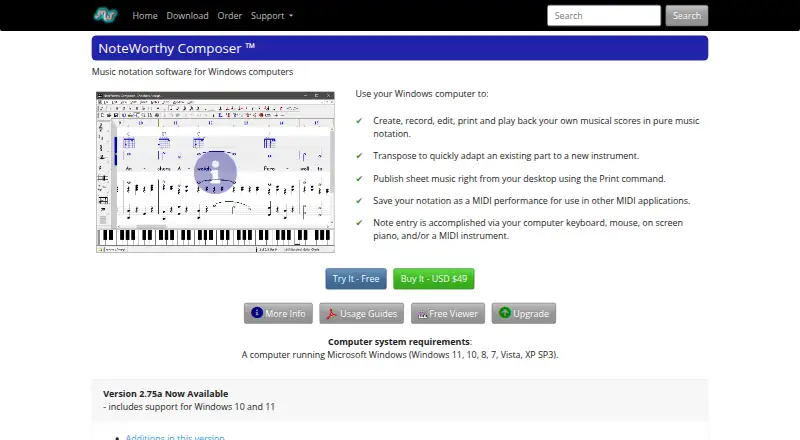
NoteWorthy Composer is desktop music notation software for Windows, aimed at musicians who want to enter, edit, play, and print scores. Notes can be entered with a computer keyboard, mouse, on-screen piano, or MIDI instrument. For keyboard players, MIDI recording is available in real time or step time, and scores can be played through a computer sound card or an external MIDI setup. The editing environment covers staves, notes, lyrics, text, and symbols, while transpose tools and printing of complete scores or selected parts support practical score preparation.
The product’s focus is score work connected to MIDI rather than a broad, platform-spanning music workflow. It imports and exports Standard MIDI files, supports external MIDI devices, and offers custom objects plus a plugin API. That combination suits Windows users who want to move between notation and MIDI performance input. The free NoteWorthy Composer Viewer provides a way to share song files with people who need to view them. Choose it if those score-entry, playback, and sharing needs match your workflow; users seeking verified MusicXML, tablature, or collaboration capabilities should consider alternatives whose documentation explicitly covers those needs.
According to the vendor’s pricing details, NoteWorthy Composer Version 2 costs $49 as a one-time purchase and is delivered as an online download for Windows. There is no free editor plan, though the separate Viewer is free for sharing songs. This is a straightforward purchase model for someone who wants a desktop editor without an ongoing subscription. The Windows-only restriction is decisive for Mac or other non-Windows users, and MIDI device support is the stated integration path. Pick NoteWorthy Composer for Windows-based notation with MIDI input and printed parts; look elsewhere if cross-platform access or the unverified capabilities above are requirements.
Your product? Our editors can test NoteWorthy Composer in depth and publish a review, labelled as paid · from $149/mo →
NoteWorthy Composer pricing
All 1 NoteWorthy Composer plans and prices →
NoteWorthy Composer fact sheet
| Free plan | No |
|---|---|
| Paid from | $49 one-time |
| Deployment | Desktop |
| MusicXML support | Not verified |
| MIDI support | Yes |
| Parts extraction | Yes |
| Tablature support | Not verified |
| Collaboration features | Not verified |
| Deployment | Desktop |
| Platforms | Windows |
| Integrations | 1 integrations: MIDI devices |
| Pricing | Paid (source) |
| Website | noteworthycomposer.com |
| Facts checked | 19 Sep 2026 |
NoteWorthy Composer integrations
NoteWorthy Composer lists 1 integrations on its own site.
- MIDI devices
Alternatives to NoteWorthy Composer
- DoricoA full notation and engraving workflow, with free editions and a 60-day trial.9.3
- SibeliusSibelius combines detailed score creation with browser-based sharing and review.9.2
- MuseScore StudioA capable desktop notation editor with MusicXML, MIDI, parts, playback, and exports at no cost.9.1


See all NoteWorthy Composer alternatives →
Used NoteWorthy Composer? Be the first to review it
The editor score above is our own research. What this page doesn't have yet is a reader's view — what you used NoteWorthy Composer for, what worked and what didn't. No stars are seeded and no review is paid for; an editor reads every one before it appears.
Write a reviewTwo minutes · verified accounts only · read by an editor before it appears
Featured on iTechGuides

NoteWorthy Composer is listed in our Music Notation Software directory. Add the badge to your site — it links back to this page.
<a href="https://www.itechguides.com/products/noteworthy-composer/"><img src="https://www.itechguides.com/best/badge/noteworthy-composer.svg" alt="Featured on iTechGuides" width="230" height="46"></a>
Reviewed by iTechGuides Editors · Editorial team · Updated Oct 2026
Advertiser disclosure: iTechGuides is reader-supported. Vendors can pay for top positions in our rankings and for a place on other products' pages, and we may earn a commission when you click some links. Bought places stand at the number bought; this page and our disclosure say so. Paying vendors may get a fuller, more detailed review from our editors, and that review can change their score. How we rank.
Last updated · How we research and update