
Notemap
Notemap: A feature-rich Mac mind mapper for AI-assisted notes, planning, and presentations. Ranked #48 of 72 in Mind Mapping Software by our editors (4.2/10); pricing: Free plan · 10-day trial; best for mac users wanting AI notes and presentations.
At a glance
- Editor score4.2 / 10
- PricingFree plan · 10-day trial
- Best forMac users wanting AI notes and presentations
- Free planYes
- Paid from$60 one-time
- AI assistanceYes
- Facts checked20 Sep 2026
Where it wins
- Rich Markdown notes, tasks, attachments, and cross-links
- AI generation, expansion, refinement, brainstorming, and summaries
- Extensive import, export, storage, and presentation options
Where it doesn't
- Available only for macOS 14 or later
- Real-time collaboration is not supported
- Pro requires your own API key for AI features
Our verdict on Notemap
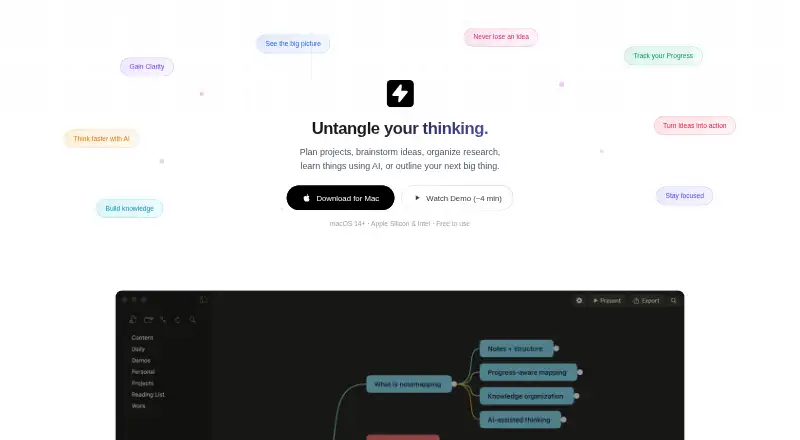
Notemap is a native macOS mind mapping application for brainstorming, project planning, research organization, studying, and writing outlines. Its maps combine nodes and branches with rich Markdown notes, tasks, attachments, cross-links, themes, colors, shapes, icons, and layouts. Local file storage and cloud-folder syncing support a local-first workflow, while offline use, presentation mode, and broad file support make it suitable for individual Mac users who want more than a basic visual brainstorming tool.
The pricing structure is straightforward. The Free plan costs $0 forever and includes unlimited mind maps, notes, tasks, attachments, cross-links, daily notes, and PNG export. A 10-day free trial is also available. Pro costs $60 as a one-time purchase and adds AI features using your own API key, 17 themes, 12 shapes, four layouts, node icons, path styles, all exports, and presentation mode. Team pricing is custom for five or more Pro licenses, with volume discounts. This makes Notemap a particularly clear fit for individuals who prefer a one-time purchase over a recurring subscription, while organizations need to request team pricing.
Its standout strength is breadth: Notemap imports from XMind, FreeMind, OPML, Markdown, and plain text, then exports to PNG, SVG, Markdown, plain text, OPML, HTML, PDF, JSON, Word, and AI-generated content. Presentation mode adds a step-by-step way to move through a map, and integrations include iCloud, Dropbox, Google Drive, Google Gemini, and OpenAI-compatible providers. Choose Notemap if you work on a Mac and want connected notes, AI-assisted map development, flexible file exchange, and presentations in one app. Choose an alternative if real-time collaboration or access beyond macOS is essential.
Your product? Our editors can test Notemap in depth and publish a review, labelled as paid · from $149/mo →
Notemap pricing
All 3 Notemap plans and prices →
Notemap fact sheet
| Free plan | Yes |
|---|---|
| Paid from | $60 one-time |
| Supported platforms | macOS |
| Export formats | PNG, SVG, Markdown, plain text, OPML, HTML, PDF, JSON, Word |
| Real-time collaboration | Not verified |
| Offline mode | Yes |
| AI assistance | Yes |
| Presentation mode | Yes |
| Collaborator limit | Not verified |
| Free trial | 10 days |
| Money-back guarantee | 15 days |
| Deployment | Desktop |
| Platforms | macOS |
| Support | Email, Docs |
| Built for | Solo, Small business (editorial estimate) |
| Integrations | 5 integrations: iCloud, Dropbox, Google Drive, Google Gemini, OpenAI-compatible providers |
| Pricing | Free plan · 10-day trial (source) |
| Website | notemap.com |
| Facts checked | 20 Sep 2026 |
Notemap integrations
Notemap lists 5 integrations on its own site.
- iCloud
- Dropbox
- Google Drive
- Google Gemini
- OpenAI-compatible providers
Alternatives to Notemap
- XmindA flexible mind-mapping workspace with AI, presentations, collaboration, and broad exports.9.3
- MindomoA broad mind-mapping workspace with AI, collaboration, planning, and multi-platform access.9.2
- MindMeisterA collaborative mind mapping workspace with AI generation, presentations, exports, and mobile apps.9.1



See all Notemap alternatives →
Used Notemap? Be the first to review it
The editor score above is our own research. What this page doesn't have yet is a reader's view — what you used Notemap for, what worked and what didn't. No stars are seeded and no review is paid for; an editor reads every one before it appears.
Write a reviewTwo minutes · verified accounts only · read by an editor before it appears
Featured on iTechGuides

Notemap is listed in our Mind Mapping Software directory. Add the badge to your site — it links back to this page.
<a href="https://www.itechguides.com/products/notemap/"><img src="https://www.itechguides.com/best/badge/notemap.svg" alt="Featured on iTechGuides" width="230" height="46"></a>
Reviewed by iTechGuides Editors · Editorial team · Updated Oct 2026
Advertiser disclosure: iTechGuides is reader-supported. Vendors can pay for top positions in our rankings and for a place on other products' pages, and we may earn a commission when you click some links. Bought places stand at the number bought; this page and our disclosure say so. Paying vendors may get a fuller, more detailed review from our editors, and that review can change their score. How we rank.
Last updated · How we research and update