nodenv
nodenv: A focused, open-source Node.js manager for project-aware version switching on Unix systems. Ranked #25 of 30 in Development Environment Managers by our editors (6.1/10); pricing: Free plan; best for unix Node.js version management.
At a glance
- Editor score6.1 / 10
- PricingFree plan
- Best forUnix Node.js version management
- Free planYes
- Paid fromFree
- Supported scopeSingle_language
- Facts checked20 Sep 2026
Where it wins
- Automatic switching based on each project's .node-version file
- Global, local, and shell-specific Node.js version selection
- Bash, Zsh, Fish, and GitHub Actions integration
Where it doesn't
- Focused on Node.js rather than multiple programming languages
- Node.js installation requires the separate node-build plugin
- Platform coverage is limited to macOS and Linux
Our verdict on nodenv
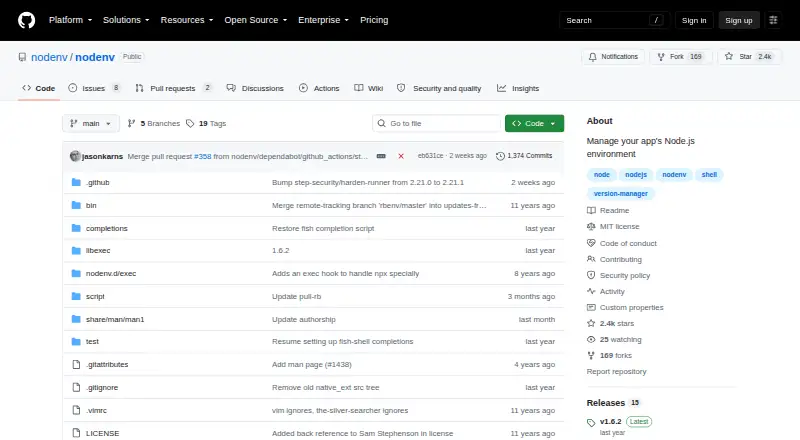
nodenv is an open-source Node.js version manager for developers working across projects that require different Node.js versions. It can maintain multiple installed versions, select a global, project-specific, or shell-specific version, and automatically switch versions when entering a project directory. Project versions are declared with a .node-version file, while PATH shims and shell initialization connect nodenv to the command line. Its focus is narrow: it manages Node.js rather than multiple programming languages, making it a fit for Unix-based Node.js workflows rather than a general development environment manager.
The main strength is project-level consistency. A project can declare its Node.js version, and nodenv can apply that choice automatically between directories. Global, local, and shell-specific settings provide different levels of control, while shell integration covers Bash, Zsh, and Fish. The published capabilities also include lockfile support, GitHub Actions use, and CI usage, so the same version-management approach can extend from local development into automation. These features suit teams and individual developers who want each project to select its intended Node.js runtime without repeatedly changing commands or environment settings.
nodenv is free and open source, with no paid tier described. Its installation model requires attention: nodenv itself does not include the nodenv install command, and Node.js installation is provided through the separate node-build plugin. Platform support is centered on macOS and Linux, so it is not a fit for workflows that require broader operating-system coverage. Choose nodenv when project pinning, automatic switching, shell integration, and GitHub Actions support matter for Node.js. Choose an alternative when you need one manager for several languages, a different platform scope, or an installation flow that includes version installation directly.
Your product? Our editors can test nodenv in depth and publish a review, labelled as paid · from $149/mo →
nodenv pricing
nodenv fact sheet
| Free plan | Yes |
|---|---|
| Paid from | Free |
| Supported scope | Single_language |
| Project version pinning | Yes |
| Lockfile support | Yes |
| Automatic switching | Yes |
| Shell integration | Yes |
| Operating systems | Cross_platform |
| CI/CD usage | Yes |
| Deployment | Self-hosted |
| Platforms | macOS, Linux |
| Support | Community, Docs |
| Built for | Solo, Small business (editorial estimate) |
| Integrations | 4 integrations: GitHub Actions, Bash, Zsh, Fish |
| Pricing | Free plan |
| Website | github.com |
| Facts checked | 20 Sep 2026 |
nodenv integrations
nodenv lists 4 integrations on its own site.
- GitHub Actions
- Bash
- Zsh
- Fish
Alternatives to nodenv
- devenvA free, open-source environment manager for teams standardizing local work and CI.9.4
- DevboxA free, open-source Nix environment manager for consistent project shells and CI.9.1
- FloxA declarative environment manager with lockfiles, services, sharing, and rollback.8.8



Also Ranked In
nodenv is ranked in 2 of our directories.
Used nodenv? Be the first to review it
The editor score above is our own research. What this page doesn't have yet is a reader's view — what you used nodenv for, what worked and what didn't. No stars are seeded and no review is paid for; an editor reads every one before it appears.
Write a reviewTwo minutes · verified accounts only · read by an editor before it appears
Featured on iTechGuides

nodenv is listed in our Development Environment Managers directory. Add the badge to your site — it links back to this page.
<a href="https://www.itechguides.com/products/nodenv/"><img src="https://www.itechguides.com/best/badge/nodenv.svg" alt="Featured on iTechGuides" width="230" height="46"></a>
Reviewed by iTechGuides Editors · Editorial team · Updated Oct 2026
Advertiser disclosure: iTechGuides is reader-supported. Vendors can pay for top positions in our rankings and for a place on other products' pages, and we may earn a commission when you click some links. Bought places stand at the number bought; this page and our disclosure say so. Paying vendors may get a fuller, more detailed review from our editors, and that review can change their score. How we rank.
Last updated · How we research and update