NewOCR
NewOCR: A low-cost OCR service with broad language support, useful exports, and a web-centric workflow. Ranked #21 of 40 in OCR Software by our editors (6.6/10); pricing: Free plan; best for low-cost multilingual OCR API users.
At a glance
- Editor score6.6 / 10
- PricingFree plan
- Best forLow-cost multilingual OCR API users
- Free planYes
- Supported languages122 languages
- Facts checked23 Sep 2026
Where it wins
- Recognizes 122 languages and fonts across common image and document formats
- Exports recognized text as TXT, Microsoft Word DOC, or PDF
- REST API pricing is 0.5 cents per recognition
Where it doesn't
- The product is focused on web and API access rather than installed desktop software
- API usage is charged per recognition instead of through a monthly subscription
- Platform coverage is narrower than its OCR and language feature set
Our verdict on NewOCR
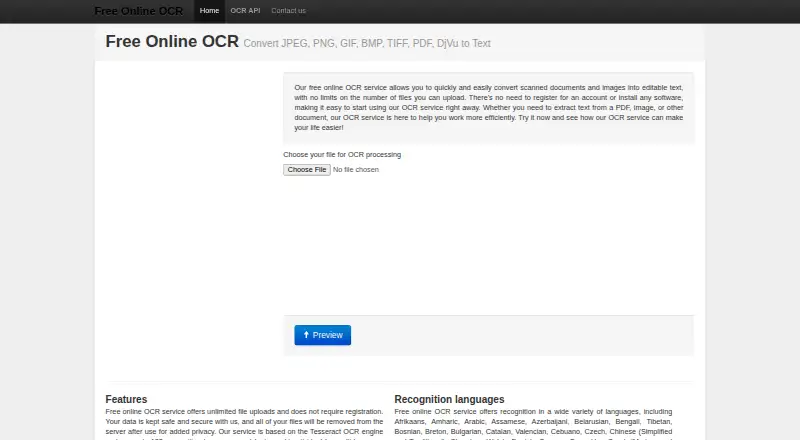
NewOCR is a browser-based OCR service for extracting text from scanned images and documents. It is aimed at people who need occasional online conversion as well as developers automating text extraction through an API. The service accepts JPEG, PNG, GIF, BMP, TIFF, PDF, and DjVu files, with recognition across 122 languages and fonts. Users can select page regions, rotate pages, and receive results as TXT, Microsoft Word DOC, or PDF files.
The pricing structure suits both light and programmatic use. The online service is free with unlimited file uploads, while the REST API uses API-key authentication and is priced at 0.5 cents per recognition rather than a monthly subscription. That makes the API relevant for workflows that need inexpensive OCR at variable volume. The feature set also extends beyond basic text capture: page layout analysis and mathematical equation detection are included, and recognized content can be edited in Google Docs.
NewOCR’s strongest fit is a web-centered workflow that values language breadth, multiple file formats, and simple output choices. Google Docs, Google Translate, and Bing Translator provide connected editing and translation options. Uploaded files are removed after processing, which is relevant for organizations reviewing document handling. Buyers seeking an installed desktop application or broader platform coverage should look elsewhere; NewOCR is better suited to browser-based conversion and focused REST API integration than to a full desktop OCR suite.
Your product? Our editors can test NewOCR in depth and publish a review, labelled as paid · from $149/mo →
NewOCR pricing
NewOCR fact sheet
| Free plan | Yes |
|---|---|
| Paid from | Not verified |
| Searchable PDF | Not verified |
| Word export | Yes |
| Handwriting OCR | Not verified |
| Supported languages | 122 languages |
| Monthly page limit | Not verified |
| Primary platform | Web |
| Supported inputs | Both |
| Deployment | Cloud |
| Platforms | Web |
| Built for | Solo, Small business (editorial estimate) |
| Integrations | 3 integrations: Google Docs, Google Translate, Bing Translator |
| Pricing | Free plan |
| Website | newocr.com |
| Facts checked | 23 Sep 2026 |
NewOCR integrations
NewOCR lists 3 integrations on its own site.
- Google Docs
- Google Translate
- Bing Translator
Alternatives to NewOCR
- PaddleOCRA developer-focused OCR toolkit with multilingual, handwriting, and document parsing workflows.9.3
- Tesseract OCRA mature, developer-focused OCR engine with broad outputs and self-hosting flexibility.9.1
- ABBYY FineReader PDFA broad desktop PDF suite for OCR, editing, conversion, forms, and document control.9.0

Used NewOCR? Be the first to review it
The editor score above is our own research. What this page doesn't have yet is a reader's view — what you used NewOCR for, what worked and what didn't. No stars are seeded and no review is paid for; an editor reads every one before it appears.
Write a reviewTwo minutes · verified accounts only · read by an editor before it appears
Featured on iTechGuides

NewOCR is listed in our OCR Software directory. Add the badge to your site — it links back to this page.
<a href="https://www.itechguides.com/products/newocr/"><img src="https://www.itechguides.com/best/badge/newocr.svg" alt="Featured on iTechGuides" width="230" height="46"></a>
Reviewed by iTechGuides Editors · Editorial team · Updated Oct 2026
Advertiser disclosure: iTechGuides is reader-supported. Vendors can pay for top positions in our rankings and for a place on other products' pages, and we may earn a commission when you click some links. Bought places stand at the number bought; this page and our disclosure say so. Paying vendors may get a fuller, more detailed review from our editors, and that review can change their score. How we rank.
Last updated · How we research and update