
NeurTask
NeurTask: A focused meeting assistant with strong follow-up tools and self-hosted deployment. Ranked #56 of 81 in AI Meeting Assistants by our editors (6.0/10); pricing: Free plan; best for teams needing self-hosted meeting capture.
At a glance
- Editor score6.0 / 10
- PricingFree plan
- Best forTeams needing self-hosted meeting capture
- Free planYes
- Paid from€15/user/mo
- TranscriptionYes
- Facts checked20 Sep 2026
Where it wins
- Speaker-labelled transcripts, summaries, decisions, and assigned actions
- Browser-tab recording avoids adding another meeting participant
- Enterprise self-hosting keeps processing inside your boundary
Where it doesn't
- Meeting capture is limited to Google Meet and Microsoft Teams
- Transcription and summaries are English-only
- Zoom is not supported
Our verdict on NeurTask
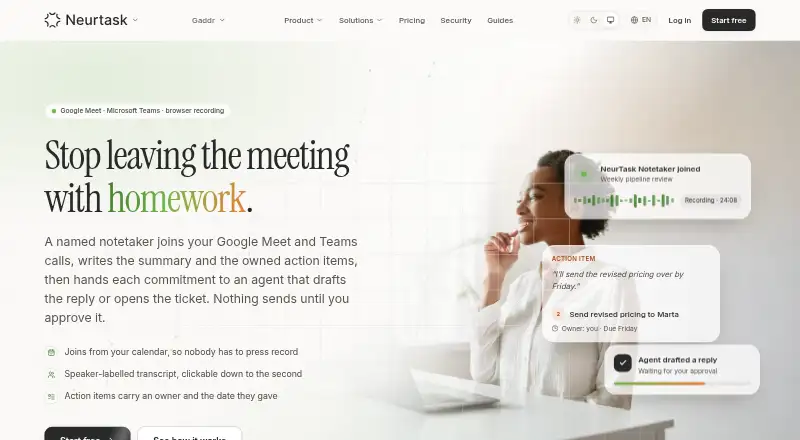
NeurTask is an AI meeting notetaker for individuals and teams that need structured records of conversations and the work that follows. It can join scheduled Google Meet and Microsoft Teams calls as a named bot or record from a browser tab without an extra participant. The service produces speaker-labelled transcripts with timestamps, summaries, topics, decisions, and action items with owners and dates. It also supports questions about an individual meeting and calendar-based capture.
Pricing spans a free plan and paid team and enterprise options. The Free plan includes Google Calendar connection and 30 days of meeting history alongside transcripts, summaries, decisions, and action items. Team costs €19 per user per month when billed monthly, or €15 per user per month on an annual term, according to the vendor's pricing details. It adds no hour cap, unlimited history, a shared workspace, follow-up agents, meeting questions, roles, per-meeting sharing, and an audit trail. Enterprise starts at €45 per user per month when billed annually and adds single-tenant deployment on your own infrastructure, processing inside your boundary, SSO, directory sync, a data processing agreement, security review, deployment support, and a named contact. Prices exclude VAT.
NeurTask's strongest distinction is the connection between meeting capture and approved follow-up work. Its agents can draft follow-up emails, tickets, or calendar invitations for approval, while integrations include Google Calendar, Gmail, Microsoft Teams, and Outlook Calendar. That makes it a practical fit for teams that want meeting outputs organized into responsibilities and next steps. The product is less suitable for organizations centered on Zoom or multilingual transcription, since meeting support covers Google Meet and Microsoft Teams and transcription and summaries are English-only. Teams seeking self-hosted, single-tenant processing should consider Enterprise; smaller groups can start with Free or Team if those platform and language boundaries fit.
Your product? Our editors can test NeurTask in depth and publish a review, labelled as paid · from $149/mo →
NeurTask pricing
All 3 NeurTask plans and prices →
NeurTask fact sheet
| Free plan | Yes |
|---|---|
| Paid from | €15/user/mo |
| Transcription | Yes |
| Summaries and action items | Yes |
| Meeting capture | Bot |
| Meeting platforms | Google Meet, Microsoft Teams |
| Transcription languages | 1 languages |
| Calendar integrations | Yes |
| Deployment | Cloud, Self-hosted |
| Platforms | Web |
| Compliance & security | SSO/SAML |
| Support | |
| Built for | Solo, Small business, Mid-market, Enterprise (editorial estimate) |
| Integrations | 4 integrations: Google Calendar, Gmail, Microsoft Teams, Outlook Calendar |
| Pricing | Free plan (source) |
| Website | neurtask.com |
| Facts checked | 20 Sep 2026 |
NeurTask integrations
NeurTask lists 4 integrations on its own site.
- Google Calendar
- Gmail
- Microsoft Teams
- Outlook Calendar
Alternatives to NeurTask
- FellowA broad meeting assistant combining capture, search, action items, governance, and integrations.9.4
- Fireflies.aiA broad AI meeting assistant for multilingual teams and conversation analysis.9.3
- MeetGeekA broad meeting workspace with a useful free tier and flexible paid plans.9.1


See all NeurTask alternatives →
Used NeurTask? Be the first to review it
The editor score above is our own research. What this page doesn't have yet is a reader's view — what you used NeurTask for, what worked and what didn't. No stars are seeded and no review is paid for; an editor reads every one before it appears.
Write a reviewTwo minutes · verified accounts only · read by an editor before it appears
Featured on iTechGuides

NeurTask is listed in our AI Meeting Assistants directory. Add the badge to your site — it links back to this page.
<a href="https://www.itechguides.com/products/neurtask/"><img src="https://www.itechguides.com/best/badge/neurtask.svg" alt="Featured on iTechGuides" width="230" height="46"></a>
Reviewed by iTechGuides Editors · Editorial team · Updated Oct 2026
Advertiser disclosure: iTechGuides is reader-supported. Vendors can pay for top positions in our rankings and for a place on other products' pages, and we may earn a commission when you click some links. Bought places stand at the number bought; this page and our disclosure say so. Paying vendors may get a fuller, more detailed review from our editors, and that review can change their score. How we rank.
Last updated · How we research and update