
NETworkManager
NETworkManager: A free Windows desktop toolkit covering scanning, monitoring, DNS, Wi-Fi, and discovery. Ranked #5 of 37 in Network Diagnostic Software by our editors (8.7/10); pricing: Free plan; best for free Windows network troubleshooting.
At a glance
- Editor score8.7 / 10
- PricingFree plan
- Best forFree Windows network troubleshooting
- Free planYes
- Paid fromFree
- Path visualizationYes
- Facts checked20 Sep 2026
Where it wins
- Combines traceroute, DNS, ping monitoring, scanning, Wi-Fi, SNMP, and discovery tools
- Supports multi-host monitoring with latency charts and reachability-change notifications
- Offers encrypted profiles, CLI options, and MSI, portable, and archive deployments
Where it doesn't
- Windows-only coverage limits use across mixed-platform environments
- Desktop deployment may not suit teams seeking a browser-based diagnostic console
- Its broad toolkit may require networking expertise to use effectively
Our verdict on NETworkManager
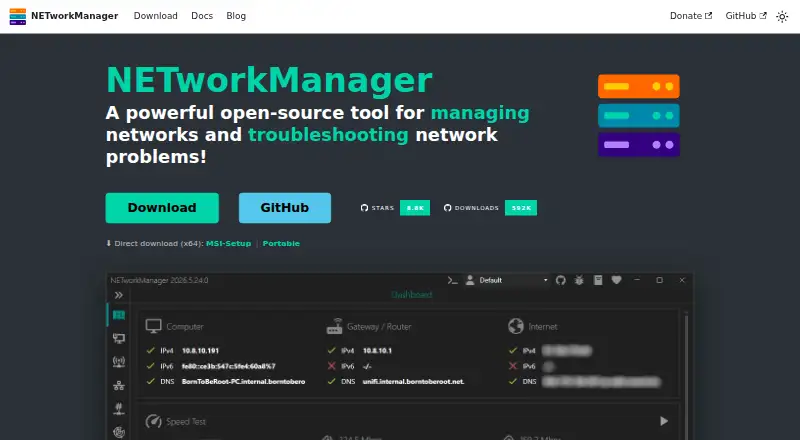
NETworkManager is a free, open-source Windows desktop application for network administration and troubleshooting. It brings IP and port scanning, traceroute, DNS queries, multi-host ping monitoring, Wi-Fi analysis, SNMP tools, and discovery-protocol capture into one interface. The product is aimed at system administrators, network engineers, enterprise IT teams, and home-lab users who want a broad set of diagnostic utilities in a single Windows application.
The published offering is straightforward: NETworkManager is free and open source, with no paid tiers presented. That makes the complete feature set available without a plan comparison. Its depth comes from the range of included tools rather than a narrow diagnostic workflow. Traceroute supports hop discovery and optional offline map path visualization; DNS queries cover A, AAAA, MX, CNAME, NS, PTR, and other record types; and ping monitoring handles multiple hosts, ranges, and subnets. Latency charts and reachability-change notifications add ongoing visibility, while IP scanning, port scanning, Wi-Fi analysis, SNMP, and discovery tools extend coverage.
Platform fit is the main boundary. The application supports Windows 10 and Windows Server on x64 or ARM64 systems running version 22H2 or later, so it suits Windows-centered teams rather than organizations needing a cross-platform diagnostic tool. Integration points include Remote Desktop, PuTTY, PowerShell, TigerVNC, and AWS Session Manager. Encrypted profiles help organize hosts and networks, command-line arguments support automation and startup customization, and MSI, portable, and archive deployment options provide flexibility for desktop and enterprise rollouts. Choose NETworkManager for a no-cost Windows toolkit with broad diagnostic coverage; choose an alternative when browser access or wider operating-system support is essential.
Your product? Our editors can test NETworkManager in depth and publish a review, labelled as paid · from $149/mo →
NETworkManager pricing
NETworkManager fact sheet
| Free plan | Yes |
|---|---|
| Paid from | Free |
| Deployment | Desktop |
| Path visualization | Yes |
| DNS diagnostics | Yes |
| Packet-loss analysis | Yes |
| Command-line interface | Yes |
| Target limit | Not verified |
| Supported platforms | Windows 10 / Windows Server, x64 or ARM64, version 22H2 or later |
| Deployment | Desktop |
| Platforms | Windows |
| Support | Docs |
| Built for | Solo, Small business, Mid-market, Enterprise (editorial estimate) |
| Integrations | 5 integrations: Remote Desktop (RDP), PuTTY, PowerShell, TigerVNC, AWS Session Manager |
| Pricing | Free plan |
| Website | borntoberoot.net |
| Facts checked | 20 Sep 2026 |
NETworkManager integrations
NETworkManager lists 5 integrations on its own site.
- Remote Desktop (RDP)
- PuTTY
- PowerShell
- TigerVNC
- AWS Session Manager
Alternatives to NETworkManager
- GlobalpingA broad, open-source toolkit for diagnosing network behavior across global locations.9.4
- RIPE AtlasA free platform for distributed measurements, path analysis, and public Internet reachability data.9.2
- PingPlotterA focused tool for tracking latency, packet loss, jitter, and network paths.9.0



See all NETworkManager alternatives →
NETworkManager vs the competition
- NETworkManager vs Globalping
- NETworkManager vs RIPE Atlas
- NETworkManager vs PingPlotter
- NETworkManager vs Nmap
- NETworkManager vs SoftPerfect Network Scanner
- NETworkManager vs NetScanTools Pro


Compare NETworkManager with any tool side by side →
Used NETworkManager? Be the first to review it
The editor score above is our own research. What this page doesn't have yet is a reader's view — what you used NETworkManager for, what worked and what didn't. No stars are seeded and no review is paid for; an editor reads every one before it appears.
Write a reviewTwo minutes · verified accounts only · read by an editor before it appears
Featured on iTechGuides

NETworkManager is listed in our Network Diagnostic Software directory. Add the badge to your site — it links back to this page.
<a href="https://www.itechguides.com/products/networkmanager/"><img src="https://www.itechguides.com/best/badge/networkmanager.svg" alt="Featured on iTechGuides" width="230" height="46"></a>
Reviewed by iTechGuides Editors · Editorial team · Updated Oct 2026
Advertiser disclosure: iTechGuides is reader-supported. Vendors can pay for top positions in our rankings and for a place on other products' pages, and we may earn a commission when you click some links. Bought places stand at the number bought; this page and our disclosure say so. Paying vendors may get a fuller, more detailed review from our editors, and that review can change their score. How we rank.
Last updated · How we research and update