
NetTraffic
NetTraffic: A focused, free Windows bandwidth tracker—not a full infrastructure monitor. Ranked #53 of 54 in Network Monitoring by our editors (4.0/10); pricing: Free plan; best for free basic Windows bandwidth tracking.
At a glance
- Editor score4.0 / 10
- PricingFree plan
- Best forFree basic Windows bandwidth tracking
- Free planYes
- Paid fromFree
- Synthetic checksNo
- Facts checked20 Sep 2026
Where it wins
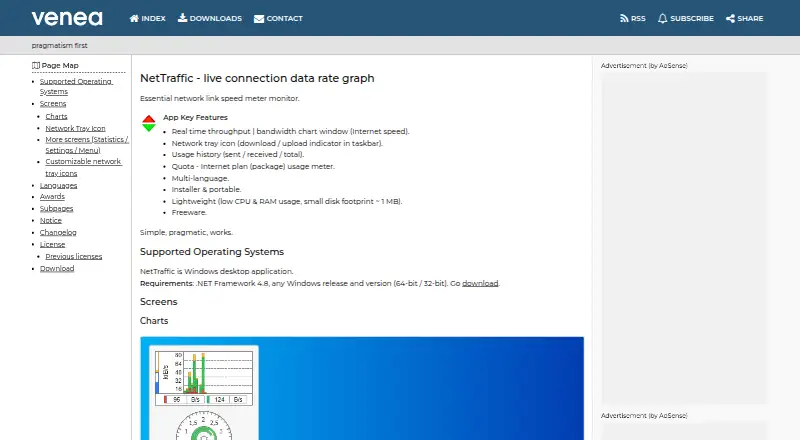
- Live download and upload charts with a taskbar activity indicator
- Tracks sent, received, and total usage over time
- Includes quota monitoring, interface checks, and portable deployment
Where it doesn't
- No alerting or scheduled synthetic checks
- No topology maps, device discovery, or integrations
- Windows-only and focused on bandwidth rather than infrastructure monitoring
Our verdict on NetTraffic
NetTraffic is a free Windows desktop utility for watching network throughput and bandwidth usage. It suits individuals and small teams that need a straightforward view of download and upload activity on a Windows device, along with historical usage and internet-plan quota tracking. The interface combines a real-time chart with a network tray icon, while monitoring can cover network interfaces and connections. Installer and portable editions give users two deployment options, and built-in utilities include ping, nslookup, tracert, and netstat.
Its strongest fit is focused bandwidth visibility. NetTraffic records sent, received, and total usage history, provides a quota meter for internet plans, and can collect HTTP(S) statistics from local or remote devices. Multiple languages and the portable edition add practical flexibility for desktop use. These capabilities make it useful when the main question is how much traffic a connection is handling, rather than how an entire environment is performing.
The trade-off is scope. NetTraffic does not provide alerting, scheduled synthetic checks, topology maps, device discovery, alert channels, or integrations. It is also limited to Windows and does not offer the broader infrastructure-monitoring depth associated with cloud or multi-device monitoring platforms. Choose it for free, lightweight tracking of Windows bandwidth and usage; choose an alternative when you need centralized infrastructure visibility, topology, automated checks, or operational alerts.
Your product? Our editors can test NetTraffic in depth and publish a review, labelled as paid · from $149/mo →
NetTraffic pricing
NetTraffic fact sheet
| Free plan | Yes |
|---|---|
| Paid from | Free |
| Synthetic checks | No |
| Device limit | Not verified |
| Traffic monitoring | Yes |
| Topology maps | Not verified |
| Alert channels | Not verified |
| Deployment | Not verified |
| Deployment | Desktop |
| Platforms | Windows |
| Support | Docs |
| Built for | Solo, Small business (editorial estimate) |
| Pricing | Free plan |
| Website | venea.net |
| Facts checked | 20 Sep 2026 |
Alternatives to NetTraffic
- ZabbixBroad infrastructure monitoring with a free self-hosted edition and paid cloud options.9.4
- CheckmkA broad hybrid monitoring platform with a capable free edition and costly paid entry.9.3
- ManageEngine OpManagerBroad monitoring, mapping, traffic analysis, automation, and distributed coverage across four editions.9.1



See all NetTraffic alternatives →
Used NetTraffic? Be the first to review it
The editor score above is our own research. What this page doesn't have yet is a reader's view — what you used NetTraffic for, what worked and what didn't. No stars are seeded and no review is paid for; an editor reads every one before it appears.
Write a reviewTwo minutes · verified accounts only · read by an editor before it appears
Featured on iTechGuides

NetTraffic is listed in our Network Monitoring directory. Add the badge to your site — it links back to this page.
<a href="https://www.itechguides.com/products/nettraffic/"><img src="https://www.itechguides.com/best/badge/nettraffic.svg" alt="Featured on iTechGuides" width="230" height="46"></a>
Reviewed by iTechGuides Editors · Editorial team · Updated Oct 2026
Advertiser disclosure: iTechGuides is reader-supported. Vendors can pay for top positions in our rankings and for a place on other products' pages, and we may earn a commission when you click some links. Bought places stand at the number bought; this page and our disclosure say so. Paying vendors may get a fuller, more detailed review from our editors, and that review can change their score. How we rank.
Last updated · How we research and update