
NetSetMan
NetSetMan: A focused Windows tool for automating local network-profile changes. Ranked #31 of 34 in Network Configuration Management Software by our editors (6.3/10); pricing: Free plan; best for windows network-profile automation.
At a glance
- Editor score6.3 / 10
- PricingFree plan
- Best forWindows network-profile automation
- Free planYes
- Founded2004
- Facts checked22 Sep 2026
Where it wins
- Automatic activation based on networks, adapters, locations and time
- Command-line control, pre-logon switching and limited-user support
- Manages IP, DNS, Wi-Fi, proxy and other Windows settings
Where it doesn't
- Windows-only deployment
- Free edition is limited to non-commercial use and 8 profiles
- Designed for endpoint settings, not multi-device network-device NCM
Our verdict on NetSetMan
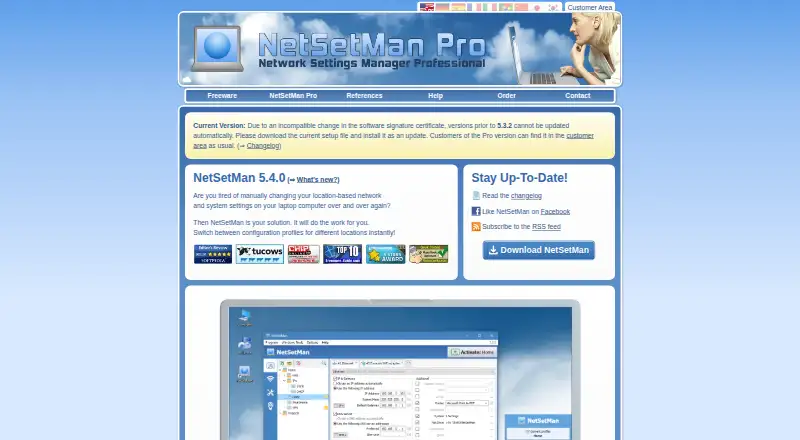
NetSetMan is an on-premises Windows desktop application for saving and switching between network and system settings profiles. It is aimed at people who move between networks or need repeatable changes to IP, gateway, DNS, WINS, Wi-Fi, proxy, firewall, printer, routing, VPN, hosts-file and adapter settings. Profiles can be activated manually, from the system tray, at logon, through the command line or automatically when conditions such as wireless networks, network locations, adapter states or time frames apply.
Its strongest fit is focused endpoint automation rather than centralized infrastructure management. Network administrators and Windows users can manage IPv4 and IPv6 settings, control Wi-Fi connections, inspect adapter status, apply driver-specific settings and scan networks from one application. Pre-logon profile switching and limited-user support extend its usefulness on managed Windows systems. NetSetMan Pro adds proxy, browser homepage and domain settings, along with deployment features. The product remains a Windows-specific tool, and it does not address the multi-device configuration workflows associated with network-device NCM platforms.
The Non-Commercial Freeware plan supports non-commercial use and 8 profiles. NetSetMan Pro plans support commercial use and unlimited profiles, with license tiers for 1–9, 10–29, 30–49, 50–99, 100–499, 500–999 and 1,000+ licenses. The 30–49 tier adds company logo customization, while the 1–9 tier specifies one license per system. Choose NetSetMan when the requirement is repeatable Windows network-profile switching with conditional or command-line activation. Organizations needing centralized configuration across network devices should choose a different category of product.
Your product? Our editors can test NetSetMan in depth and publish a review, labelled as paid · from $149/mo →
NetSetMan pricing
All 8 NetSetMan plans and prices →
NetSetMan fact sheet
| Free plan | Yes |
|---|---|
| Paid from | Not verified |
| Managed devices | Not verified |
| Configuration backup | Not verified |
| Configuration comparison | Not verified |
| Compliance auditing | Not verified |
| Scheduled backups | Not verified |
| Change rollback | Not verified |
| Deployment model | On-premises |
| Deployment | Desktop |
| Platforms | Windows |
| Support | Community, Docs |
| Built for | Solo, Small business, Mid-market (editorial estimate) |
| Pricing | Free plan (source) |
| Website | netsetman.com |
| Facts checked | 22 Sep 2026 |
Alternatives to NetSetMan
- SolarWinds Network Configuration ManagerA mature NCM suite for established teams managing complex network changes.9.0
- Skylar ComplianceA multi-vendor network management platform for backup, rollback, compliance, and automation.8.7
- Infoblox NetMRIA governed platform for discovering, auditing, automating, and analyzing multi-vendor networks.8.5


See all NetSetMan alternatives →
Used NetSetMan? Be the first to review it
The editor score above is our own research. What this page doesn't have yet is a reader's view — what you used NetSetMan for, what worked and what didn't. No stars are seeded and no review is paid for; an editor reads every one before it appears.
Write a reviewTwo minutes · verified accounts only · read by an editor before it appears
Featured on iTechGuides

NetSetMan is listed in our Network Configuration Management Software directory. Add the badge to your site — it links back to this page.
<a href="https://www.itechguides.com/products/netsetman/"><img src="https://www.itechguides.com/best/badge/netsetman.svg" alt="Featured on iTechGuides" width="230" height="46"></a>
Reviewed by iTechGuides Editors · Editorial team · Updated Oct 2026
Advertiser disclosure: iTechGuides is reader-supported. Vendors can pay for top positions in our rankings and for a place on other products' pages, and we may earn a commission when you click some links. Bought places stand at the number bought; this page and our disclosure say so. Paying vendors may get a fuller, more detailed review from our editors, and that review can change their score. How we rank.
Last updated · How we research and update