
NetCrunch
NetCrunch: Broad Windows-based monitoring with strong topology, flow, alerting, and API coverage. Ranked #17 of 54 in Network Monitoring by our editors (7.6/10); pricing: Pricing on request · 30-day trial; best for windows-based agentless monitoring.
At a glance
- Editor score7.6 / 10
- PricingPricing on request · 30-day trial
- Best forWindows-based agentless monitoring
- Free planNo
- Paid from$3,200/yr
- Synthetic checksYes
- Facts checked23 Sep 2026
Where it wins
- Agentless monitoring covers devices, servers, apps, logs, and cloud services
- Automatic Layer 2 and Layer 3 topology maps
- NetFlow, sFlow, IPFIX, REST API, and broad alerting support
Where it doesn't
- Windows Server deployment limits platform flexibility
- Professional pricing starts with a 12,100 zł/year worked example
- Pricing depends on node and interface counts
Our verdict on NetCrunch
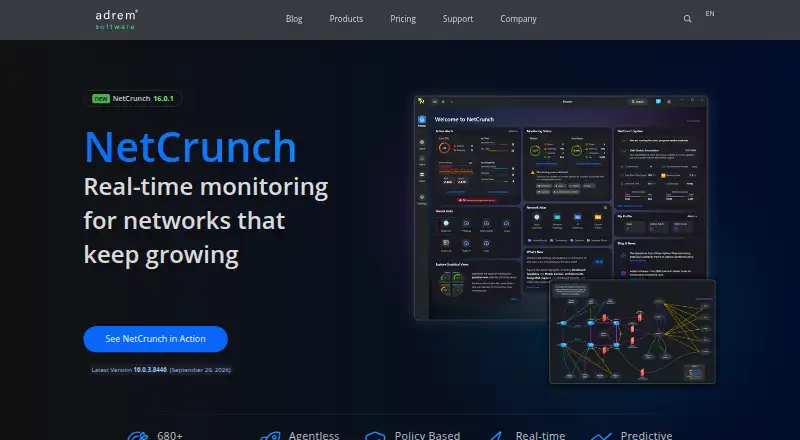
NetCrunch is an agentless network monitoring and infrastructure management platform from AdRem Software. It is designed for IT teams that need to monitor network devices, servers, applications, logs, virtualization environments, cloud services, and web resources from a Windows Server deployment. The platform also supports on-premises installations and virtual machines in customer-controlled cloud infrastructure, making it a fit for organizations that want self-hosted control across small IT teams or distributed environments.
Pricing is organized into Professional and Enterprise plans, with pricing based on node and interface counts. The Professional plan includes a worked example of 100 nodes and 600 interfaces at 12,100 zł/year, plus agentless monitoring with more than 680 built-in targets, live dashboards, automatic topology maps, and SNMP, systems, applications, and log monitoring. The Enterprise plan provides a tailored quote at scale and adds capacity of up to 10,000 nodes and more than 100,000 interfaces, along with NetFlow and sFlow support, cloud monitoring, remote probes, REST API access, and advanced alert correlation. A 30-day free trial is available, but there is no free plan.
NetCrunch stands out for breadth: its sensors cover web pages, web transactions, HTTP, REST HTTP, performance thresholds, baselines, state triggers, and alert correlation. Teams can escalate alerts through email, SMS, webhooks, desktop notifications, and remote actions, while integrations include ServiceNow, Jira, Microsoft Teams, Slack, SNMP traps, and syslog. Custom dashboards, charts, status views, live maps, and traffic-flow analysis support operational visibility. Choose NetCrunch if your environment is Windows-based and needs broad agentless coverage in one self-hosted platform. Teams requiring a platform independent of Windows should choose an alternative.
Your product? Our editors can test NetCrunch in depth and publish a review, labelled as paid · from $149/mo →
NetCrunch pricing
All 1 NetCrunch plans and prices →
NetCrunch fact sheet
| Free plan | No |
|---|---|
| Paid from | $3,200/yr |
| Synthetic checks | Yes |
| Device limit | Not verified |
| Traffic monitoring | Yes |
| Topology maps | Yes |
| Alert channels | Not verified |
| Deployment | Self_hosted |
| Free trial | 30 days · no card needed |
| Deployment | Self-hosted |
| Platforms | Web, Windows |
| Support | Email, Docs |
| Built for | Solo, Small business, Mid-market, Enterprise (editorial estimate) |
| Integrations | 20+ integrations: Slack, PagerDuty, Jira, Zendesk, ConnectWise, Grafana |
| Pricing | Pricing on request · 30-day trial (source) |
| Website | adremsoft.com |
| Facts checked | 23 Sep 2026 |
NetCrunch integrations
NetCrunch lists 20+ integrations on its own site — the 6 named here are the ones its pages call out.
- Slack
- PagerDuty
- Jira
- Zendesk
- ConnectWise
- Grafana
Alternatives to NetCrunch
- ZabbixBroad infrastructure monitoring with a free self-hosted edition and paid cloud options.9.4
- CheckmkA broad hybrid monitoring platform with a capable free edition and costly paid entry.9.3
- ManageEngine OpManagerBroad monitoring, mapping, traffic analysis, automation, and distributed coverage across four editions.9.1



See all NetCrunch alternatives →
Used NetCrunch? Be the first to review it
The editor score above is our own research. What this page doesn't have yet is a reader's view — what you used NetCrunch for, what worked and what didn't. No stars are seeded and no review is paid for; an editor reads every one before it appears.
Write a reviewTwo minutes · verified accounts only · read by an editor before it appears
Featured on iTechGuides

NetCrunch is listed in our Network Monitoring directory. Add the badge to your site — it links back to this page.
<a href="https://www.itechguides.com/products/netcrunch/"><img src="https://www.itechguides.com/best/badge/netcrunch.svg" alt="Featured on iTechGuides" width="230" height="46"></a>
Reviewed by iTechGuides Editors · Editorial team · Updated Oct 2026
Advertiser disclosure: iTechGuides is reader-supported. Vendors can pay for top positions in our rankings and for a place on other products' pages, and we may earn a commission when you click some links. Bought places stand at the number bought; this page and our disclosure say so. Paying vendors may get a fuller, more detailed review from our editors, and that review can change their score. How we rank.
Last updated · How we research and update