
NetBalancer
NetBalancer: A focused Windows tool for per-process bandwidth monitoring, limits, priorities, and automation. Ranked #26 of 33 in Bandwidth Monitoring Software by our editors (6.4/10); pricing: Free plan · 14-day trial; best for windows per-process bandwidth control.
At a glance
- Editor score6.4 / 10
- PricingFree plan · 14-day trial
- Best forWindows per-process bandwidth control
- Free planYes
- Application monitoringYes
- Founded2007 · Chisinau, Moldova
- Facts checked21 Sep 2026
Where it wins
- Per-process monitoring with upload and download limits
- Rules and filters cover apps, protocols, ports, IPs, and adapters
- REST API and command-line automation support
Where it doesn't
- Primarily limited to Windows environments
- The paid tier covers one PC
- Advanced synchronization is tied to the paid tier
Our verdict on NetBalancer
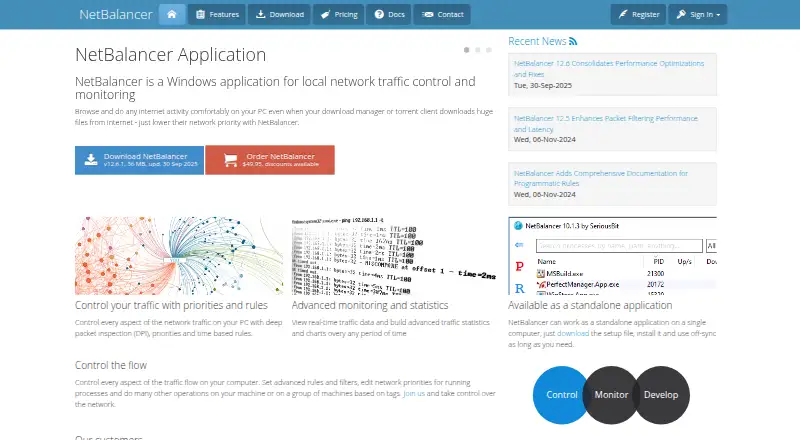
NetBalancer is Windows software for monitoring and managing network traffic on one computer or across grouped computers. It is aimed at home users, administrators, and organizations that need visibility and control at the application level. The product shows per-process upload and download activity, current connection details, traffic history, charts, and statistics. Users can assign priorities, set speed limits, and create traffic rules for applications, protocols, ports, IPs, and adapters. Global traffic limits and IPv6 support extend control beyond individual processes.
The published plans follow a freemium structure. The Unregistered version includes application monitoring. NetBalancer App and Sync costs $49.95 as a one-time payment and includes an activation code with no expiration date, one PC, one year of included updates, and one year of Sync service. The listed renewal price is $34.95 as a one-time payment. A 14-day App trial and a 30-day Sync trial are available. The paid tier is most relevant for users who need synchronization and browser-based management in addition to local monitoring and control.
NetBalancer’s standout capability is its depth of per-process traffic management. Deep packet inspection supports traffic identification and control, while the REST API and command-line tooling allow automation. Traffic history is available with unlimited retention, giving administrators a longer view of network activity. This focus makes NetBalancer a good fit for Windows users who need application-level policies, prioritization, and limits on a single PC. It is less suitable for teams seeking a broader, cross-platform bandwidth monitoring system or a network-flow-focused product.
Your product? Our editors can test NetBalancer in depth and publish a review, labelled as paid · from $149/mo →
NetBalancer pricing
All 3 NetBalancer plans and prices →
NetBalancer fact sheet
| Free plan | Yes |
|---|---|
| Paid from | Not verified |
| Application monitoring | Yes |
| User monitoring | Not verified |
| Flow protocol support | Not verified |
| SNMP monitoring | Not verified |
| Monitored device limit | 1 devices |
| Historical data retention | Unlimited |
| Bandwidth alerts | Not verified |
| Free trial | 14 days |
| Money-back guarantee | 30 days |
| Deployment | Cloud, Desktop |
| Platforms | Web, Windows |
| Support | Email, Docs |
| Built for | Solo, Small business, Mid-market (editorial estimate) |
| Integrations | 2 integrations: REST API, Command line |
| Pricing | Free plan · 14-day trial (source) |
| Website | netbalancer.com |
| Facts checked | 21 Sep 2026 |
NetBalancer integrations
NetBalancer lists 2 integrations on its own site.
- REST API
- Command line
Alternatives to NetBalancer
- ntopngA broad self-hosted toolkit for real-time, historical, and infrastructure visibility.9.4
- ManageEngine NetFlow AnalyzerA broad flow-monitoring suite for enterprise networks, with free and scalable paid editions.9.2
- Progress FlowmonA broad hybrid monitoring platform for teams needing flow, topology, performance and security analysis.9.0



See all NetBalancer alternatives →
Also Ranked In
NetBalancer is ranked in 2 of our directories.
Used NetBalancer? Be the first to review it
The editor score above is our own research. What this page doesn't have yet is a reader's view — what you used NetBalancer for, what worked and what didn't. No stars are seeded and no review is paid for; an editor reads every one before it appears.
Write a reviewTwo minutes · verified accounts only · read by an editor before it appears
Featured on iTechGuides

NetBalancer is listed in our Bandwidth Monitoring Software directory. Add the badge to your site — it links back to this page.
<a href="https://www.itechguides.com/products/netbalancer/"><img src="https://www.itechguides.com/best/badge/netbalancer.svg" alt="Featured on iTechGuides" width="230" height="46"></a>
Reviewed by iTechGuides Editors · Editorial team · Updated Oct 2026
Advertiser disclosure: iTechGuides is reader-supported. Vendors can pay for top positions in our rankings and for a place on other products' pages, and we may earn a commission when you click some links. Bought places stand at the number bought; this page and our disclosure say so. Paying vendors may get a fuller, more detailed review from our editors, and that review can change their score. How we rank.
Last updated · How we research and update