Neevia PDFcompress
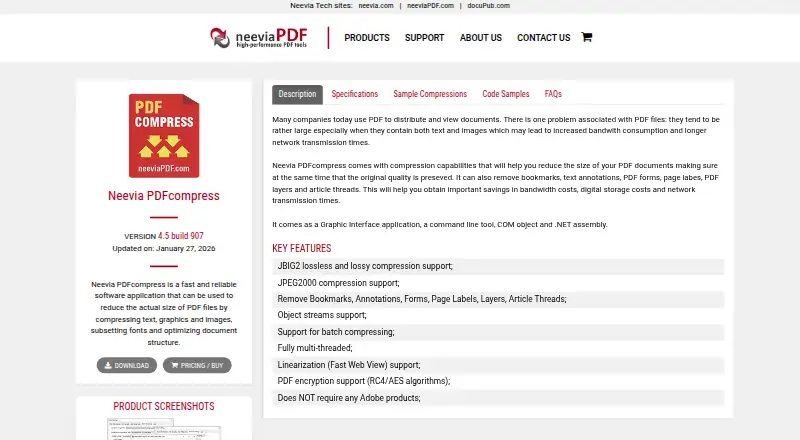
Neevia PDFcompress: A focused Windows compressor with deep optimization controls and developer-facing interfaces. Ranked #10 of 36 in PDF Compression Software by our editors (8.3/10); pricing: Paid; best for windows users needing technical PDF optimization.
At a glance
- Editor score8.3 / 10
- PricingPaid
- Best forWindows users needing technical PDF optimization
- Free planNo
- Paid from$99 one-time
- Facts checked19 Sep 2026
Where it wins
- Compresses text, graphics, images, fonts, and document structures
- Supports batch processing, command-line, COM, and .NET interfaces
- Includes JBIG2, JPEG2000, object streams, and PDF linearization
Where it doesn't
- Licensed per computer rather than as a shared license
- Evaluation downloads include trial watermarks
- Windows-focused platform support limits broader deployment options
Our verdict on Neevia PDFcompress
Neevia PDFcompress is Windows software for reducing PDF file sizes through compression and document optimization. It is aimed at Windows users who need more control than a basic file-size reduction tool provides, including teams processing collections of PDFs and developers integrating compression into applications or workflows. The product combines a graphical interface with a command-line tool, COM object, and .NET assembly, supporting both desktop and programmatic use.
Pricing is straightforward: the Single computer license costs US$99 as a one-time payment and is licensed per computer. An evaluation version is available with trial watermarks. The published plan is suited to an individual workstation or a defined Windows installation, while batch compression and the command-line, COM, and .NET interfaces extend its use beyond one-off manual jobs. Supported environments include Windows 10 and 11, plus Windows Server 2012, 2016, 2019, 2022, and 2025.
Its standout strength is the breadth of technical controls. Neevia PDFcompress can compress text, graphics, and images, including JBIG2 lossless and lossy compression and JPEG2000 compression. It can subset fonts, optimize document structure, use object streams, linearize PDFs, and remove selected elements such as bookmarks, annotations, forms, page labels, layers, and article threads. PDF encryption using RC4 and AES algorithms is also included. Choose it when detailed optimization and automation interfaces matter; users seeking a broad cross-platform workflow or a license that covers multiple computers should consider a different fit.
Your product? Our editors can test Neevia PDFcompress in depth and publish a review, labelled as paid · from $149/mo →
Neevia PDFcompress pricing
All 1 Neevia PDFcompress plans and prices →
Neevia PDFcompress fact sheet
| Free plan | No |
|---|---|
| Paid from | $99 one-time |
| Compression modes | Not verified |
| Maximum file size | Not verified |
| Batch compression | Yes |
| Offline desktop app | Yes |
| API access | Yes |
| Supported platforms | Windows 10/11 and Windows Server 2012, 2016, 2019, 2022, and 2025 |
| Deployment | Desktop |
| Platforms | Windows |
| Pricing | Paid (source) |
| Website | neeviapdf.com |
| Facts checked | 19 Sep 2026 |
Alternatives to Neevia PDFcompress
- BentoPDF Hyper CompressA flexible compression engine with private processing and developer-focused interfaces.9.3
- iText pdfOptimizerA developer-focused PDF optimizer with detailed controls, automation, and flexible licensing.9.1
- PDFOptimA flexible PDF compressor with previews, batch processing, and cross-platform coverage.9.0


See all Neevia PDFcompress alternatives →
Used Neevia PDFcompress? Be the first to review it
The editor score above is our own research. What this page doesn't have yet is a reader's view — what you used Neevia PDFcompress for, what worked and what didn't. No stars are seeded and no review is paid for; an editor reads every one before it appears.
Write a reviewTwo minutes · verified accounts only · read by an editor before it appears
Featured on iTechGuides

Neevia PDFcompress is listed in our PDF Compression Software directory. Add the badge to your site — it links back to this page.
<a href="https://www.itechguides.com/products/neevia-pdfcompress/"><img src="https://www.itechguides.com/best/badge/neevia-pdfcompress.svg" alt="Featured on iTechGuides" width="230" height="46"></a>
Reviewed by iTechGuides Editors · Editorial team · Updated Oct 2026
Advertiser disclosure: iTechGuides is reader-supported. Vendors can pay for top positions in our rankings and for a place on other products' pages, and we may earn a commission when you click some links. Bought places stand at the number bought; this page and our disclosure say so. Paying vendors may get a fuller, more detailed review from our editors, and that review can change their score. How we rank.
Last updated · How we research and update