NeCast
NeCast: A free Android streamer with 1440p60 output, overlays, alerts, and mobile controls. Ranked #23 of 44 in Game Streaming Software by our editors (6.9/10); pricing: Free plan; best for android YouTube streamers wanting 1440p output.
At a glance
- Editor score6.9 / 10
- PricingFree plan
- Best forAndroid YouTube streamers wanting 1440p output
- Free planYes
- Paid fromFree
- Max output resolution1440p
- Facts checked20 Sep 2026
Where it wins
- Streams up to 1440p at 60 FPS from Android
- Custom overlays, alerts, goals, and webcam frames
- Supports YouTube Live and custom RTMP output
Where it doesn't
- Android-only platform focus
- No paid tiers are offered
- Core plan details center on YouTube and custom RTMP
Our verdict on NeCast
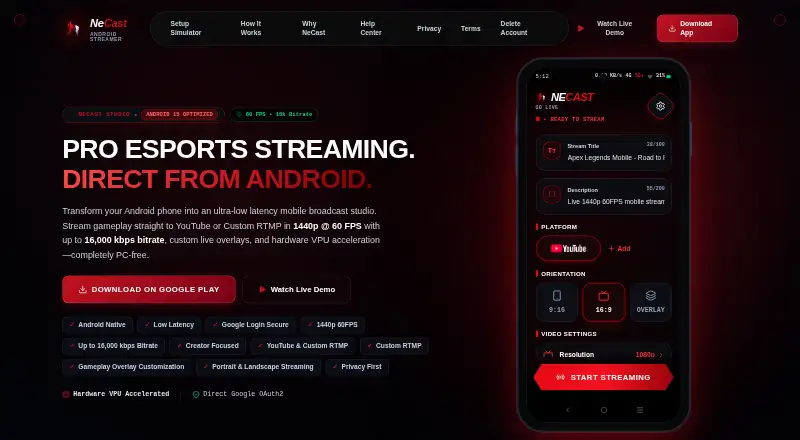
NeCast is an Android mobile livestreaming app for game creators, esports players, and IRL vloggers. It sends gameplay directly from an Android device to YouTube or custom RTMP destinations, so creators can stream without a PC. Output reaches 1440p at 60 FPS, with portrait and landscape modes for different broadcast formats. Google OAuth 2.0 authentication and floating in-game HUD controls round out the mobile-focused workflow. Its clearest fit is an Android YouTube streamer who wants high-resolution output and on-screen stream elements.
NeCast uses a free model, and the published Free plan includes Android mobile streaming, YouTube and custom RTMP output, 1440p at 60 FPS, and custom overlays. A standout capability is the combination of hardware VPU/MediaCodec acceleration with a gameplay overlay editor. Creators can add webcam frames, subscriber goals, chat alerts, and custom layout elements while streaming in portrait or landscape. These features make the app suited to broadcasts that need more than a basic gameplay feed while keeping the workflow centered on the phone.
Platform fit is focused: Android is the supported platform, while listed destinations include YouTube Live, Twitch, Kick, Facebook Gaming, and custom RTMP. The plan details specifically name YouTube and custom RTMP, so creators should confirm that their intended destination works through the available route. NeCast is a strong match for Android users who prioritize 1440p60, overlays, alerts, and in-game controls. It is a weaker choice for teams that need desktop capture, a broader platform setup, or paid tiers.
Your product? Our editors can test NeCast in depth and publish a review, labelled as paid · from $149/mo →
NeCast pricing
All 1 NeCast plans and prices →
NeCast fact sheet
| Free plan | Yes |
|---|---|
| Paid from | Free |
| Max output resolution | 1440p |
| Multistreaming | Not verified |
| Hardware encoding | Yes |
| Alerts and widgets | Yes |
| Custom RTMP output | Yes |
| Virtual camera | Not verified |
| Supported platforms | Android |
| Deployment | Mobile |
| Platforms | Android |
| Support | Email, Docs |
| Built for | Solo, Small business (editorial estimate) |
| Integrations | 5 integrations: YouTube Live, Twitch, Kick, Facebook Gaming, Custom RTMP |
| Pricing | Free plan (source) |
| Website | necast.live |
| Facts checked | 20 Sep 2026 |
NeCast integrations
NeCast lists 5 integrations on its own site.
- YouTube Live
- Twitch
- Kick
- Facebook Gaming
- Custom RTMP
Alternatives to NeCast
- OBS StudioA flexible desktop studio with deep production tools and no software cost.9.4
- PRISM Live StudioA cross-platform encoder with scheduling, interaction tools, and six-channel multistreaming.9.1
- SplitCam MultistreamA free encoder for creators who want broad multistreaming without a cloud relay.9.0



Used NeCast? Be the first to review it
The editor score above is our own research. What this page doesn't have yet is a reader's view — what you used NeCast for, what worked and what didn't. No stars are seeded and no review is paid for; an editor reads every one before it appears.
Write a reviewTwo minutes · verified accounts only · read by an editor before it appears
Featured on iTechGuides

NeCast is listed in our Game Streaming Software directory. Add the badge to your site — it links back to this page.
<a href="https://www.itechguides.com/products/necast/"><img src="https://www.itechguides.com/best/badge/necast.svg" alt="Featured on iTechGuides" width="230" height="46"></a>
Reviewed by iTechGuides Editors · Editorial team · Updated Oct 2026
Advertiser disclosure: iTechGuides is reader-supported. Vendors can pay for top positions in our rankings and for a place on other products' pages, and we may earn a commission when you click some links. Bought places stand at the number bought; this page and our disclosure say so. Paying vendors may get a fuller, more detailed review from our editors, and that review can change their score. How we rank.
Last updated · How we research and update