
Nebo
Nebo: A free mobile app combining round-ups, savings goals, debt tools and financial planning. Ranked #11 of 17 in Automated Savings Apps by our editors (7.6/10); pricing: Free plan; best for free round-ups with regional bank coverage.
At a glance
- Editor score7.6 / 10
- PricingFree plan
- Best forFree round-ups with regional bank coverage
- Free planYes
- Paid fromFree
- Card roundupsYes
- Facts checked20 Sep 2026
Where it wins
- Free access to round-ups, savings goals and financial planning
- Connects with M-PESA, major Kenyan banks and digital wallets
- Adds debt tracking, repayment plans and Nia AI assistance
Where it doesn't
- Early-access availability includes a waitlist
- Designed for iOS and Android rather than broader platforms
- Financial services may depend on licensed third-party partners
Our verdict on Nebo
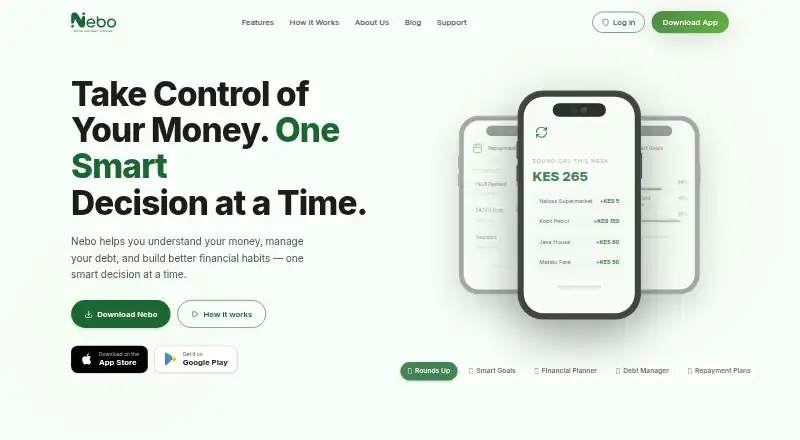
Nebo is a mobile financial-planning app for Kenyans who want to automate saving while keeping spending, debt and financial goals in one place. Its core tools include automatic card and transaction round-ups, savings goals with automated contributions, personalized financial planning, debt tracking, repayment plans and payment reminders. Spending, savings and debt insights add an overview layer, while Nia provides an AI financial assistant. Nebo is available on iOS and Android and is free to download and start.
The strongest fit is its regional connection coverage. Nebo integrates with M-PESA, Airtel Money and T-Kash, alongside Equity Bank, KCB, Cooperative Bank, NCBA and Standard Chartered. That gives users several ways to connect everyday transactions and move toward automated saving, rather than limiting the product to one bank or wallet. The combination of round-ups, scheduled contributions and goal tracking suits people who prefer gradual saving routines, while the planning and debt features broaden its usefulness beyond a single-purpose savings app.
Nebo is presented as an early-access product with a waitlist, so availability may shape the onboarding experience. Its mobile focus also makes it a less suitable choice for people who expect a desktop-first planning workflow. Financial services are provided by licensed third-party partners where applicable, which is important context for users evaluating how the app fits alongside their existing financial providers. Pick Nebo if you want a free Kenyan savings app with broad local integrations, automated contributions and debt guidance. Choose an alternative if you need immediate access, a desktop platform or a more narrowly focused savings tool.
Questions about Nebo
What does Nebo run on? iOS and Android. It runs as a mobile app.
What does Nebo integrate with? 8 integrations, including M-PESA, Equity Bank, KCB, Cooperative Bank and NCBA.
Who is Nebo built for? Solo users and small businesses (our editorial estimate).
Your product? Our editors can test Nebo in depth and publish a review, labelled as paid · from $149/mo →
Nebo pricing
Nebo fact sheet
| Free plan | Yes |
|---|---|
| Paid from | Free |
| Card roundups | Yes |
| Scheduled transfers | Yes |
| Custom savings rules | Not verified |
| Savings goal limit | Not verified |
| Interest on savings | Not verified |
| Withdrawal method | Not verified |
| Supported platforms | Not verified |
| Deployment | Mobile |
| Platforms | iOS, Android |
| Built for | Solo, Small business (editorial estimate) |
| Integrations | 8 integrations: M-PESA, Equity Bank, KCB, Cooperative Bank, NCBA, Standard Chartered … |
| Pricing | Free plan |
| Website | nebo.co.ke |
| Facts checked | 20 Sep 2026 |
Nebo integrations
Nebo lists 8 integrations on its own site.
- M-PESA
- Equity Bank
- KCB
- Cooperative Bank
- NCBA
- Standard Chartered
- Airtel Money
- T-Kash
Alternatives to Nebo
- PlumA broad savings and investing app with free automation and tiered upgrades.9.4
- ChipA flexible UK savings app with AI autosaves, goals, investments and quick withdrawals.9.1
- PiggyVestA free savings app with automation, targets, flexible wallets, and fixed-term options.8.9



Used Nebo? Be the first to review it
The editor score above is our own research. What this page doesn't have yet is a reader's view — what you used Nebo for, what worked and what didn't. No stars are seeded and no review is paid for; an editor reads every one before it appears.
Write a reviewTwo minutes · verified accounts only · read by an editor before it appears
Featured on iTechGuides

Nebo is listed in our Automated Savings Apps directory. Add the badge to your site — it links back to this page.
<a href="https://www.itechguides.com/products/nebo/"><img src="https://www.itechguides.com/best/badge/nebo.svg" alt="Featured on iTechGuides" width="230" height="46"></a>
Reviewed by iTechGuides Editors · Editorial team · Updated Nov 2026
Advertiser disclosure: iTechGuides is reader-supported. Vendors can pay for top positions in our rankings and for a place on other products' pages, and we may earn a commission when you click some links. Bought places stand at the number bought; this page and our disclosure say so. Paying vendors may get a fuller, more detailed review from our editors, and that review can change their score. How we rank.
Last updated · How we research and update