NEAITECH DiskHealth
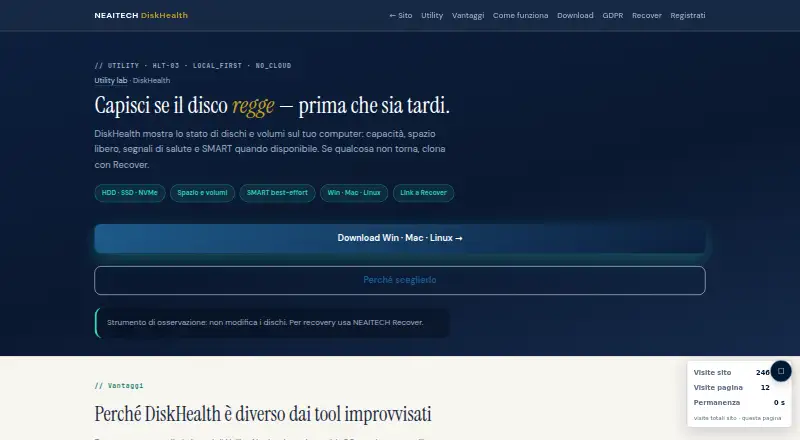
NEAITECH DiskHealth: A focused offline utility for basic local disk checks, without remote monitoring. Ranked #21 of 30 in Disk Health Monitoring Software by our editors (7.0/10); pricing: Free plan; best for basic cross-platform local health checks.
At a glance
- Editor score7.0 / 10
- PricingFree plan
- Best forBasic cross-platform local health checks
- Free planYes
- Paid from€49 one-time
- SMART monitoringYes
- Founded2005 · Genova, Italy
- Facts checked21 Sep 2026
Where it wins
- Supports Windows, macOS, and Linux, including HDD, SSD, and NVMe storage
- Reports capacity, free space, disk status, SMART data, and health notes
- Works offline and detects critical space and anomalous states
Where it doesn't
- Remote monitoring is unavailable
- SMART support depends on the operating system and smartctl
- Advanced functionality requires a paid license
Our verdict on NEAITECH DiskHealth
NEAITECH DiskHealth is a local desktop utility for checking disk and volume status, capacity, free space, health indicators, and SMART data when available. It supports HDD, SSD, and NVMe storage on Windows, macOS, and Linux, making it a practical fit for individuals and teams that need basic health checks directly on each computer. The software operates offline and does not modify disks. Its free edition covers basic functionality and offline use, while the paid licenses extend the product beyond that entry point.
The pricing structure is straightforward. The Free plan provides basic functionality and offline operation. Pro · one OS costs €49 as a one-time license for Windows, macOS, or Linux. Utility Suite costs €129 as a one-time license and combines HashGuard, DiskHealth, and SecureWipe for one operating system. Enterprise costs €249 as a one-time license, includes the utility suite, supports all operating systems, and covers business use. The published product description states that these perpetual licenses include 12 months of software updates.
DiskHealth’s main strength is its focused local reporting: users can view disk and volume status, capacity, free space, SMART information when available, health and SMART notes, and alerts for critical space or anomalous states. SMART support is best-effort and depends on the operating system and smartctl, so the depth of information can vary by environment. Remote monitoring is unavailable, which limits the product for centralized administration or distributed device oversight. Choose DiskHealth for offline, cross-platform checks on local machines; consider another option when remote monitoring is a core requirement.
Your product? Our editors can test NEAITECH DiskHealth in depth and publish a review, labelled as paid · from $149/mo →
NEAITECH DiskHealth pricing
All 4 NEAITECH DiskHealth plans and prices →
NEAITECH DiskHealth fact sheet
| Free plan | Yes |
|---|---|
| Paid from | €49 one-time |
| SMART monitoring | Yes |
| SSD wear tracking | Not verified |
| Temperature alerts | Not verified |
| Failure warnings | Yes |
| Remote monitoring | No |
| Drives on cheapest plan | Not verified |
| Supported platforms | Windows, macOS, Linux |
| Deployment | Desktop |
| Platforms | Windows, macOS, Linux |
| Compliance & security | GDPR |
| Support | Email, Docs |
| Built for | Solo, Small business, Enterprise (editorial estimate) |
| Pricing | Free plan (source) |
| Website | neaitech.com |
| Facts checked | 21 Sep 2026 |
Alternatives to NEAITECH DiskHealth
- Hard Disk SentinelA full-featured Windows and Linux monitor with diagnostics, alerts, backups, and remote management.9.4
- smartmontoolsBroad, free disk-health monitoring for technical users comfortable with command-line tools.9.2
- DA Drive AnalyzerA low-cost, cross-platform drive monitor with AI predictions and NAS coverage.9.0


See all NEAITECH DiskHealth alternatives →
Used NEAITECH DiskHealth? Be the first to review it
The editor score above is our own research. What this page doesn't have yet is a reader's view — what you used NEAITECH DiskHealth for, what worked and what didn't. No stars are seeded and no review is paid for; an editor reads every one before it appears.
Write a reviewTwo minutes · verified accounts only · read by an editor before it appears
Featured on iTechGuides

NEAITECH DiskHealth is listed in our Disk Health Monitoring Software directory. Add the badge to your site — it links back to this page.
<a href="https://www.itechguides.com/products/neaitech-diskhealth/"><img src="https://www.itechguides.com/best/badge/neaitech-diskhealth.svg" alt="Featured on iTechGuides" width="230" height="46"></a>
Reviewed by iTechGuides Editors · Editorial team · Updated Oct 2026
Advertiser disclosure: iTechGuides is reader-supported. Vendors can pay for top positions in our rankings and for a place on other products' pages, and we may earn a commission when you click some links. Bought places stand at the number bought; this page and our disclosure say so. Paying vendors may get a fuller, more detailed review from our editors, and that review can change their score. How we rank.
Last updated · How we research and update