
NASGuard Cloud Backup
NASGuard Cloud Backup: A focused NAS-to-cloud service with strong protection controls and a high annual price. Ranked #32 of 46 in NAS Backup Software by our editors (6.1/10); pricing: Paid; best for cross-vendor NAS backup administrators.
At a glance
- Editor score6.1 / 10
- PricingPaid
- Best forCross-vendor NAS backup administrators
- Free planNo
- Paid from$71.99/unit/yr
- Backup directionFrom_nas
- Founded2014
- Facts checked20 Sep 2026
Where it wins
- Scheduled jobs, monitoring, email alerts and guided restores
- AES-256 encryption, immutable copies and retention policies
- Synology, QNAP, rsync and S3-compatible integrations
Where it doesn't
- No free plan is available
- Annual pricing starts at $71.99 per TB
- The service is delivered through a web platform
Our verdict on NASGuard Cloud Backup
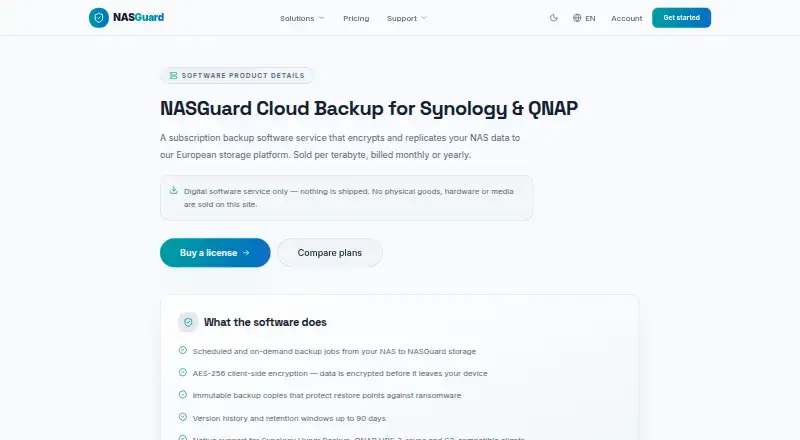
NASGuard Cloud Backup is a web-based backup management service for teams protecting Synology and QNAP environments. It supports scheduled and on-demand jobs, monitoring, email alerts, encryption before upload, retention policies and file-level recovery. Database and virtual-machine jobs are also supported, making it suitable for administrators managing more than ordinary file backups. Storage capacity is included in the subscription and licensed by terabyte.
Pricing is straightforward but demanding for larger backup repositories. The NASGuard Backup Manager plan is priced at $71.99 per TB with annual billing, and backup capacity is included. Monthly billing is available for the same plan. Prices exclude VAT. There is no free plan, so the service is positioned for teams ready to budget for a paid backup platform rather than users seeking a no-cost starting point. The main buying question is whether the included capacity and administration features justify the annual cost for the amount of NAS data being protected.
Its strongest fit is a mixed NAS environment that needs cloud protection across common backup workflows. Integrations cover Synology Hyper Backup, QNAP HBS 3, rsync and S3-compatible clients, while AES-256 encryption, immutable copies, retention and version policies add control over stored backups. Guided restores support file-level recovery through the web dashboard. Choose NASGuard when centralized monitoring, recovery controls and support for database or virtual-machine jobs matter across Synology and QNAP systems. A different option may suit organizations that need a free plan, a lower starting price, or a platform beyond the web-based management model.
Your product? Our editors can test NASGuard Cloud Backup in depth and publish a review, labelled as paid · from $149/mo →
NASGuard Cloud Backup pricing
All 1 NASGuard Cloud Backup plans and prices →
NASGuard Cloud Backup fact sheet
| Free plan | No |
|---|---|
| Paid from | $71.99/unit/yr |
| Backup direction | From_nas |
| File and folder restore | Yes |
| Virtual machine backup | Yes |
| Immutable backups | Yes |
| Database backup | Yes |
| Retention limit | Not verified |
| Deployment | Cloud |
| Platforms | Web |
| Support | |
| Built for | Small business, Mid-market (editorial estimate) |
| Integrations | 4 integrations: Synology Hyper Backup, QNAP HBS 3, rsync, S3-compatible clients |
| Pricing | Paid (source) |
| Website | nasguard.cloud |
| Facts checked | 20 Sep 2026 |
NASGuard Cloud Backup integrations
NASGuard Cloud Backup lists 4 integrations on its own site.
- Synology Hyper Backup
- QNAP HBS 3
- rsync
- S3-compatible clients
Alternatives to NASGuard Cloud Backup
- QNAP Hybrid Backup SyncA broad, free QNAP-native backup tool for files, devices, servers, and cloud storage.9.4
- Alibaba Cloud BackupA strong fit for Alibaba Cloud NAS users needing scheduled backup and recovery controls.9.1
- Veeam Backup & ReplicationA broad backup platform for NAS users who need VM recovery and security controls.8.9



See all NASGuard Cloud Backup alternatives →
Used NASGuard Cloud Backup? Be the first to review it
The editor score above is our own research. What this page doesn't have yet is a reader's view — what you used NASGuard Cloud Backup for, what worked and what didn't. No stars are seeded and no review is paid for; an editor reads every one before it appears.
Write a reviewTwo minutes · verified accounts only · read by an editor before it appears
Featured on iTechGuides

NASGuard Cloud Backup is listed in our NAS Backup Software directory. Add the badge to your site — it links back to this page.
<a href="https://www.itechguides.com/products/nasguard-cloud-backup/"><img src="https://www.itechguides.com/best/badge/nasguard-cloud-backup.svg" alt="Featured on iTechGuides" width="230" height="46"></a>
Reviewed by iTechGuides Editors · Editorial team · Updated Oct 2026
Advertiser disclosure: iTechGuides is reader-supported. Vendors can pay for top positions in our rankings and for a place on other products' pages, and we may earn a commission when you click some links. Bought places stand at the number bought; this page and our disclosure say so. Paying vendors may get a fuller, more detailed review from our editors, and that review can change their score. How we rank.
Last updated · How we research and update