
Nacsport
Nacsport: Deep sports video coding with frame-accurate analysis, AI support, and broad exports. Ranked #15 of 34 in Video Annotation Software by our editors (7.4/10); pricing: 30-day trial; best for professional sports coding workflows.
At a glance
- Editor score7.4 / 10
- Pricing30-day trial
- Best forProfessional sports coding workflows
- Free planNo
- Frame-accurate markingYes
- Facts checked20 Sep 2026
Where it wins
- Frame-by-frame playback, tagging, timelines, and drawing overlays
- Custom coding, dashboards, presentations, and multi-angle analysis
- Exports to Excel, XLS, PDF, and XML with Hub sharing
Where it doesn't
- Paid product with no free plan
- Five editions may require careful plan selection
- Advanced workflows may exceed the needs of casual reviewers
Our verdict on Nacsport
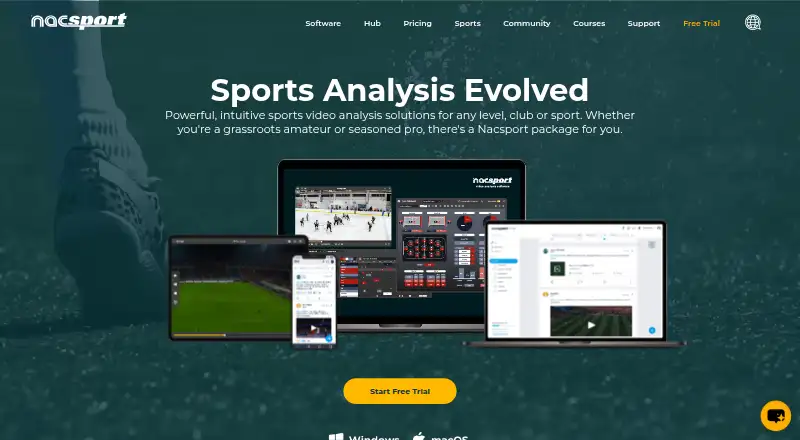
Nacsport is sports video analysis software for coaches, performance analysts, and teams working with live or recorded footage. Its workflow combines video tagging, play-by-play game logs, frame-by-frame playback, slow motion, fast playback, and a dynamic timeline for reviewing and comparing plays. Customizable tagging windows and buttons support tailored coding, while dashboards, data visualization, presentations, and exports help turn annotated footage into reports and team materials.
The product’s strongest area is the depth of its analysis workflow. Drawing overlays, live video capture, multi-angle analysis, and video presentations with notes, transitions, music, and slides extend it beyond basic clip annotation. Data can be exported to Excel, XLS, PDF, and XML, with Excel, Power BI, Nacsport Hub, and KlipDraw listed among its integrations. Nacsport Hub supports online sharing and collaboration, while companion tools cover mobile tagging, live analysis, video review, and remote presentation control. AI features add another layer to an already broad toolset.
Nacsport is a paid product with a 30-day free trial and editions named Basic, Basic+, Scout, Pro, and Elite. The range gives teams room to match the product to their workflow, while the absence of a free plan makes it less suited to occasional users seeking a no-cost starting point. Professional sports organizations that need structured coding, detailed review, visual analysis, and exportable datasets should consider Nacsport. Teams looking only for simple video markup or a free-first workflow should choose a more focused alternative.
Your product? Our editors can test Nacsport in depth and publish a review, labelled as paid · from $99/mo →
Nacsport pricing
Nacsport fact sheet
| Free plan | No |
|---|---|
| Paid from | Not verified |
| Frame-accurate marking | Yes |
| Drawing annotations | Yes |
| Custom labels or fields | Yes |
| Review workflow | Not verified |
| Dataset export | Yes |
| Video length limit | Not verified |
| Free trial | 30 days |
| Deployment | Cloud, Desktop, Mobile |
| Platforms | Web, Windows, macOS, iOS, Android |
| Support | Live chat, Docs |
| Built for | Small business, Mid-market, Enterprise (editorial estimate) |
| Integrations | 4 integrations: Excel, Power BI, Nacsport Hub, KlipDraw |
| Pricing | 30-day trial (source) |
| Website | nacsport.com |
| Facts checked | 20 Sep 2026 |
Nacsport integrations
Nacsport lists 4 integrations on its own site.
- Excel
- Power BI
- Nacsport Hub
- KlipDraw
Alternatives to Nacsport
- Frame.ioFrame-accurate review, approvals, version comparison, and production-tool integrations.9.3
- KollaborateA mature review hub with strong editing-app integrations and low-cost entry pricing.9.1
- FrameQueryA strong choice for AI-assisted footage search, precise review, and editing exports.9.0



See all Nacsport alternatives →
Used Nacsport? Be the first to review it
The editor score above is our own research. What this page doesn't have yet is a reader's view — what you used Nacsport for, what worked and what didn't. No stars are seeded and no review is paid for; an editor reads every one before it appears.
Write a reviewTwo minutes · verified accounts only · read by an editor before it appears
Featured on iTechGuides

Nacsport is listed in our Video Annotation Software directory. Add the badge to your site — it links back to this page.
<a href="https://www.itechguides.com/products/nacsport/"><img src="https://www.itechguides.com/best/badge/nacsport.svg" alt="Featured on iTechGuides" width="230" height="46"></a>
Reviewed by iTechGuides Editors · Editorial team · Updated Oct 2026
Advertiser disclosure: iTechGuides is reader-supported. Vendors can pay for top positions in our rankings and for a place on other products' pages, and we may earn a commission when you click some links. How we rank.
Last updated · How we research and update