
FrameQuery
FrameQuery: A strong choice for AI-assisted footage search, precise review, and editing exports. Ranked #3 of 34 in Video Annotation Software by our editors (9.0/10); pricing: Free plan; best for AI-powered video search and annotation.
At a glance
- Editor score9.0 / 10
- PricingFree plan
- Best forAI-powered video search and annotation
- Free planYes
- Paid from$19/mo
- Frame-accurate markingYes
- Founded2024
- Facts checked22 Sep 2026
Where it wins
- Semantic search spans transcripts, scenes, objects, and people.
- Frame-accurate comments, drawings, threads, and approval workflows.
- Supports 50+ formats with FCPXML, EDL, and LosslessCut exports.
Where it doesn't
- Cloud-hosted sharing and review begin with the Pro plan.
- The listed platform coverage is web, Windows, and macOS.
- The Developer API is planned and not yet available.
Our verdict on FrameQuery
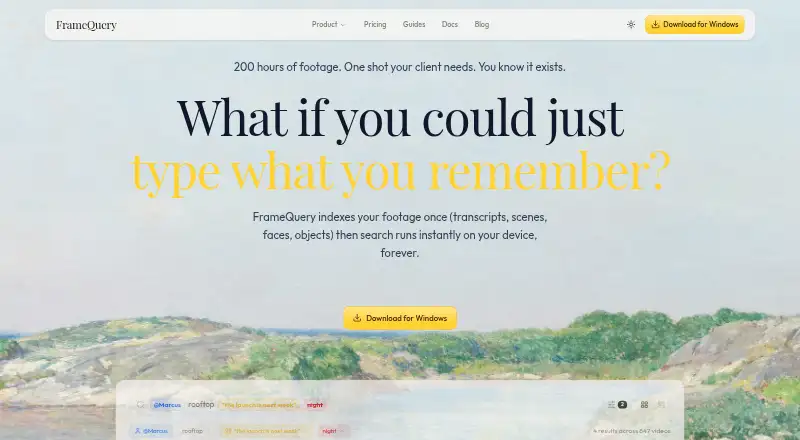
FrameQuery is a video analysis and search application for editors, post-production teams, filmmakers, and other video professionals. It indexes footage through transcripts, scene descriptions, object recognition, face recognition, and voice recognition, then supports local semantic search. Review features include frame-accurate timecoded comments, drawings directly on video frames, threaded discussions, comment resolution, and approval verdicts shared through web links.
The published plans offer a useful range for different workflows. Free includes search, metadata search, shared-index access, and Local, Drive, and NAS sharing. Starter costs $19 per month and adds the full AI analysis suite, local index and search, plus Drive or NAS sharing. Pro costs $45 per month or $540 per year, with cloud-hosted sharing, 100 GB of cloud proxy storage, collaboration, and review. Max costs $190 per month or $2,280 per year and raises cloud proxy storage to 600 GB. Studio adds unlimited video hours, one-time archive processing, dedicated onboarding, and priority support. A Developer API plan includes REST API access, programmatic indexing, and webhook notifications, while the API functionality is planned and not yet available.
FrameQuery’s strongest fit is footage-heavy work that benefits from searchable transcripts, scene understanding, recognition, and precise visual feedback in one workflow. Scene detection includes shot type, angle, and descriptions, while speaker-separated transcription provides word-level timestamps. Support for 50+ formats—including R3D, BRAW, ProRes, and H.264—helps accommodate professional source media, and exports to FCPXML, EDL, and LosslessCut connect selected material to editing workflows. Choose it when AI-assisted discovery and annotation are central; consider another option if you need cloud-hosted sharing without moving to Pro or an available API for programmatic workflows.
Your product? Our editors can test FrameQuery in depth and publish a review, labelled as paid · from $99/mo →
FrameQuery pricing
All 6 FrameQuery plans and prices →
FrameQuery fact sheet
| Free plan | Yes |
|---|---|
| Paid from | $19/mo |
| Frame-accurate marking | Yes |
| Drawing annotations | Yes |
| Custom labels or fields | Not verified |
| Review workflow | Yes |
| Dataset export | Not verified |
| Video length limit | Not verified |
| Deployment | Cloud, Desktop |
| Platforms | Web, Windows, macOS |
| Support | Docs |
| Built for | Solo, Small business, Mid-market (editorial estimate) |
| Integrations | 9 integrations: Final Cut Pro, Premiere Pro, DaVinci Resolve, Avid, Google Drive, Dropbox … |
| Pricing | Free plan (source) |
| Website | framequery.com |
| Facts checked | 22 Sep 2026 |
FrameQuery integrations
FrameQuery lists 9 integrations on its own site.
- Final Cut Pro
- Premiere Pro
- DaVinci Resolve
- Avid
- Google Drive
- Dropbox
- Amazon S3
- SMB
- NAS
Alternatives to FrameQuery
- Frame.ioFrame-accurate review, approvals, version comparison, and production-tool integrations.9.3
- KollaborateA mature review hub with strong editing-app integrations and low-cost entry pricing.9.1
- WorkflawsA focused browser workspace for frame-accurate review, approvals, and version comparison.8.8



See all FrameQuery alternatives →
FrameQuery vs the competition
- FrameQuery vs Frame.io
- FrameQuery vs Kollaborate
- FrameQuery vs Workflaws
- FrameQuery vs Wipster
- FrameQuery vs cineSync
- FrameQuery vs Tator


Compare FrameQuery with any tool side by side →
Also Ranked In
FrameQuery is ranked in 2 of our directories.
Used FrameQuery? Be the first to review it
The editor score above is our own research. What this page doesn't have yet is a reader's view — what you used FrameQuery for, what worked and what didn't. No stars are seeded and no review is paid for; an editor reads every one before it appears.
Write a reviewTwo minutes · verified accounts only · read by an editor before it appears
Featured on iTechGuides

FrameQuery is listed in our Video Annotation Software directory. Add the badge to your site — it links back to this page.
<a href="https://www.itechguides.com/products/framequery/"><img src="https://www.itechguides.com/best/badge/framequery.svg" alt="Featured on iTechGuides" width="230" height="46"></a>
Reviewed by iTechGuides Editors · Editorial team · Updated Oct 2026
Advertiser disclosure: iTechGuides is reader-supported. Vendors can pay for top positions in our rankings and for a place on other products' pages, and we may earn a commission when you click some links. How we rank.
Last updated · How we research and update