MyEventViewer
MyEventViewer: A free, focused event-log viewer for Windows with filtering, live refresh, and export. Ranked #97 of 109 in Log Management Software by our editors (3.0/10); pricing: Free plan; best for windows users reviewing event logs for free.
At a glance
- Editor score3.0 / 10
- PricingFree plan
- Best forWindows users reviewing event logs for free
- Free planYes
- Paid fromFree
- Founded2001
- Facts checked21 Sep 2026
Where it wins
- Views multiple event logs in one list with lower-pane details
- Filters by type, source, user, ID, and time range
- Exports to text, CSV, HTML, XML, or the clipboard
Where it doesn't
- Windows-only coverage
- No ingestion pipelines, structured parsing, or retention management
- The vendor notes possible errors or crashes on Windows 10 and 11
Our verdict on MyEventViewer
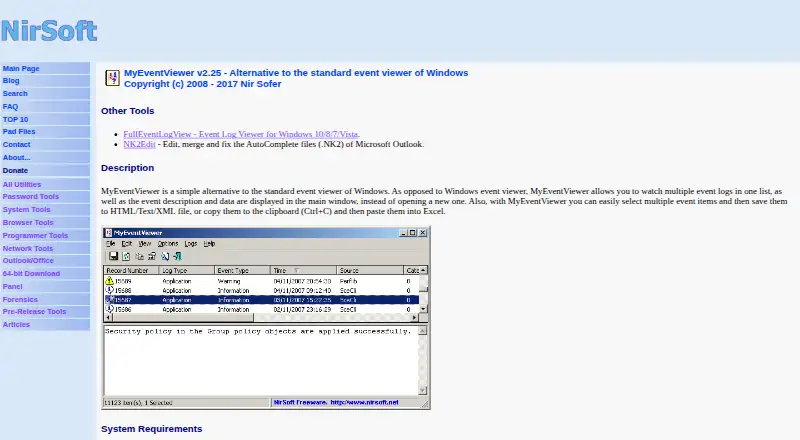
MyEventViewer is a free, portable Windows utility from NirSoft that provides an alternative to the standard Windows Event Viewer. It is aimed at users who need to inspect Windows event logs without installing software. Multiple logs appear in a single list, while a lower pane displays event descriptions and data. The utility also reads external .evt files and can connect to remote computers with administrator access, making it suitable for focused troubleshooting and event review.
Its strongest capabilities center on filtering, live review, and export. Events can be filtered by type, source, user, ID, and time range, and the display can refresh automatically as new events are created. Selected event lists can be exported to text, CSV, HTML, or XML, or copied to the clipboard. These features give Windows administrators and technical users practical ways to narrow event lists and preserve records outside the viewer. The published freeware plan includes the portable utility, no installation requirement, and Windows event-log viewing and export.
MyEventViewer is a narrow event-log viewer rather than a broader log-management platform. It does not provide ingestion pipelines, structured parsing, or retention management, and its platform coverage is limited to Windows. The vendor recommends FullEventLogView for Windows 7, 8, 10, and 11, while noting that MyEventViewer may show errors or crashes on Windows 10 and 11. Choose MyEventViewer for free, portable inspection of Windows event logs, especially when filtering, remote access, or export matters. Choose an alternative when you need broader platform coverage or managed log collection and retention.
Your product? Our editors can test MyEventViewer in depth and publish a review, labelled as paid · from $149/mo →
MyEventViewer pricing
All 1 MyEventViewer plans and prices →
MyEventViewer fact sheet
| Free plan | Yes |
|---|---|
| Paid from | Free |
| Included ingestion | Not verified |
| Log retention | Not verified |
| Log pipelines | No |
| Archive export | Yes |
| Live log tailing | Yes |
| Deployment options | Not verified |
| Structured log parsing | Not verified |
| Deployment | Desktop |
| Platforms | Windows |
| Support | Email, Docs |
| Built for | Solo, Small business (editorial estimate) |
| Pricing | Free plan (source) |
| Website | nirsoft.net |
| Facts checked | 21 Sep 2026 |
Alternatives to MyEventViewer
- ELK StackA flexible open-source log stack with broad deployment options and layered pricing.9.4
- Splunk EnterpriseA broad, self-managed log analytics platform for large enterprises with sales-led pricing.9.3
- Google Cloud LoggingA capable Google Cloud logging service with usage-based pricing and broad routing options.9.2



See all MyEventViewer alternatives →
Used MyEventViewer? Be the first to review it
The editor score above is our own research. What this page doesn't have yet is a reader's view — what you used MyEventViewer for, what worked and what didn't. No stars are seeded and no review is paid for; an editor reads every one before it appears.
Write a reviewTwo minutes · verified accounts only · read by an editor before it appears
Featured on iTechGuides

MyEventViewer is listed in our Log Management Software directory. Add the badge to your site — it links back to this page.
<a href="https://www.itechguides.com/products/myeventviewer/"><img src="https://www.itechguides.com/best/badge/myeventviewer.svg" alt="Featured on iTechGuides" width="230" height="46"></a>
Reviewed by iTechGuides Editors · Editorial team · Updated Oct 2026
Advertiser disclosure: iTechGuides is reader-supported. Vendors can pay for top positions in our rankings and for a place on other products' pages, and we may earn a commission when you click some links. Bought places stand at the number bought; this page and our disclosure say so. Paying vendors may get a fuller, more detailed review from our editors, and that review can change their score. How we rank.
Last updated · How we research and update