
MustardOS
MustardOS: A capable free frontend for supported Anbernic and TrimUI handhelds. Ranked #22 of 25 in Emulation Frontends by our editors (7.1/10); pricing: Free plan; best for supported Anbernic and TrimUI devices.
At a glance
- Editor score7.1 / 10
- PricingFree plan
- Best forSupported Anbernic and TrimUI devices
- Free planYes
- Paid fromFree
- Supported platformsAnbernic RG28XX H, RG34XX H, RG34XX SP, RG35XX 2024, RG35XX H, RG35XX PLUS, RG35XX PRO, RG35XX SP, RG40XX H, RG40XX V, RGCUBEXX; TrimUI Brick and Smart Pro
- Facts checked22 Sep 2026
Where it wins
- Bundled RetroArch, PPSSPP, ScummVM, and emulator cores
- Browses SD1, SD2, and USB storage with collections and history
- Includes PortMaster, backups, hotkeys, themes, and device settings
Where it doesn't
- Support is limited to specified Anbernic and TrimUI models
- Does not include game-content scraping
- Requires SD-card image installation and updates
Our verdict on MustardOS
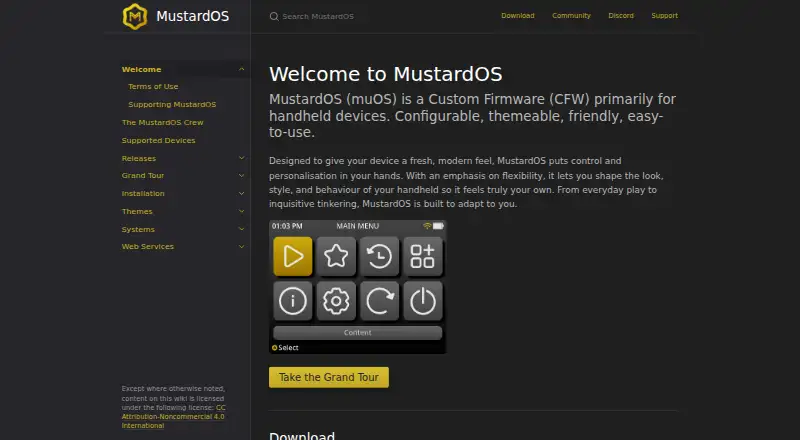
MustardOS, also called muOS, is open-source custom firmware with a configurable, themeable frontend for selected retro handhelds. It is aimed at owners of supported Anbernic and TrimUI devices who want game browsing, emulator launching, controller navigation, and device controls in one portable interface. The supported hardware includes specified RG28XX, RG34XX, RG35XX, RG40XX, RGCUBEXX, TrimUI Brick, and TrimUI Smart Pro models.
Its main strength is breadth within the handheld frontend category. MustardOS can browse game content across SD1, SD2, and USB storage, organize collections, show recently played history, and launch bundled emulator cores and applications including RetroArch, PPSSPP, and ScummVM. PortMaster support adds compatible ports, while device configuration covers connectivity, power, storage, overlays, and interface behavior. Controller hotkeys support navigation, save states, screenshots, and system actions, and backup and restore archives help manage device data.
Installation centers on SD-card images for supported hardware, followed by updates distributed for those devices. That approach suits owners comfortable managing handheld firmware and storage, but the product's value depends on matching the supported model list before installation. MustardOS is a strong pick for users who want a free, open-source frontend with bundled emulators, storage browsing, collections, backups, and device configuration. It is less suitable for owners of unsupported handhelds or anyone who specifically needs built-in scraping. Users seeking a narrow, model-agnostic frontend should consider an alternative with broader hardware coverage.
Your product? Our editors can test MustardOS in depth and publish a review, labelled as paid · from $149/mo →
MustardOS pricing
MustardOS fact sheet
| Free plan | Yes |
|---|---|
| Paid from | Free |
| Supported platforms | Anbernic RG28XX H, RG34XX H, RG34XX SP, RG35XX 2024, RG35XX H, RG35XX PLUS, RG35XX PRO, RG35XX SP, RG40XX H, RG40XX V, RGCUBEXX; TrimUI Brick and Smart Pro |
| Emulators included | Yes |
| Library import | Not verified |
| Metadata scraping | Not verified |
| Controller navigation | Yes |
| Portable mode | Yes |
| Cloud sync | Not verified |
| Deployment | Self-hosted |
| Support | Community, Docs |
| Built for | Solo, Small business (editorial estimate) |
| Pricing | Free plan |
| Website | muos.dev |
| Facts checked | 22 Sep 2026 |
Alternatives to MustardOS
- ES-DE FrontendA capable free desktop frontend for organizing and launching broad game collections.9.3
- LaunchBoxA flexible storefront and emulator library with free core features and one-time premium licenses.9.2
- RetroArchA broad, free frontend for organizing and running emulation across desktop, mobile, and web.9.1


See all MustardOS alternatives →
Used MustardOS? Be the first to review it
The editor score above is our own research. What this page doesn't have yet is a reader's view — what you used MustardOS for, what worked and what didn't. No stars are seeded and no review is paid for; an editor reads every one before it appears.
Write a reviewTwo minutes · verified accounts only · read by an editor before it appears
Featured on iTechGuides

MustardOS is listed in our Emulation Frontends directory. Add the badge to your site — it links back to this page.
<a href="https://www.itechguides.com/products/mustardos/"><img src="https://www.itechguides.com/best/badge/mustardos.svg" alt="Featured on iTechGuides" width="230" height="46"></a>
Reviewed by iTechGuides Editors · Editorial team · Updated Oct 2026
Advertiser disclosure: iTechGuides is reader-supported. Vendors can pay for top positions in our rankings and for a place on other products' pages, and we may earn a commission when you click some links. Bought places stand at the number bought; this page and our disclosure say so. Paying vendors may get a fuller, more detailed review from our editors, and that review can change their score. How we rank.
Last updated · How we research and update