
MultiMC
MultiMC: MultiMC keeps Minecraft instances separate, with per-instance Java settings and modpack imports. Ranked #13 of 74 in Minecraft Launchers by our editors (6.0/10); pricing: Free; best for players managing separate Minecraft setups.
At a glance
- Editor score6.0 / 10
- PricingFree
- Best forPlayers managing separate Minecraft setups
- Free planYes
- Paid fromNone
- Founded2013
- Facts checked19 Sep 2026
Where it wins
- Keeps mods, saves, settings, and Java options in isolated instances
- Installs Forge, Fabric, Quilt, and LiteLoader
- Imports modpacks and supports instance import and export
Where it doesn't
- Desktop support is limited to Windows, macOS, and Linux
- Modpack imports are limited to supported platforms and formats
- Its focus is instance management rather than built-in modpack discovery
Our verdict on MultiMC
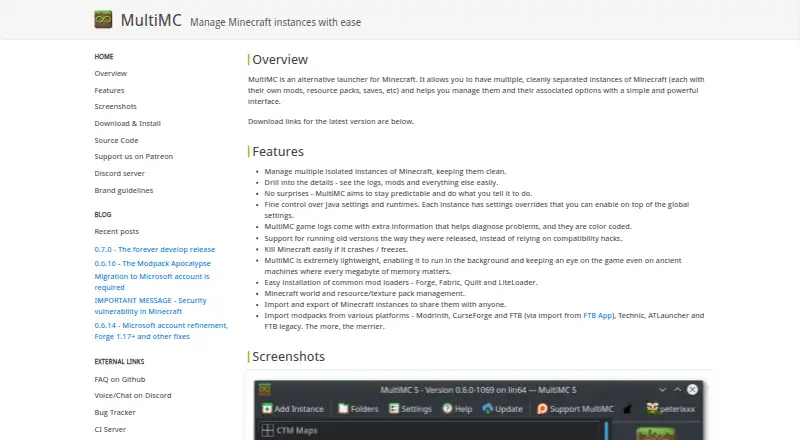
Players who want separate, independently configured Minecraft setups may find MultiMC a focused fit. This free, open-source desktop launcher manages isolated instances, each with its own mods, resource packs, saves, settings, and Java options. It runs on Windows, macOS, and Linux, and supports installing Forge, Fabric, Quilt, and LiteLoader. Instance import and export, world management, and color-coded logs with crash handling add tools for keeping different game setups distinct.
MultiMC’s instance workflow is its main strength: Java settings and runtime options can be configured per instance, and players can manage worlds and resource or texture packs without treating every setup as one shared configuration. The launcher also offers update-channel selection and update checks. For players who regularly switch between differently configured instances, this combination is more relevant than a launcher centered on a single default setup. Those who want one simple configuration may not need this degree of separation.
Modpack imports connect MultiMC to Modrinth and supported platforms, with support for .mrpack files and FTB App modpacks. Integrations include Modrinth, FTB App, Technic, ATLauncher, and CurseForge. The import support is useful for players bringing existing packs into separate instances, though it depends on supported platforms and formats. Choose MultiMC if isolated instance management, Java controls, and pack handling are priorities; consider another launcher if your priority is a different workflow rather than managing distinct setups.
MultiMC pricing
MultiMC fact sheet
| Free plan | Yes |
|---|---|
| Paid from | None |
| Desktop OS support | Not verified |
| Separate instances | Yes |
| Modpack import | Both |
| Mod loader support | Multiple |
| Java runtime management | Yes |
| Built-in modpack catalog | Yes |
| Automatic updates | Yes |
| Deployment | Desktop |
| Platforms | Windows, macOS, Linux |
| Integrations | 5 integrations: Modrinth, FTB App, Technic, ATLauncher, CurseForge |
| Pricing | Free |
| Website | multimc.org |
| Facts checked | 19 Sep 2026 |
MultiMC integrations
MultiMC lists 5 integrations on its own site.
- Modrinth
- FTB App
- Technic
- ATLauncher
- CurseForge
Alternatives to MultiMC
- Prism LauncherA free, open-source launcher for organizing isolated Minecraft instances and modpacks.9.0
- RefractA broad, free launcher for players moving libraries and modpacks from other launchers.8.2
- Spectra LauncherA free, open-source launcher with strong instance, mod, and modpack workflows.7.7


See all MultiMC alternatives →
Also listed in
Used MultiMC? Be the first to review it
The editor score above is our own research. What this page doesn't have yet is a reader's view — what you used MultiMC for, what worked and what didn't. No stars are seeded and no review is paid for; an editor reads every one before it appears.
Write a reviewTwo minutes · verified accounts only · read by an editor before it appears
Featured on iTechGuides

MultiMC is listed in our Minecraft Launchers directory. Add the badge to your site — it links back to this page.
<a href="https://www.itechguides.com/products/multimc/"><img src="https://www.itechguides.com/best/badge/multimc.svg" alt="Featured on iTechGuides" width="230" height="46"></a>
Guides on minecraft launchers
- Which Minecraft Launchers Are Safe? Official, Prism, Modrinth, and CurseForge ComparedAug 2026
- What Is the Best Minecraft Launcher for High FPS? Lunar vs. PrismAug 2026
- What Is the Safest Cracked Minecraft Launcher? None Is Safe Enough to RecommendAug 2026
Reviewed by iTechGuides Editors · Editorial team · Updated Sep 2026
Advertiser disclosure: iTechGuides is reader-supported. We may earn a commission when you click some links. How we rank.
Last updated · How we research and update