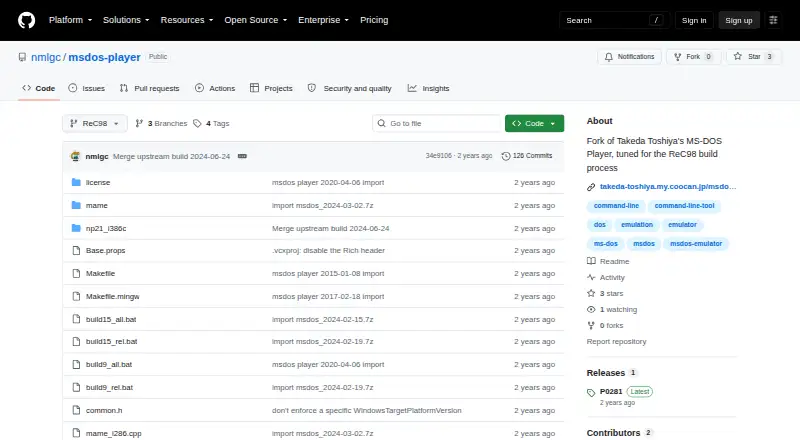
MS-DOS Player
MS-DOS Player: A focused, open-source choice for running DOS command-line tools on Windows. Ranked #16 of 26 in MS-DOS Emulators by our editors (5.8/10); pricing: Free plan; best for running 16-bit DOS commands on Windows.
At a glance
- Editor score5.8 / 10
- PricingFree plan
- Best forRunning 16-bit DOS commands on Windows
- Free planYes
- Paid fromNone
- Supported host platformsWindows
- Facts checked20 Sep 2026
Where it wins
- Supports multiple emulated CPU generations, from 8086 through Pentium 4
- Provides XMS, LIM EMS, DOS version, and Windows version emulation
- Converts command files into standalone 32-bit or 64-bit executables
Where it doesn't
- Windows-only platform support limits cross-platform use
- Does not target game software or implement graphics and sound hardware
- Gamepad support is not provided
Our verdict on MS-DOS Player
MS-DOS Player is a free, open-source Win32-x64 console emulator for running 16-bit MS-DOS-compatible commands on Windows. It is aimed at people who need to run command-line utilities such as compilers, assemblers, debuggers, text editors, and file converters without using a virtual machine. Direct access to host Windows file paths and inherited environment variables makes it suited to workflows that need DOS tools to interact with the Windows environment.
Its strongest capability is breadth within command-line emulation. MS-DOS Player can emulate the 8086, 80286, 80386, 80486, Pentium 4, V30, and IA32 CPU models, while selectable DOS and Windows version responses help accommodate software expecting particular system versions. XMS and LIM EMS memory emulation extend compatibility for older programs, and virtual serial ports can map to host COM ports. The optional internal debugger, accessible through telnet, adds a useful diagnostic path for technical users. Command files can also be converted into standalone 32-bit or 64-bit executables.
The product stays deliberately focused on console workloads rather than presenting a complete retro-computing or gaming environment. It provides basic IBM PC-like hardware and mouse emulation, but it does not implement graphics or sound hardware and does not target game software. Gamepad support is not provided, making it a poor fit for users seeking a DOS game emulator with broader multimedia or controller features. Choose MS-DOS Player when Windows-based access to legacy DOS commands, memory behavior, CPU variants, serial I/O, and debugging matters most; choose another category option when graphics, sound, gamepads, or a broader virtual machine experience are central requirements.
MS-DOS Player pricing
MS-DOS Player fact sheet
| Free plan | Yes |
|---|---|
| Paid from | None |
| Supported host platforms | Windows |
| DOS target versions | Ms-dos |
| Disk image formats | Not verified |
| Gamepad support | No |
| Save states | Not verified |
| Audio CD support | Not verified |
| Source available | Yes |
| Deployment | Desktop |
| Platforms | Windows |
| Built for | Solo, Small business (editorial estimate) |
| Pricing | Free plan |
| Website | github.com |
| Facts checked | 20 Sep 2026 |
Alternatives to MS-DOS Player
- DOSBox StagingA capable free emulator for DOS software, games, and Windows 3.1 environments.9.0
- DOSBox PureA focused, free DOS emulator with convenient archive loading and Libretro support.8.8
- DOSBox-XA free, highly configurable choice for advanced DOS and legacy Windows emulation.7.7


See all MS-DOS Player alternatives →
Used MS-DOS Player? Be the first to review it
The editor score above is our own research. What this page doesn't have yet is a reader's view — what you used MS-DOS Player for, what worked and what didn't. No stars are seeded and no review is paid for; an editor reads every one before it appears.
Write a reviewTwo minutes · verified accounts only · read by an editor before it appears
Featured on iTechGuides

MS-DOS Player is listed in our MS-DOS Emulators directory. Add the badge to your site — it links back to this page.
<a href="https://www.itechguides.com/products/ms-dos-player/"><img src="https://www.itechguides.com/best/badge/ms-dos-player.svg" alt="Featured on iTechGuides" width="230" height="46"></a>
Reviewed by iTechGuides Editors · Editorial team · Updated Sep 2026
Advertiser disclosure: iTechGuides is reader-supported. We may earn a commission when you click some links. How we rank.
Last updated · How we research and update