
Moom
Moom: Moom saves window layouts and adds customizable controls for moving and resizing on Mac. Ranked #24 of 65 in Window Management Software by our editors (7.0/10); pricing: Paid; best for mac users wanting saved layouts and window actions.
At a glance
- Editor score7.0 / 10
- PricingPaid
- Best forMac users wanting saved layouts and window actions
- Free planNo
- Paid from$15 one-time
- Layout presetsYes
- Facts checked19 Sep 2026
Where it wins
- Save app-specific layouts and layouts spanning recently used windows.
- Choose palette, Hover, Snap, and keyboard-based window controls.
- Organize custom actions into folders, chains, and per-window loops.
Where it doesn't
- It requires macOS 10.13 High Sierra or newer.
- Managing windows requires Accessibility permission.
- There is no free plan; the one-time purchase is $15.
Our verdict on Moom
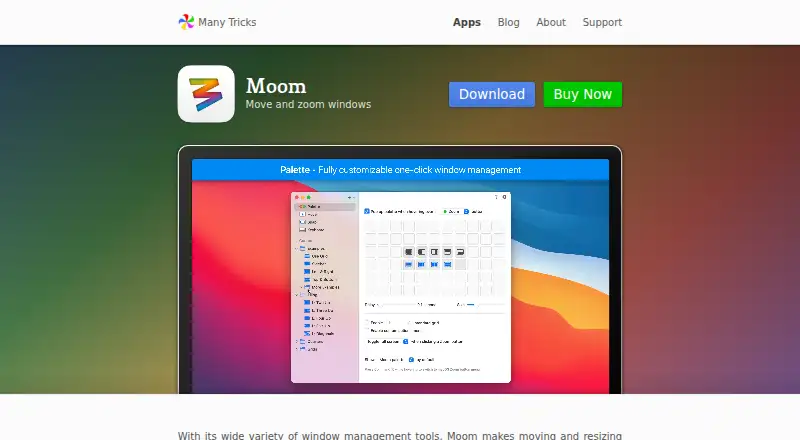
Moom is a macOS utility for moving, resizing, snapping, and organizing application windows. It is aimed at Mac users who want repeatable layouts and several ways to control windows, from a customizable pop-up palette to hover actions and keyboard shortcuts. Saved layouts can target an app's windows or recently used windows across applications, making the product relevant to people who regularly arrange the same workspaces. It requires macOS 10.13 High Sierra or newer and Accessibility permission to manage windows.
Its notable strength is the combination of layout recall and configurable actions. Snap zones and layout-based drop zones provide ways to place windows, while users can move windows between displays and arrange actions in custom folders. Chained actions and per-window loops add structure for users who want a set of window operations to run together. AppleScript support extends layouts and actions into scriptable workflows; buyers looking for a window utility with this kind of customization may find Moom a better fit than a tool focused only on basic snapping. That breadth also means it suits users who are comfortable shaping their own actions more than those seeking a narrowly defined, minimal control.
According to the published plan, Moom costs $15 as a one-time purchase, and its license is valid forever. The purchase includes at least one year of updates, and a free trial is available; the vendor notes that paid updates may be optional after the included update period. There is no free plan. Moom makes sense for Mac users who expect to reuse layouts or value configurable actions and AppleScript support. Those who need a free option, use a platform other than macOS, or do not want to grant Accessibility permission should look elsewhere.
Your product? Our editors can test Moom in depth and publish a review, labelled as paid · from $149/mo →
Moom pricing
Moom fact sheet
| Free plan | No |
|---|---|
| Paid from | $15 one-time |
| Platforms | macos |
| Maximum displays | Not verified |
| Layout presets | Yes |
| Application rules | Yes |
| Window grouping | Yes |
| Virtual desktop controls | No |
| Deployment | Desktop |
| Platforms | macOS |
| Integrations | 1 integrations: AppleScript |
| Pricing | Paid (source) |
| Website | manytricks.com |
| Facts checked | 19 Sep 2026 |
Moom integrations
Moom lists 1 integrations on its own site.
- AppleScript
Alternatives to Moom
- i3A configurable X11 window manager for Linux users who want precise tiling and workspace control.9.4
- SwayA free, open-source Wayland compositor for configurable window layouts and i3 users.9.3
- HyprlandA flexible Linux building block for users who want to configure their own desktop.9.2



Used Moom? Be the first to review it
The editor score above is our own research. What this page doesn't have yet is a reader's view — what you used Moom for, what worked and what didn't. No stars are seeded and no review is paid for; an editor reads every one before it appears.
Write a reviewTwo minutes · verified accounts only · read by an editor before it appears
Featured on iTechGuides

Moom is listed in our Window Management Software directory. Add the badge to your site — it links back to this page.
<a href="https://www.itechguides.com/products/moom/"><img src="https://www.itechguides.com/best/badge/moom.svg" alt="Featured on iTechGuides" width="230" height="46"></a>
Reviewed by iTechGuides Editors · Editorial team · Updated Oct 2026
Advertiser disclosure: iTechGuides is reader-supported. Vendors can pay for top positions in our rankings and for a place on other products' pages, and we may earn a commission when you click some links. Bought places stand at the number bought; this page and our disclosure say so. Paying vendors may get a fuller, more detailed review from our editors, and that review can change their score. How we rank.
Last updated · How we research and update