Mole (Windows)
Mole (Windows): A Windows cleanup toolkit, not screen magnifier software. Ranked #18 of 18 in Screen Magnifier Software by our editors (6.2/10); pricing: Free plan; best for windows users cleaning software, not magnifying screens.
At a glance
- Editor score6.2 / 10
- PricingFree plan
- Best forWindows users cleaning software, not magnifying screens
- Free planYes
- Paid fromNone
- Facts checked23 Sep 2026
Where it wins
- Removes apps with related files and settings
- Includes temporary-file cleanup and disk usage analysis
- Open-source toolkit with system status and build-artifact tools
Where it doesn't
- Does not list screen magnification features
- Windows edition is marked experimental and not mature
- Command-line interface may not suit users seeking a graphical tool
Our verdict on Mole (Windows)
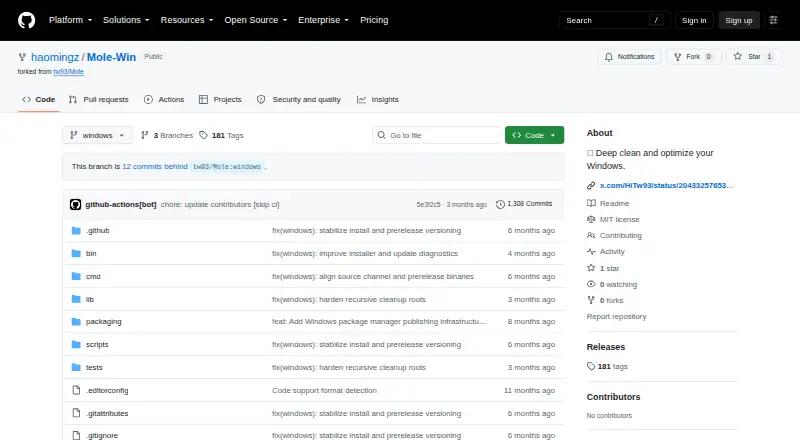
Mole is an open-source command-line toolkit for Windows cleanup and system maintenance, aimed at solo users who want to remove applications and clear files rather than magnify on-screen content. Its app removal flow presents installed apps for selection and removes related files and settings, while separate tools cover temporary files, caches, disk usage, and project build artifacts. The distinction matters for this category: Mole does not list screen magnification features, so it is a poor fit for someone seeking software to enlarge screen content. Its stated Windows target is Windows 10 and 11, and its maintainers mark the Windows edition experimental and not mature.
The feature set centers on maintenance rather than accessibility. App removal can address associated AppData, caches, preferences, logs, registry entries, extensions, and plugins. Other documented tools include a live system status dashboard, optimization of selected Windows services, and cleanup of project build artifacts. That breadth may appeal to a Windows user who prefers a single command-line toolkit for these tasks; it does not change the absence of the category's core function. Choose a screen magnifier instead if enlarging text or interface elements is the goal.
Mole is free and open source, with self-hosted deployment and community support. Those characteristics suit users comfortable evaluating an experimental project and relying on community channels, rather than buyers looking for a mature magnification product. The repository's Windows support is specifically stated for Windows 10 and 11. Overall, Mole is relevant to cleanup and system maintenance, not screen magnification: consider it only if those maintenance tasks are your actual need, and choose another product for magnifying the display.
Your product? Our editors can test Mole (Windows) in depth and publish a review, labelled as paid · from $99/mo →
Mole (Windows) pricing
Mole (Windows) fact sheet
| Free plan | Yes |
|---|---|
| Paid from | None |
| Magnification modes | Not verified |
| Speech support | Not verified |
| Maximum magnification | Not verified |
| Supported platforms | Not verified |
| Screen reader compatibility | Not verified |
| Color adjustments | Not verified |
| Deployment | Self-hosted |
| Platforms | Windows |
| Support | Community |
| Built for | Solo (editorial estimate) |
| Pricing | Free plan |
| Website | github.com |
| Facts checked | 23 Sep 2026 |
Alternatives to Mole (Windows)
- Apple ZoomA free Apple accessibility feature with flexible Mac zoom modes and VoiceOver compatibility.9.2
- FusionCombines ZoomText magnification with JAWS screen reading for Windows users.9.0
- MAGicMAGic pairs adjustable Windows magnification with speech and screen-reading tools.8.8
See all Mole (Windows) alternatives →
Used Mole (Windows)? Be the first to review it
The editor score above is our own research. What this page doesn't have yet is a reader's view — what you used Mole (Windows) for, what worked and what didn't. No stars are seeded and no review is paid for; an editor reads every one before it appears.
Write a reviewTwo minutes · verified accounts only · read by an editor before it appears
Featured on iTechGuides

Mole (Windows) is listed in our Screen Magnifier Software directory. Add the badge to your site — it links back to this page.
<a href="https://www.itechguides.com/products/mole-windows/"><img src="https://www.itechguides.com/best/badge/mole-windows.svg" alt="Featured on iTechGuides" width="230" height="46"></a>
Reviewed by iTechGuides Editors · Editorial team · Updated Oct 2026
Advertiser disclosure: iTechGuides is reader-supported. Vendors can pay for top positions in our rankings and for a place on other products' pages, and we may earn a commission when you click some links. How we rank.
Last updated · How we research and update