MLightCAD Viewer
MLightCAD Viewer: A capable open-source browser viewer for measuring, marking up, and editing CAD drawings. Ranked #18 of 32 in CAD Viewer Software by our editors (7.1/10); pricing: Open source; best for open-source browser-based markup and measurement.
At a glance
- Editor score7.1 / 10
- PricingOpen source
- Best forOpen-source browser-based markup and measurement
- Paid fromFree
- Measurement toolsYes
- Facts checked22 Sep 2026
Where it wins
- Opens DWG and DXF files with client-side parsing and rendering
- Combines measurement, markup, and drawing-entity editing tools
- Exports drawings as self-contained offline HTML files
Where it doesn't
- Web-only access may not suit users seeking a native desktop application
- Markup exchange relies on JSON sidecar files
- Offline sharing centers on HTML export rather than a broader export set
Our verdict on MLightCAD Viewer
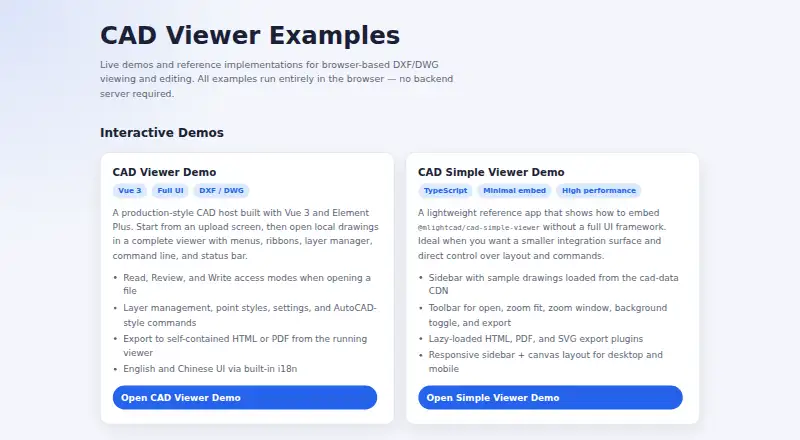
MLightCAD Viewer is an open-source, browser-based CAD viewer and editor for people who need to inspect, measure, annotate, or make direct changes to DWG and DXF drawings. It runs parsing and rendering in the browser without a backend service, while supporting desktop, tablet, and mobile interfaces. The feature set is aimed at drawing review and light editing rather than a broad, full CAD production workflow, making it a practical fit for users who want an accessible web tool for technical files.
Its strongest area is the combination of measurement and markup. Users can measure distance, area, angle, coordinates, and arc length, then add arrows, text, clouds, shapes, and callouts. Markups can be imported or exported through JSON sidecar files, which gives review annotations a defined exchange format. Layer management and switching between model space and paper space add useful navigation for drawings with multiple presentation contexts. Direct creation, editing, and deletion of drawing entities extends the product beyond a read-only viewer.
The browser-first design also shapes where MLightCAD Viewer fits. Self-contained offline HTML export supports sharing a portable view, and the product can be embedded into other web applications. At the same time, users who require a native desktop workflow or a more expansive CAD authoring environment should look elsewhere. Choose MLightCAD Viewer for open-source DWG/DXF review, measurement, markup, and focused entity editing across responsive web devices; choose an alternative when native-app workflows or broader CAD production capabilities are the priority.
Your product? Our editors can test MLightCAD Viewer in depth and publish a review, labelled as paid · from $149/mo →
MLightCAD Viewer pricing
MLightCAD Viewer fact sheet
| Free plan | Not verified |
|---|---|
| Paid from | Free |
| DWG support | Yes |
| Measurement tools | Yes |
| Markup and annotation | Yes |
| Sharing and collaboration | Yes |
| Platforms | Cross_platform |
| DXF support | Yes |
| Deployment | Cloud |
| Platforms | Web |
| Support | Community, Docs |
| Built for | Solo, Small business, Mid-market, Enterprise (editorial estimate) |
| Pricing | Open source |
| Website | mlightcad.com |
| Facts checked | 22 Sep 2026 |
Alternatives to MLightCAD Viewer
- Autodesk ViewerA capable free viewer for browser-based design review, measurement, markup, and sharing.9.2
- Autodesk Design ReviewA mature free Windows viewer for design review, comparison, measurement, and markups.9.0
- Autodesk DWG TrueViewA capable free Windows viewer for DWG and DXF files, with measurement and conversion tools.8.8


See all MLightCAD Viewer alternatives →
Used MLightCAD Viewer? Be the first to review it
The editor score above is our own research. What this page doesn't have yet is a reader's view — what you used MLightCAD Viewer for, what worked and what didn't. No stars are seeded and no review is paid for; an editor reads every one before it appears.
Write a reviewTwo minutes · verified accounts only · read by an editor before it appears
Featured on iTechGuides

MLightCAD Viewer is listed in our CAD Viewer Software directory. Add the badge to your site — it links back to this page.
<a href="https://www.itechguides.com/products/mlightcad-viewer/"><img src="https://www.itechguides.com/best/badge/mlightcad-viewer.svg" alt="Featured on iTechGuides" width="230" height="46"></a>
Reviewed by iTechGuides Editors · Editorial team · Updated Oct 2026
Advertiser disclosure: iTechGuides is reader-supported. Vendors can pay for top positions in our rankings and for a place on other products' pages, and we may earn a commission when you click some links. Bought places stand at the number bought; this page and our disclosure say so. Paying vendors may get a fuller, more detailed review from our editors, and that review can change their score. How we rank.
Last updated · How we research and update