MinimalPDF Compress
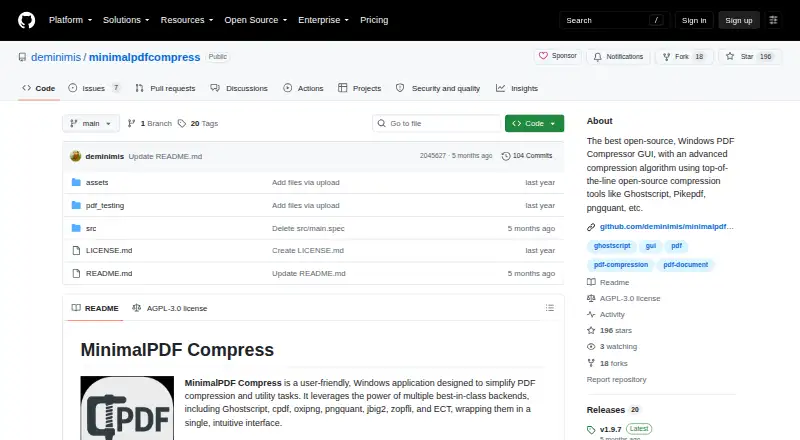
MinimalPDF Compress: A local Windows PDF utility with compression modes, PDF/A conversion, and broad file-management tools. Ranked #13 of 36 in PDF Compression Software by our editors (8.0/10); pricing: Free plan; best for windows users wanting free local PDF utilities.
At a glance
- Editor score8.0 / 10
- PricingFree plan
- Best forWindows users wanting free local PDF utilities
- Free planYes
- Paid fromFree
- Compression modesLossless
- Facts checked19 Sep 2026
Where it wins
- Configurable image DPI supports targeted lossy compression.
- Local processing keeps PDF files on the Windows computer.
- Compression sits alongside merging, repair, metadata, and page tools.
Where it doesn't
- Windows is the only supported platform.
- The lossless mode is still being worked on and is not truly lossless.
- There is no API access for automated or server-based workflows.
Our verdict on MinimalPDF Compress
MinimalPDF Compress is a free, open-source Windows desktop application for reducing PDF file sizes and managing related document tasks. It suits individuals and teams that want local processing rather than sending files over the internet, especially when compression is only one part of a broader PDF workflow. Its portable executable and ZIP releases also fit users who prefer a desktop utility that can run without a conventional installation process.
Compression is organized around several practical modes: lossy compression with configurable image DPI, lossless-style optimization, PDF/A-2b conversion, and image removal. The lossy controls are useful when visual quality and file size need to be balanced, while PDF/A conversion targets document archiving requirements. The lossless mode deserves a careful qualification: it is still being worked on and is not truly lossless. For users who require exact preservation, that limitation may be decisive. The project also connects with Ghostscript, cpdf, oxipng, pngquant, jbig2, zopfli, ECT, and pikepdf.
Its broader utility set is a significant reason to choose it over a compression-only tool. MinimalPDF Compress can merge, split, rotate, and delete pages; create watermarks and headers or footers; strip or edit metadata; convert PDFs to images; repair PDFs; and add or remove password protection. Batch compression is supported, but there is no API access, so it is better suited to local desktop work than unattended pipeline automation. Choose it for free, offline Windows PDF processing with many built-in utilities. Choose an alternative if you need macOS or Linux support, API-driven workflows, or a lossless mode with exact lossless guarantees.
Your product? Our editors can test MinimalPDF Compress in depth and publish a review, labelled as paid · from $149/mo →
MinimalPDF Compress pricing
MinimalPDF Compress fact sheet
| Free plan | Yes |
|---|---|
| Paid from | Free |
| Compression modes | Lossless |
| Maximum file size | Not verified |
| Batch compression | Yes |
| Offline desktop app | Yes |
| API access | No |
| Supported platforms | windows |
| Deployment | Desktop |
| Platforms | Windows |
| Integrations | 8 integrations: Ghostscript, cpdf, oxipng, pngquant, jbig2, zopfli … |
| Pricing | Free plan |
| Website | github.com |
| Facts checked | 19 Sep 2026 |
MinimalPDF Compress integrations
MinimalPDF Compress lists 8 integrations on its own site.
- Ghostscript
- cpdf
- oxipng
- pngquant
- jbig2
- zopfli
- ECT
- pikepdf
Alternatives to MinimalPDF Compress
- BentoPDF Hyper CompressA flexible compression engine with private processing and developer-focused interfaces.9.3
- iText pdfOptimizerA developer-focused PDF optimizer with detailed controls, automation, and flexible licensing.9.1
- PDFOptimA flexible PDF compressor with previews, batch processing, and cross-platform coverage.9.0


See all MinimalPDF Compress alternatives →
Also Ranked In
MinimalPDF Compress is ranked in 2 of our directories.
Used MinimalPDF Compress? Be the first to review it
The editor score above is our own research. What this page doesn't have yet is a reader's view — what you used MinimalPDF Compress for, what worked and what didn't. No stars are seeded and no review is paid for; an editor reads every one before it appears.
Write a reviewTwo minutes · verified accounts only · read by an editor before it appears
Featured on iTechGuides

MinimalPDF Compress is listed in our PDF Compression Software directory. Add the badge to your site — it links back to this page.
<a href="https://www.itechguides.com/products/minimalpdf-compress/"><img src="https://www.itechguides.com/best/badge/minimalpdf-compress.svg" alt="Featured on iTechGuides" width="230" height="46"></a>
Reviewed by iTechGuides Editors · Editorial team · Updated Oct 2026
Advertiser disclosure: iTechGuides is reader-supported. Vendors can pay for top positions in our rankings and for a place on other products' pages, and we may earn a commission when you click some links. Bought places stand at the number bought; this page and our disclosure say so. Paying vendors may get a fuller, more detailed review from our editors, and that review can change their score. How we rank.
Last updated · How we research and update