Milo
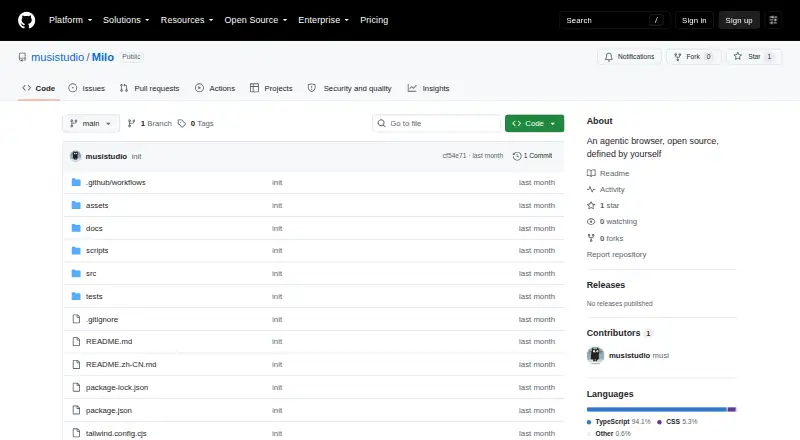
Milo: A customizable browser workspace for page-aware automation across desktop platforms. Ranked #18 of 23 in AI Browsers by our editors (7.3/10); pricing: Open source; best for people who want customizable browser workspaces.
At a glance
- Editor score7.3 / 10
- PricingOpen source
- Best forPeople who want customizable browser workspaces
- Paid fromFree
- Browser agentYes
- Facts checked19 Sep 2026
Where it wins
- Agents support long-running browser tasks and page-aware automation.
- Workspaces draw context from tabs, bookmarks, downloads, and page state.
- Widgets, user scripts, profiles, and selected Chrome extensions add flexibility.
Where it doesn't
- Chrome-extension compatibility is limited to selected extensions.
- The project is early-stage, with version 0.1.0 and no releases shown.
- Its verified AI research feature set is limited.
Our verdict on Milo
Milo is an open-source desktop browser for people who want to organize web work and automate multi-step browser tasks. Its agent workspace is designed for long-running tasks, while an AI sidebar can inspect pages and automate actions with page context. Workspaces can use tabs, bookmarks, downloads, and page state as context. Alongside those AI features, Milo includes translation, split views, passkeys, downloads, and workspace profiles, making it relevant to users who want browsing and workflow tools in one customizable desktop environment. It supports macOS, Windows, and Linux.
Customization and ecosystem fit are central to the product. Users can shape the start page with widgets, embeds, notes, and shortcuts, and author user scripts to augment web pages. Local widget packages use milo:// and widget:// protocols. Milo can import browsing history and bookmarks from Chromium-based browsers and offers compatibility with selected Chrome extensions. The project is built as an Electron desktop application and supports configurable OpenAI-compatible providers for agents, translation, and learning. These options suit people who want to adjust their browser workspace and connect AI features to compatible providers; users who depend on a specific extension should check whether it is among those supported.
The project is at an early stage, with version 0.1.0 and no releases shown. That makes Milo a better fit for users willing to work with an evolving open-source browser than for those seeking a mature, established browser workflow. Its standout breadth is in workspace context, agent tasks, scripts, and widgets, while the verified AI research feature set is limited. Choose Milo if those customizable workspace and automation capabilities are your priority. If you need broad extension compatibility, a more mature release history, or extensive AI research features, another browser may be a better match.
Your product? Our editors can test Milo in depth and publish a review, labelled as paid · from $149/mo →
Milo pricing
Milo fact sheet
| Free plan | Not verified |
|---|---|
| Paid from | Free |
| Page summaries | Not verified |
| AI research mode | Not verified |
| Browser agent | Yes |
| Supported platforms | macos, windows, linux |
| Browser engine | Not verified |
| Privacy model | Not verified |
| Deployment | Desktop |
| Platforms | macOS, Windows, Linux |
| Integrations | 2 integrations: OpenAI-compatible providers, Selected Chrome extensions |
| Pricing | Open source |
| Website | github.com |
| Facts checked | 19 Sep 2026 |
Milo integrations
Milo lists 2 integrations on its own site.
- OpenAI-compatible providers
- Selected Chrome extensions
Alternatives to Milo
- Mind BrowserA free desktop browser combining task agents, cited research, and privacy tools.9.4
- Norton NeoAI search and research tools paired with VPN and browser protections, free to download.9.2
- CometA free, cross-device browser that adds Perplexity search and AI help to familiar browsing.9.1



Also Ranked In
Milo is ranked in 2 of our directories.
Used Milo? Be the first to review it
The editor score above is our own research. What this page doesn't have yet is a reader's view — what you used Milo for, what worked and what didn't. No stars are seeded and no review is paid for; an editor reads every one before it appears.
Write a reviewTwo minutes · verified accounts only · read by an editor before it appears
Featured on iTechGuides

Milo is listed in our AI Browsers directory. Add the badge to your site — it links back to this page.
<a href="https://www.itechguides.com/products/milo/"><img src="https://www.itechguides.com/best/badge/milo.svg" alt="Featured on iTechGuides" width="230" height="46"></a>
Reviewed by iTechGuides Editors · Editorial team · Updated Oct 2026
Advertiser disclosure: iTechGuides is reader-supported. Vendors can pay for top positions in our rankings and for a place on other products' pages, and we may earn a commission when you click some links. Bought places stand at the number bought; this page and our disclosure say so. Paying vendors may get a fuller, more detailed review from our editors, and that review can change their score. How we rank.
Last updated · How we research and update