
Microspot DWG Viewer
Microspot DWG Viewer: A private local Mac viewer for reviewing, measuring and annotating DWG and DXF drawings. Ranked #29 of 32 in CAD Viewer Software by our editors (6.0/10); pricing: Paid; best for mac users needing private local DWG viewing.
At a glance
- Editor score6.0 / 10
- PricingPaid
- Best forMac users needing private local DWG viewing
- Free planNo
- Paid from$49/device one-time
- Measurement toolsYes
- Facts checked22 Sep 2026
Where it wins
- Opens DWG, DXF and MacDraft files locally without internet upload
- Includes layers, layouts, model space, measurements and annotations
- Exports annotated drawings as vector PDFs and supports Apple sharing tools
Where it doesn't
- Does not edit or resave DWG files
- Runs on macOS only
- The $49 license uses one serial number per machine
Our verdict on Microspot DWG Viewer
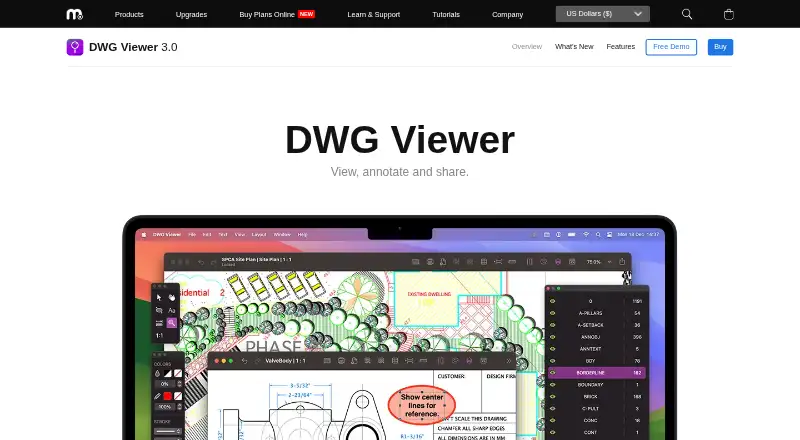
Microspot DWG Viewer is a macOS application for people who need to open, inspect and mark up CAD drawings without sending files to online storage. It supports AutoCAD DWG and DXF files, as well as Microspot MacDraft and annotation files. Viewers can switch between layouts and model space, control drawing-layer visibility, measure distances, and add text or shape annotations. Printing and sharing are also included, making it suited to review workflows rather than full CAD authoring.
The published DWG Viewer 3 plan costs $49 USD as a one-time purchase per device. It includes the macOS application, support for DWG, DXF, MacDraft and annotation files, PDF export, and one serial number per machine. A free demo is available for evaluation, but PDF export and printing are disabled, so the paid plan is the relevant option for complete output and sharing workflows. The pricing structure is straightforward for an individual Mac user who prefers a one-time license instead of a recurring plan.
Privacy and platform fit are central to the product’s scope. Files can be opened locally without internet upload, while Mail, Messages and AirDrop provide Apple sharing options. Annotated drawings can be exported as vector PDFs, which supports document exchange and printing without requiring DWG editing. The boundary is equally clear: Microspot DWG Viewer is intended for viewing and annotation, not editing and resaving DWG files. Choose it for private, local Mac-based drawing review; choose an alternative if you need DWG authoring, broader platform support or collaborative editing.
Your product? Our editors can test Microspot DWG Viewer in depth and publish a review, labelled as paid · from $149/mo →
Microspot DWG Viewer pricing
All 1 Microspot DWG Viewer plans and prices →
Microspot DWG Viewer fact sheet
| Free plan | No |
|---|---|
| Paid from | $49/device one-time |
| DWG support | Yes |
| Measurement tools | Yes |
| Markup and annotation | Yes |
| Sharing and collaboration | Yes |
| Platforms | Desktop |
| DXF support | Yes |
| Deployment | Desktop |
| Platforms | macOS |
| Support | Email, Live chat |
| Built for | Solo, Small business, Mid-market (editorial estimate) |
| Integrations | 3 integrations: Mail, Messages, AirDrop |
| Pricing | Paid (source) |
| Website | microspot.com |
| Facts checked | 22 Sep 2026 |
Microspot DWG Viewer integrations
Microspot DWG Viewer lists 3 integrations on its own site.
- Messages
- AirDrop
Alternatives to Microspot DWG Viewer
- Autodesk ViewerA capable free viewer for browser-based design review, measurement, markup, and sharing.9.2
- Autodesk Design ReviewA mature free Windows viewer for design review, comparison, measurement, and markups.9.0
- Autodesk DWG TrueViewA capable free Windows viewer for DWG and DXF files, with measurement and conversion tools.8.8


See all Microspot DWG Viewer alternatives →
Used Microspot DWG Viewer? Be the first to review it
The editor score above is our own research. What this page doesn't have yet is a reader's view — what you used Microspot DWG Viewer for, what worked and what didn't. No stars are seeded and no review is paid for; an editor reads every one before it appears.
Write a reviewTwo minutes · verified accounts only · read by an editor before it appears
Featured on iTechGuides

Microspot DWG Viewer is listed in our CAD Viewer Software directory. Add the badge to your site — it links back to this page.
<a href="https://www.itechguides.com/products/microspot-dwg-viewer/"><img src="https://www.itechguides.com/best/badge/microspot-dwg-viewer.svg" alt="Featured on iTechGuides" width="230" height="46"></a>
Reviewed by iTechGuides Editors · Editorial team · Updated Oct 2026
Advertiser disclosure: iTechGuides is reader-supported. Vendors can pay for top positions in our rankings and for a place on other products' pages, and we may earn a commission when you click some links. Bought places stand at the number bought; this page and our disclosure say so. Paying vendors may get a fuller, more detailed review from our editors, and that review can change their score. How we rank.
Last updated · How we research and update