
Microsoft Loop
Microsoft Loop: A connected collaborative workspace for teams already working across Microsoft 365. Ranked #31 of 34 in Collaborative Document Software by our editors (5.9/10); pricing: Paid; best for microsoft 365 teams using connected workspaces.
At a glance
- Editor score5.9 / 10
- PricingPaid
- Best forMicrosoft 365 teams using connected workspaces
- Real-time editingYes
- Facts checked22 Sep 2026
Where it wins
- Portable components stay synchronized across Microsoft 365 apps
- Real-time pages support comments, mentions, tasks, and reactions
- Copilot, templates, and slash commands speed up content creation
Where it doesn't
- Guest or external sharing is unsupported
- Some Copilot and organizational features depend on Microsoft 365 licensing
- Loop-specific version-history retention is not stated
Our verdict on Microsoft Loop
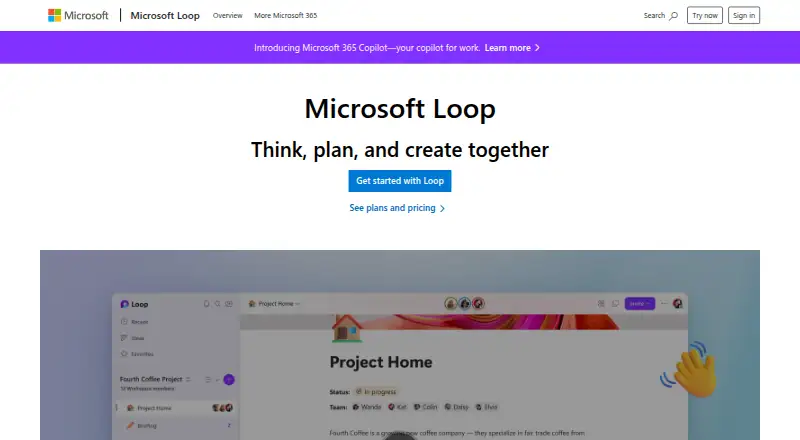
Microsoft Loop is a collaborative workspace application for teams and individuals. It combines shared workspaces, flexible pages, and portable components that can be embedded across Microsoft 365 applications. Users can organize project information, create notes and task lists, collaborate in real time, and add comments, mentions, reactions, and notifications. It suits Microsoft 365 teams that want project information and working content connected in one environment.
Loop’s strongest advantage is its fit within the Microsoft ecosystem. Components can be embedded across Microsoft Teams, Outlook, OneNote, Whiteboard, Word for the web, Planner, To Do, OneDrive, and SharePoint. Task lists synchronize with Microsoft Planner and To Do, while pages can contain links, tasks, data, and other components. The web, Windows, iOS, and Android access options support work across devices, and sensitivity and retention labels add administrative controls for managed environments.
The main constraint is collaboration scope: guest or external sharing is unsupported, so Loop is better suited to teams working within an established Microsoft 365 tenant than to projects involving outside contributors. Copilot-assisted co-creation and summarization, along with some organizational features, depend on Microsoft 365 licensing and storage requirements. Teams already centered on Microsoft 365 should consider Loop for connected workspaces and synchronized content; organizations that need guest collaboration should choose a product designed for external sharing instead.
Your product? Our editors can test Microsoft Loop in depth and publish a review, labelled as paid · from $149/mo →
Microsoft Loop pricing
All 3 Microsoft Loop plans and prices →
Microsoft Loop fact sheet
| Free plan | Not verified |
|---|---|
| Paid from | Not verified |
| Real-time editing | Yes |
| Version history | Not stated |
| Guest access | No |
| Offline access | Not verified |
| Comments | Yes |
| Native app coverage | All |
| Deployment | Cloud, Desktop, Mobile |
| Platforms | Web, Windows, iOS, Android |
| Support | Docs, Community |
| Built for | Small business, Mid-market, Enterprise (editorial estimate) |
| Integrations | 6 integrations: Microsoft Teams, Microsoft Outlook, Microsoft OneNote, Microsoft Whiteboard, Microsoft OneDrive, Microsoft SharePoint |
| Pricing | Paid (source) |
| Website | microsoft.com |
| Facts checked | 22 Sep 2026 |
Microsoft Loop integrations
Microsoft Loop lists 6 integrations on its own site.
- Microsoft Teams
- Microsoft Outlook
- Microsoft OneNote
- Microsoft Whiteboard
- Microsoft OneDrive
- Microsoft SharePoint
Alternatives to Microsoft Loop
- Google DocsA capable collaborative editor with strong permissions, offline access, and Google integrations.9.4
- Zoho WriterA broad collaborative word processor with strong desktop coverage and a free core edition.9.2
- ONLYOFFICE DocsAn open-source, self-hosted office suite with broad editing and collaboration tools.9.1



See all Microsoft Loop alternatives →
Also Ranked In
Microsoft Loop is ranked in 4 of our directories.
Used Microsoft Loop? Be the first to review it
The editor score above is our own research. What this page doesn't have yet is a reader's view — what you used Microsoft Loop for, what worked and what didn't. No stars are seeded and no review is paid for; an editor reads every one before it appears.
Write a reviewTwo minutes · verified accounts only · read by an editor before it appears
Featured on iTechGuides

Microsoft Loop is listed in our Collaborative Document Software directory. Add the badge to your site — it links back to this page.
<a href="https://www.itechguides.com/products/microsoft-loop/"><img src="https://www.itechguides.com/best/badge/microsoft-loop.svg" alt="Featured on iTechGuides" width="230" height="46"></a>
Reviewed by iTechGuides Editors · Editorial team · Updated Oct 2026
Advertiser disclosure: iTechGuides is reader-supported. Vendors can pay for top positions in our rankings and for a place on other products' pages, and we may earn a commission when you click some links. Bought places stand at the number bought; this page and our disclosure say so. Paying vendors may get a fuller, more detailed review from our editors, and that review can change their score. How we rank.
Last updated · How we research and update