Microsoft Dev Box
Microsoft Dev Box: A managed Windows cloud workstation service with broad Azure and Microsoft integration. Ranked #12 of 27 in Cloud Development Environments by our editors (6.4/10); pricing: Paid; best for microsoft teams needing managed Windows workstations.
At a glance
- Editor score6.4 / 10
- PricingPaid
- Best forMicrosoft teams needing managed Windows workstations
- Free planNo
- Workspace configCustom
- Founded1975 · Redmond, Washington, USA
- Facts checked22 Sep 2026
Where it wins
- Self-service workstations with custom compute, storage, networks, and images
- Persistent Azure Premium SSD storage plus reusable image builds
- GPU sessions and access through browser, Windows App, and VS Code tunnels
Where it doesn't
- Paid-only product with no free plan
- Microsoft states Dev Box is in maintenance mode
- Windows-focused workstation model may not fit every development workflow
Our verdict on Microsoft Dev Box
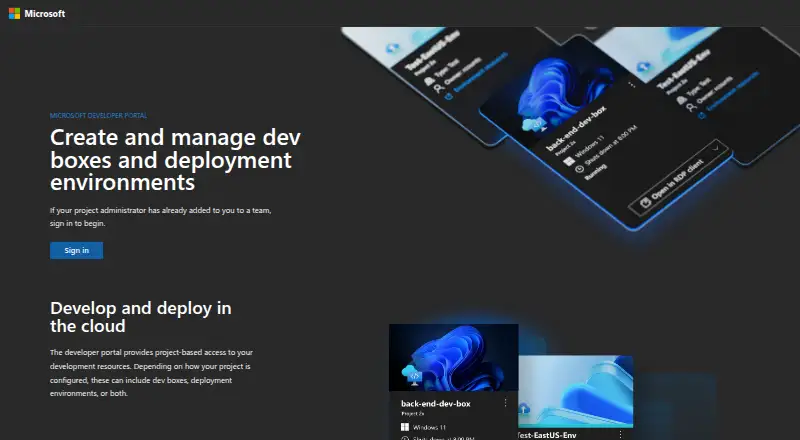
Microsoft Dev Box provides self-service, ready-to-code Windows cloud workstations for development teams. Administrators configure projects, dev box pools, images, compute, storage, networks, and access policies, while developers create separate workstations for projects or workloads. Workstations can include project-specific tools, source code, customizations, and prebuilt binaries. Access is available through Windows App, a web browser, or Visual Studio Code remote tunnels from supported desktop and mobile platforms.
Its strongest fit is the Microsoft development ecosystem. Dev Box integrates with GitHub, Azure DevOps Repos, Azure Compute Gallery, Azure Container Apps, Visual Studio Code, Windows App, Microsoft Entra ID, and Microsoft Intune. Teams can use marketplace, custom, and reusable images, including YAML-based customizations for team environments. Custom compute, storage, and network configuration supports different project requirements, while persistent Azure Premium SSD storage keeps workstation data available across sessions. Serverless GPU sessions extend the offering to AI and data workloads.
The main consideration is product direction. Microsoft states that Dev Box is in maintenance mode, with no additional features planned, and recommends Windows 365 for new virtualized developer-environment scenarios. That makes Dev Box more suitable for teams evaluating an existing Microsoft-centered workstation model than for organizations seeking a product with an expanding feature roadmap. The paid-only model also means it is intended for teams with an allocated budget rather than casual evaluation. Choose Dev Box when self-service Windows workstations, reusable images, custom Azure configuration, and Microsoft identity integrations are central requirements. Consider an alternative when future feature development or a different development-environment model matters more.
Microsoft Dev Box pricing
All 3 Microsoft Dev Box plans and prices →
Microsoft Dev Box fact sheet
| Free plan | No |
|---|---|
| Paid from | Not verified |
| Workspace config | Custom |
| VCS hosts | Multiple |
| Prebuilds | Yes |
| Persistent storage | Yes |
| Self-hosted option | No |
| GPU workspaces | Yes |
| JetBrains support | Not verified |
| Deployment | Cloud, Browser extension |
| Platforms | Web, Windows, macOS, Linux, iOS, Android |
| Support | Docs |
| Built for | Mid-market, Enterprise (editorial estimate) |
| Integrations | 9 integrations: GitHub, Azure Repos, Azure Compute Gallery, Azure Marketplace, Microsoft Intune, Microsoft Entra ID … See all → |
| Pricing | Paid (source) |
| Website | devbox.microsoft.com |
| Facts checked | 22 Sep 2026 |
Microsoft Dev Box integrations
Microsoft Dev Box lists 9 integrations on its own site.
- GitHub
- Azure Repos
- Azure Compute Gallery
- Azure Marketplace
- Microsoft Intune
- Microsoft Entra ID
- Visual Studio Code
- Azure Container Apps
- Azure Blob Storage
See all Microsoft Dev Box integrations →
Alternatives to Microsoft Dev Box
- CoderA flexible self-hosted CDE with Terraform templates, multiple IDEs, and AI workflows.9.8
- GitHub CodespacesA GitHub-native cloud workspace with flexible IDE access and usage-based pricing.8.8
- Eclipse CheA Kubernetes-native, open-source workspace platform for teams managing development environments.7.7


See all Microsoft Dev Box alternatives →
Used Microsoft Dev Box? Be the first to review it
The editor score above is our own research. What this page doesn't have yet is a reader's view — what you used Microsoft Dev Box for, what worked and what didn't. No stars are seeded and no review is paid for; an editor reads every one before it appears.
Write a reviewTwo minutes · verified accounts only · read by an editor before it appears
Featured on iTechGuides

Microsoft Dev Box is listed in our Cloud Development Environments directory. Add the badge to your site — it links back to this page.
<a href="https://www.itechguides.com/products/microsoft-dev-box/"><img src="https://www.itechguides.com/best/badge/microsoft-dev-box.svg" alt="Featured on iTechGuides" width="230" height="46"></a>
Reviewed by iTechGuides Editors · Editorial team · Updated Sep 2026
Advertiser disclosure: iTechGuides is reader-supported. We may earn a commission when you click some links. How we rank.
Last updated · How we research and update