
MergeCam
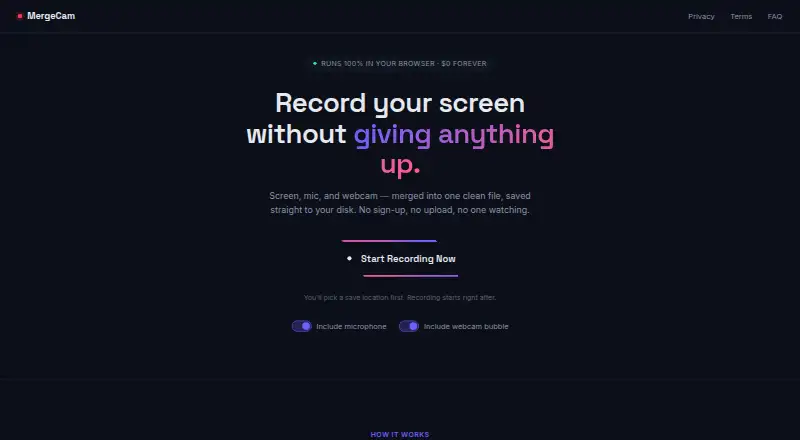
MergeCam: A free, account-free browser recorder for local WebM capture with webcam and audio. Ranked #123 of 131 in Screen Recording Software by our editors (3.0/10); pricing: Free plan; best for private, no-account browser recording.
At a glance
- Editor score3.0 / 10
- PricingFree plan
- Best forPrivate, no-account browser recording
- Free planYes
- Paid fromFree
- Webcam recordingYes
- Facts checked20 Sep 2026
Where it wins
- Records tabs, windows, or entire displays with webcam and audio
- Saves recordings locally without accounts or uploads
- No hard recording time limit and chunked disk writing
Where it doesn't
- Requires recent Chrome or Edge on desktop
- Saves recordings as WebM files only
- Includes no editing, integrations, or AI features
Our verdict on MergeCam
MergeCam is a browser-based screen recorder for people who want to capture a browser tab, window, or entire display without creating an account or uploading recordings. It can combine screen video with optional webcam and microphone input, capture system audio, composite those streams locally in the browser, and save the result directly to the device. Its focus is private, straightforward recording rather than a broader production or collaboration workflow.
The Free plan costs $0 per user and includes no account requirement, screen, microphone, and webcam recording, local saving directly to disk, and no hard recording time limit. Users can choose a disk location, preview the recording immediately after stopping, and save the result as a WebM file. For longer sessions, MergeCam streams data to disk in small chunks, which supports its local-recording approach without adding a paid tier or account-based storage layer.
Platform fit is the main consideration. MergeCam runs on the web but currently requires a recent Chrome or Edge version on desktop, so it is suited to users who are comfortable recording inside a supported browser. It captures browser tabs, windows, or entire displays and includes system audio, microphone input, and webcam overlay support, but the workflow ends with the recorded file: editing, integrations, and AI features are not part of the product. Choose MergeCam for private, local browser recording with minimal account overhead. Choose another screen recorder if you need broader platform coverage, formats beyond WebM, or tools for editing and connected workflows.
Your product? Our editors can test MergeCam in depth and publish a review, labelled as paid · from $149/mo →
MergeCam pricing
All 1 MergeCam plans and prices →
MergeCam fact sheet
| Free plan | Yes |
|---|---|
| Paid from | Free |
| Webcam recording | Yes |
| System audio | Yes |
| Microphone recording | Yes |
| Max recording length | Not verified |
| Maximum video quality | Not verified |
| Supported platforms | web |
| Deployment | Cloud |
| Platforms | Web |
| Built for | Solo, Small business (editorial estimate) |
| Pricing | Free plan (source) |
| Website | mergecam.com |
| Facts checked | 20 Sep 2026 |
Alternatives to MergeCam
- CamtasiaA deep desktop toolkit for training videos, tutorials, and structured learning content.9.3
- ScreenPalA feature-rich choice for budget-conscious creators who need more than basic recording.9.1
- LoomA broad screen recorder for teams that communicate through polished async video.9.0



See all MergeCam alternatives →
Used MergeCam? Be the first to review it
The editor score above is our own research. What this page doesn't have yet is a reader's view — what you used MergeCam for, what worked and what didn't. No stars are seeded and no review is paid for; an editor reads every one before it appears.
Write a reviewTwo minutes · verified accounts only · read by an editor before it appears
Featured on iTechGuides

MergeCam is listed in our Screen Recording Software directory. Add the badge to your site — it links back to this page.
<a href="https://www.itechguides.com/products/mergecam/"><img src="https://www.itechguides.com/best/badge/mergecam.svg" alt="Featured on iTechGuides" width="230" height="46"></a>
Reviewed by iTechGuides Editors · Editorial team · Updated Oct 2026
Advertiser disclosure: iTechGuides is reader-supported. Vendors can pay for top positions in our rankings and for a place on other products' pages, and we may earn a commission when you click some links. Bought places stand at the number bought; this page and our disclosure say so. Paying vendors may get a fuller, more detailed review from our editors, and that review can change their score. How we rank.
Last updated · How we research and update