MenuBarDockX
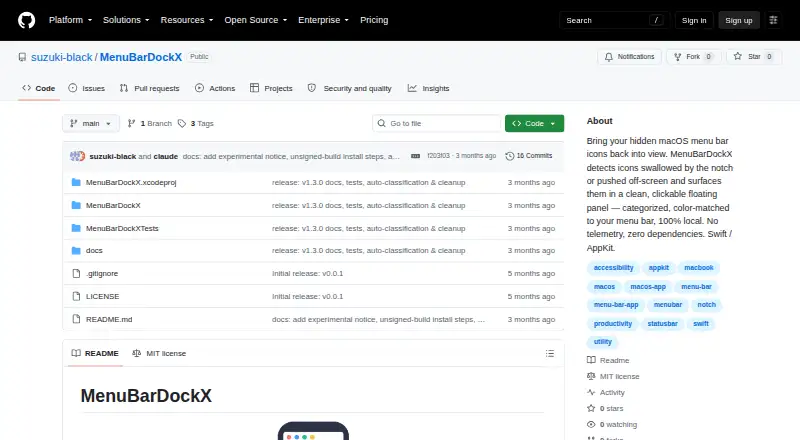
MenuBarDockX: A free, open-source utility for overflow, notch, and off-screen menu bar icons. Ranked #16 of 25 in Menu Bar Customization Software by our editors (7.1/10); pricing: Free plan; best for users with overflow and notch problems.
At a glance
- Editor score7.1 / 10
- PricingFree plan
- Best forUsers with overflow and notch problems
- Free planYes
- Paid fromFree
- Facts checked20 Sep 2026
Where it wins
- Detects overflow, notch, and off-screen menu bar icon problems
- Floating panel supports interaction with recovered icons
- Free, open source, local, and account-free
Where it doesn't
- Supports macOS 14 or later only
- Release builds are unsigned and not notarized
- Experimental, work-in-progress project
Our verdict on MenuBarDockX
MenuBarDockX is a local macOS utility for recovering menu bar icons hidden behind a display notch or pushed off-screen. It is aimed at users who need to access crowded menu bar items without relying on an external service or account. The utility supports Apple Silicon and Intel Macs running macOS 14 or later, and its open-source design operates locally without telemetry, external servers, or third-party dependencies.
Its strongest feature set focuses on recovery and organization. Automatic overflow detection identifies hidden icons, while a floating overflow panel provides a place to interact with them. Notch and off-screen dead-zone detection address two specific macOS menu bar problems. Users can open the panel with a global keyboard shortcut, reorder icons by dragging and dropping, and organize them with category assignments and tabs. MenuBarDockX also samples the menu bar color for panel backgrounds, can launch at login, and uses accessibility-based click forwarding for recovered icon interactions.
The trade-off is project maturity and installation trust. The project is described as experimental and work-in-progress, and release builds are unsigned and not notarized. That makes MenuBarDockX a better fit for users who specifically need overflow or notch recovery and are comfortable with an open-source utility in an early stage. Users who want a broadly established menu bar manager, a more polished release process, or functionality beyond icon recovery and organization should consider an alternative. For the focused problem it addresses, its free local model and combination of detection, panel access, shortcuts, and categorization make it a practical option for compatible Macs.
Your product? Our editors can test MenuBarDockX in depth and publish a review, labelled as paid · from $149/mo →
MenuBarDockX pricing
MenuBarDockX fact sheet
| Free plan | Yes |
|---|---|
| Paid from | Free |
| Hide menu items | Not verified |
| Rearrange items | Yes |
| Group menu items | Yes |
| Custom menu items | Not verified |
| Keyboard shortcuts | Yes |
| Multiple displays | Not verified |
| Notch support | Yes |
| Deployment | Desktop |
| Platforms | macOS |
| Support | Community, Docs |
| Built for | Solo, Small business (editorial estimate) |
| Pricing | Free plan |
| Website | github.com |
| Facts checked | 20 Sep 2026 |
Alternatives to MenuBarDockX
- ThawA free, highly configurable way to organize, hide, and search macOS menu bar items.9.4
- BartenderA broad Mac menu bar toolkit for users who need profiles, triggers, widgets, and layouts.9.2
- SaneBarA capable free option for organizing crowded Mac menu bars.8.9


See all MenuBarDockX alternatives →
Used MenuBarDockX? Be the first to review it
The editor score above is our own research. What this page doesn't have yet is a reader's view — what you used MenuBarDockX for, what worked and what didn't. No stars are seeded and no review is paid for; an editor reads every one before it appears.
Write a reviewTwo minutes · verified accounts only · read by an editor before it appears
Featured on iTechGuides

MenuBarDockX is listed in our Menu Bar Customization Software directory. Add the badge to your site — it links back to this page.
<a href="https://www.itechguides.com/products/menubardockx/"><img src="https://www.itechguides.com/best/badge/menubardockx.svg" alt="Featured on iTechGuides" width="230" height="46"></a>
Reviewed by iTechGuides Editors · Editorial team · Updated Oct 2026
Advertiser disclosure: iTechGuides is reader-supported. Vendors can pay for top positions in our rankings and for a place on other products' pages, and we may earn a commission when you click some links. Bought places stand at the number bought; this page and our disclosure say so. Paying vendors may get a fuller, more detailed review from our editors, and that review can change their score. How we rank.
Last updated · How we research and update