MeetingSidekick
MeetingSidekick: A flexible meeting capture tool with strong core features but limited ecosystem support. Ranked #55 of 81 in AI Meeting Assistants by our editors (6.0/10); pricing: Free plan; best for individuals wanting flexible pay-as-you-go meeting capture.
At a glance
- Editor score6.0 / 10
- PricingFree plan
- Best forIndividuals wanting flexible pay-as-you-go meeting capture
- Free planYes
- Paid from$120/yr
- TranscriptionYes
- Facts checked20 Sep 2026
Where it wins
- Live transcripts, summaries, decisions, and action items
- Bot-free browser capture for virtual and in-person conversations
- Hours packs offer five recording hours without a subscription
Where it doesn't
- No integrations or calendar support
- Pro limits recording to 30 hours per month
- Platform footprint is narrower than meeting assistants with broader ecosystems
Our verdict on MeetingSidekick
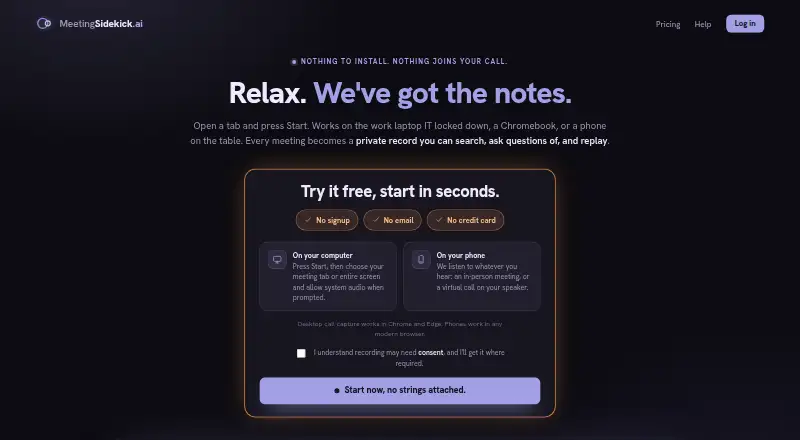
MeetingSidekick is a browser-based AI meeting assistant for individuals capturing virtual and in-person conversations. It records audio through a device, creates live transcripts, summarizes meetings with decisions and action items, and supports transcript questions through a meeting chatbot. Browser-based capture works with shared audio from Zoom, Microsoft Teams, Google Meet, Webex, and other browser-played calls, while phone-based microphone capture supports room meetings, interviews, lectures, and speaker-based calls. It does not require a bot, desktop app, or browser extension.
Its pricing suits buyers who want either a free starting point or usage-based flexibility. The Free plan costs $0 per month and includes live transcription, AI summaries, a meeting chatbot, and email recaps. Pro costs $15 per month or $120 per year, adding 30 hours of recording per month, speaker names on every transcript, search across all meetings, and meeting audio replay. Max costs $50 per month or $400 per year, adding unlimited recording and screenshot chat. An Hours pack costs $9 as a one-time payment for five recording hours, with hours that never expire and no subscription required.
MeetingSidekick’s main strength is focused capture across web and mobile: it supports web, iOS, and Android, with search, saved audio replay on Pro and Max, email recaps, and screenshot chat on Max. The trade-off is a narrower platform footprint: there are no integrations or calendar support. Buyers who primarily need flexible transcription, summaries, and occasional recording should find the plan structure easy to match to their usage. Teams seeking connected scheduling, workflow automation, or a wider integration ecosystem should choose an alternative.
Your product? Our editors can test MeetingSidekick in depth and publish a review, labelled as paid · from $149/mo →
MeetingSidekick pricing
All 4 MeetingSidekick plans and prices →
MeetingSidekick fact sheet
| Free plan | Yes |
|---|---|
| Paid from | $120/yr |
| Transcription | Yes |
| Summaries and action items | Yes |
| Meeting capture | Desktop |
| Meeting platforms | Zoom, Microsoft Teams, Google Meet, Webex |
| Transcription languages | Not verified |
| Calendar integrations | No |
| Deployment | Cloud, Mobile |
| Platforms | Web, iOS, Android |
| Support | Email, Docs |
| Built for | Solo, Small business (editorial estimate) |
| Pricing | Free plan (source) |
| Website | meetingsidekick.ai |
| Facts checked | 20 Sep 2026 |
Alternatives to MeetingSidekick
- FellowA broad meeting assistant combining capture, search, action items, governance, and integrations.9.4
- Fireflies.aiA broad AI meeting assistant for multilingual teams and conversation analysis.9.3
- MeetGeekA broad meeting workspace with a useful free tier and flexible paid plans.9.1



See all MeetingSidekick alternatives →
Used MeetingSidekick? Be the first to review it
The editor score above is our own research. What this page doesn't have yet is a reader's view — what you used MeetingSidekick for, what worked and what didn't. No stars are seeded and no review is paid for; an editor reads every one before it appears.
Write a reviewTwo minutes · verified accounts only · read by an editor before it appears
Featured on iTechGuides

MeetingSidekick is listed in our AI Meeting Assistants directory. Add the badge to your site — it links back to this page.
<a href="https://www.itechguides.com/products/meetingsidekick/"><img src="https://www.itechguides.com/best/badge/meetingsidekick.svg" alt="Featured on iTechGuides" width="230" height="46"></a>
Reviewed by iTechGuides Editors · Editorial team · Updated Oct 2026
Advertiser disclosure: iTechGuides is reader-supported. Vendors can pay for top positions in our rankings and for a place on other products' pages, and we may earn a commission when you click some links. Bought places stand at the number bought; this page and our disclosure say so. Paying vendors may get a fuller, more detailed review from our editors, and that review can change their score. How we rank.
Last updated · How we research and update