
Marta
Marta: A free, keyboard-focused Mac file manager for power users who want depth without bloat. Ranked #55 of 100 in File Manager Software by our editors (3.4/10); pricing: Free plan; best for mac users wanting a free lightweight manager.
At a glance
- Editor score3.4 / 10
- PricingFree plan
- Best forMac users wanting a free lightweight manager
- Free planYes
- Paid fromFree
- Supported platformsmacos
- Facts checked20 Sep 2026
Where it wins
- Dual panes, tabs, archives, previews, and search in one app
- Background operation queue and disk-usage analysis support file-heavy work
- Embedded terminal and Lua plugin API extend keyboard-driven workflows
Where it doesn't
- Available only on macOS
- Currently in beta, so workflows may change before final release
- A paid license may be introduced after the beta period
Our verdict on Marta
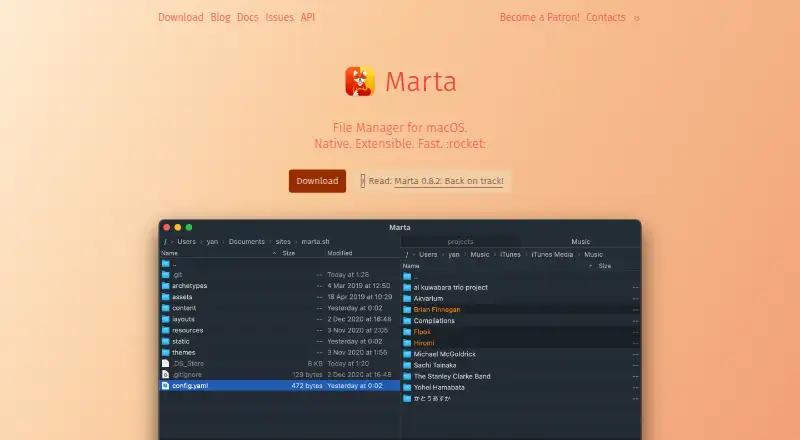
Marta is a free, native file manager for macOS aimed at power users who prefer keyboard-focused workflows. Its dual directory panes support copying and moving files, while tabs, configurable shortcuts, previews, hidden-file visibility, customizable themes, and command-line launching add control around everyday file management. Archive creation, extraction, browsing, and editing are included, making Marta a broader file utility than a simple folder browser.
Its strongest fit is a workflow that combines navigation, search, and terminal work. Global and local file search help locate items across directories, while the embedded terminal keeps command-line access close to the file view. The background operation queue is useful for handling file operations without making the interface revolve around each transfer. Disk-usage analysis adds a practical way to inspect how storage is being consumed. Marta also connects with Terminal, iTerm, Sublime Text, Atom, Visual Studio Code, and macvim, which suits users who move between file management and development tools.
Marta remains in beta, which is the main consideration for anyone choosing it for a long-term workflow. According to the vendor's notes, current versions are available for free, while a paid license may be introduced after beta. The Lua plugin API, themes, shortcuts, and terminal integration give advanced users room to tailor the application, but that focus may be more than needed for people who want a basic graphical file browser. Choose Marta if you use macOS and value dual panes, keyboard control, archives, search, and extensibility. Choose an alternative if you need a non-macOS platform or prefer software outside a beta release.
Your product? Our editors can test Marta in depth and publish a review, labelled as paid · from $149/mo →
Marta pricing
Marta fact sheet
| Free plan | Yes |
|---|---|
| Paid from | Free |
| Supported platforms | macos |
| Dual-pane view | Yes |
| Tabbed interface | Yes |
| Batch rename | Not verified |
| Archive support | Yes |
| Cloud storage access | Not verified |
| Portable version | Not verified |
| Deployment | Desktop |
| Platforms | macOS |
| Support | Email, Community, Docs |
| Built for | Solo, Small business (editorial estimate) |
| Integrations | 6 integrations: Terminal, iTerm, Sublime Text, Atom, Visual Studio Code, macvim |
| Pricing | Free plan |
| Website | marta.sh |
| Facts checked | 20 Sep 2026 |
Marta integrations
Marta lists 6 integrations on its own site.
- Terminal
- iTerm
- Sublime Text
- Atom
- Visual Studio Code
- macvim
Alternatives to Marta
- Total CommanderA feature-rich file manager for Windows users who want power beyond Explorer.9.3
- DolphinA capable free file manager, especially for Linux and KDE-oriented desktops.9.1
- WinSCPA capable Windows file manager for secure transfers, automation, and synchronization.9.0



Used Marta? Be the first to review it
The editor score above is our own research. What this page doesn't have yet is a reader's view — what you used Marta for, what worked and what didn't. No stars are seeded and no review is paid for; an editor reads every one before it appears.
Write a reviewTwo minutes · verified accounts only · read by an editor before it appears
Featured on iTechGuides

Marta is listed in our File Manager Software directory. Add the badge to your site — it links back to this page.
<a href="https://www.itechguides.com/products/marta/"><img src="https://www.itechguides.com/best/badge/marta.svg" alt="Featured on iTechGuides" width="230" height="46"></a>
Reviewed by iTechGuides Editors · Editorial team · Updated Oct 2026
Advertiser disclosure: iTechGuides is reader-supported. Vendors can pay for top positions in our rankings and for a place on other products' pages, and we may earn a commission when you click some links. Bought places stand at the number bought; this page and our disclosure say so. Paying vendors may get a fuller, more detailed review from our editors, and that review can change their score. How we rank.
Last updated · How we research and update