Marknote
Marknote: A free Windows Markdown editor that pairs linked notes with integrated Git tools. Ranked #70 of 76 in Notes Apps by our editors (3.0/10); pricing: Free plan; best for windows users who want Markdown notes with Git.
At a glance
- Editor score3.0 / 10
- PricingFree plan
- Best forWindows users who want Markdown notes with Git
- Free planYes
- Offline accessYes
- Facts checked5 Oct 2026
Where it wins
- Git sidebar handles staging, commits, pushes, branches, and change review.
- Wiki links, backlinks, and an interactive graph connect related notes.
- Offline editing, search, preview, and export support work without syncing.
Where it doesn't
- Available only as a Windows desktop editor.
- No web clipper is documented.
- Sync is in beta; paid plans are not yet on sale.
Our verdict on Marknote
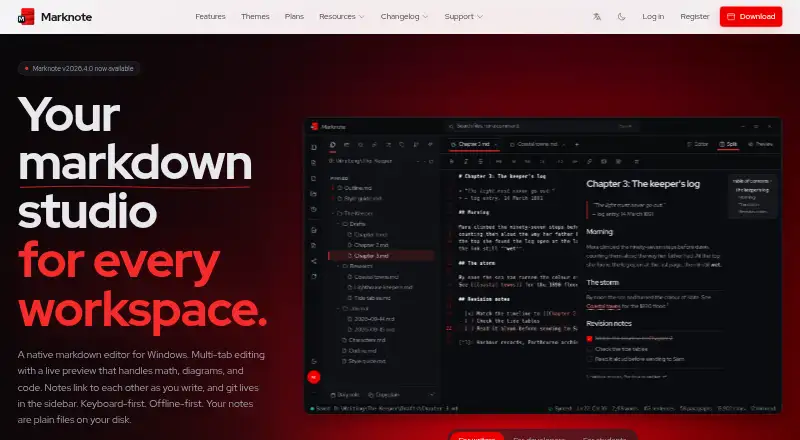
Marknote is a native Markdown editor for Windows, aimed at writers, developers, and students who want files stored in folders they choose. It combines multi-tab editing and a live preview with wiki links, backlinks, an interactive graph, and a sidebar for Git workflows. Its local-first approach makes it a fit for people who prefer ordinary Markdown files and offline work over a browser-based notes system; its Windows-only reach makes it a poor fit for users who need a native editor on other platforms.
The standout distinction is the breadth of its Markdown and Git workflow in one desktop app. Preview supports math, Mermaid diagrams, and syntax-highlighted code, while the Git sidebar includes staging, commits, push, branch switching, and change review. Notes can be searched and edited offline, and the Tasks sidebar gathers checkboxes across notes. Export options include HTML, PDF, and print, with more formats available through Pandoc. That combination suits technical writers and developers who already organize work as files and use Git; people seeking a documented web clipper or a less Git-centered notes experience may prefer another tool.
Marknote's editor is free, and the vendor says Sync is currently free during beta. Sync is optional and encrypts notes end-to-end before syncing across devices. The listed Student, Personal, Business, and Enterprise plans describe audiences or capabilities, but are not yet on sale, so they do not provide a current paid option. Collaboration is listed, including shared vaults for teams under Business, but buyers seeking an immediately purchasable team plan should look elsewhere. Choose Marknote for a Windows-based, offline-capable Markdown workflow with Git; skip it if cross-platform editing or a web clipper is essential.
Your product? Our editors can test Marknote in depth and publish a review, labelled as paid · from $99/mo →
Marknote pricing
All 5 Marknote plans and prices →
Marknote fact sheet
| Free plan | Yes |
|---|---|
| Paid from | Not verified |
| Offline access | Yes |
| Sync model | Both |
| Markdown support | Yes |
| Web clipper | No |
| Device limit | 3 |
| Shared collaboration | Yes |
| Deployment | Desktop, Cloud |
| Platforms | Windows |
| Support | Tickets |
| Built for | Solo, Small business, Mid-market, Enterprise (editorial estimate) |
| Pricing | Free plan (source) |
| Website | marknote.md |
| Facts checked | 5 Oct 2026 |
Alternatives to Marknote
- EvernoteA broad note workspace for capture, search, tasks, calendar-linked notes, and sharing.9.4
- Google KeepA free, straightforward notes app for shared lists and everyday capture.9.2
- NotionA flexible workspace for shared knowledge, with a free plan and paid collaboration features.9.1


See all Marknote alternatives →
Used Marknote? Be the first to review it
The editor score above is our own research. What this page doesn't have yet is a reader's view — what you used Marknote for, what worked and what didn't. No stars are seeded and no review is paid for; an editor reads every one before it appears.
Write a reviewTwo minutes · verified accounts only · read by an editor before it appears
Featured on iTechGuides

Marknote is listed in our Notes Apps directory. Add the badge to your site — it links back to this page.
<a href="https://www.itechguides.com/products/marknote/"><img src="https://www.itechguides.com/best/badge/marknote.svg" alt="Featured on iTechGuides" width="230" height="46"></a>
Guides on notes apps
- 12 Best Notes Apps for Windows 11 in 2026Aug 2026
- How to use the new Notes app on your Apple WatchAug 2026
- 20 Best Samsung Notes Alternatives & Competitors in 2026Aug 2026
Reviewed by iTechGuides Editors · Editorial team · Updated Oct 2026
Advertiser disclosure: iTechGuides is reader-supported. Vendors can pay for top positions in our rankings and for a place on other products' pages, and we may earn a commission when you click some links. Bought places stand at the number bought; this page and our disclosure say so. Paying vendors may get a fuller, more detailed review from our editors, and that review can change their score. How we rank.
Last updated · How we research and update