MapleRead
MapleRead: A focused iOS reader with Calibre, cloud sync, annotations, and immersion reading. Ranked #18 of 27 in Ebook Reader Software by our editors (7.4/10); pricing: Paid; best for iOS readers wanting Calibre and immersion reading.
At a glance
- Editor score7.4 / 10
- PricingPaid
- Best foriOS readers wanting Calibre and immersion reading
- Free planNo
- Annotation toolsYes
- Facts checked22 Sep 2026
Where it wins
- Calibre, OPDS, and multiple file-import routes support flexible book management
- Annotations, vocabulary tools, themes, fonts, and immersion reading deepen reading
- Cloud sync preserves positions, notes, vocabulary, bookmarks, and book sets
Where it doesn't
- Available only on iPhone and iPad
- There is no free plan
- PDF reading is limited to MapleRead SE
Our verdict on MapleRead
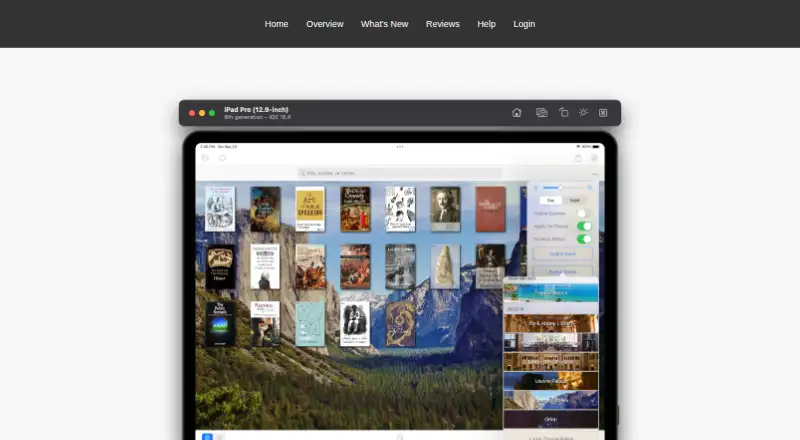
MapleRead is an iOS ebook-reading and library-management app for individual readers with personal book collections. Its editions support EPUB reading, while MapleRead SE adds PDF reading and a built-in library server. Readers can customize themes and fonts, organize books with sets and tags, search their library, and use highlights, notes, bookmarks, and vocabulary tools. The lineup is aimed at iPhone and iPad owners who want more control over a personal collection than a basic reading app provides.
The strongest fit is its combination of collection management and reading support. MapleRead can import and export through Files, Finder, iTunes, AirDrop, OPDS, and PC Upload, and it integrates with Calibre, Dropbox, iCloud Drive, Google Drive, and Microsoft OneDrive. Cloud synchronization covers reading positions, notes, vocabulary, bookmarks, and book-set membership. Text-to-speech and synchronized immersion reading add accessibility and language-learning options, while the SE edition’s library server gives readers another way to manage access to their books.
MapleRead is a paid product with no free plan, and the listed starting price is 6.99. MapleRead CE focuses on EPUB reading for iPhone and iPad; MapleRead SE adds PDF reading and the built-in library server; the SE-CE Bundle includes both editions and supports iPad split-view multitasking. That structure makes the choice clearer for readers with specific format needs, but it also means EPUB-only and PDF readers should compare editions before buying. Choose MapleRead for an iOS-centered collection, Calibre integration, detailed annotations, and immersion reading. Choose another option if you need Android, desktop, or a free plan.
Your product? Our editors can test MapleRead in depth and publish a review, labelled as paid · from $149/mo →
MapleRead pricing
All 3 MapleRead plans and prices →
MapleRead fact sheet
| Free plan | No |
|---|---|
| Paid from | Not verified |
| Supported platforms | iOS |
| Supported formats | EPUB, PDF |
| Annotation tools | Yes |
| Reading sync | Yes |
| Offline reading | Not verified |
| Library storage | Not verified |
| Deployment | Mobile |
| Platforms | iOS |
| Support | Docs |
| Built for | Solo, Small business (editorial estimate) |
| Integrations | 6 integrations: Calibre, Dropbox, iCloud Drive, Google Drive, Microsoft OneDrive, OPDS |
| Pricing | Paid (source) |
| Website | maplepop.com |
| Facts checked | 22 Sep 2026 |
MapleRead integrations
MapleRead lists 6 integrations on its own site.
- Calibre
- Dropbox
- iCloud Drive
- Google Drive
- Microsoft OneDrive
- OPDS
Alternatives to MapleRead
- ReadestA cross-platform ebook reader for broad format support and detailed annotations.9.4
- BookFusionA flexible cloud library for mixed-format readers who want offline access and sync.9.2
- PocketBook ReaderA format-rich free reader for mobile users who need Adobe DRM and reading-position sync.9.0

See all MapleRead alternatives →
Used MapleRead? Be the first to review it
The editor score above is our own research. What this page doesn't have yet is a reader's view — what you used MapleRead for, what worked and what didn't. No stars are seeded and no review is paid for; an editor reads every one before it appears.
Write a reviewTwo minutes · verified accounts only · read by an editor before it appears
Featured on iTechGuides

MapleRead is listed in our Ebook Reader Software directory. Add the badge to your site — it links back to this page.
<a href="https://www.itechguides.com/products/mapleread/"><img src="https://www.itechguides.com/best/badge/mapleread.svg" alt="Featured on iTechGuides" width="230" height="46"></a>
Reviewed by iTechGuides Editors · Editorial team · Updated Oct 2026
Advertiser disclosure: iTechGuides is reader-supported. Vendors can pay for top positions in our rankings and for a place on other products' pages, and we may earn a commission when you click some links. Bought places stand at the number bought; this page and our disclosure say so. Paying vendors may get a fuller, more detailed review from our editors, and that review can change their score. How we rank.
Last updated · How we research and update