Manico
Manico: A $15 one-time macOS app switcher, not a menu bar customization tool. Ranked #24 of 25 in Menu Bar Customization Software by our editors (4.0/10); pricing: Paid; best for users seeking keyboard-driven app switching.
At a glance
- Editor score4.0 / 10
- PricingPaid
- Best forUsers seeking keyboard-driven app switching
- Free planNo
- Paid from$15 one-time
- Facts checked23 Sep 2026
Where it wins
- Assign custom keyboard shortcuts to apps and jump directly to them
- Switch between multiple windows of the same app
- One-time purchase includes future updates
Where it doesn't
- Focuses on app and window switching, not menu bar customization
- Requires macOS 13 or newer
- No free plan
Our verdict on Manico
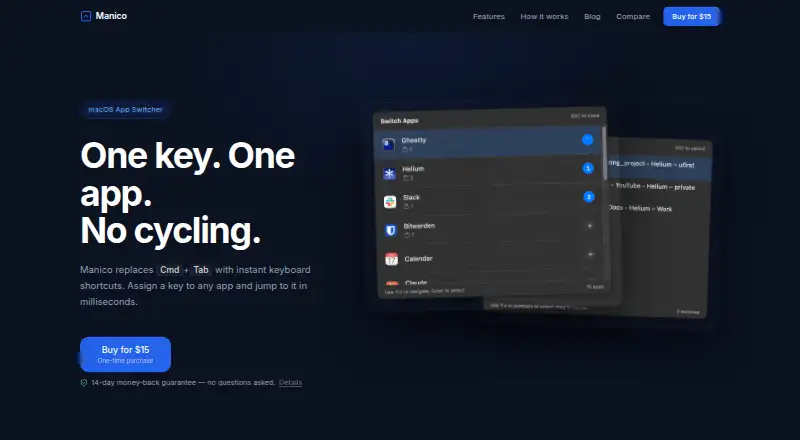
Manico is a macOS app launcher and switcher for people who prefer keyboard-driven navigation between apps. You can assign shortcuts to apps and jump directly to one rather than cycling through the system app switcher. For apps with multiple windows, Manico lets you select a window as well. It runs from the menu bar without a Dock icon and can optionally replace the native Cmd+Tab switcher. Although it sits in the menu bar, its purpose is app switching rather than customizing menu bar items or appearance, so it is a category mismatch for buyers seeking those controls.
The published plan is a single $15 one-time purchase, with future updates included. There is no free plan, and the vendor describes a 14-day refund period. This pricing model may suit someone who wants a focused utility without an ongoing subscription; it offers less flexibility for a buyer who wants to evaluate a free tier first. Manico requires macOS 13 or newer and supports both Apple Silicon and Intel Macs, according to its product description.
The fit is strongest for solo users and small teams looking for direct keyboard shortcuts and window-level selection on a Mac. Its focus is deliberately narrow: it handles app and window switching, with an option to take over Cmd+Tab, rather than providing a broader set of menu bar customization functions. Choose Manico if faster keyboard access to apps is the goal; choose another product if changing or organizing menu bar controls is the main requirement. Email is the listed support channel.
Your product? Our editors can test Manico in depth and publish a review, labelled as paid · from $149/mo →
Manico pricing
All 1 Manico plans and prices →
Manico fact sheet
| Free plan | No |
|---|---|
| Paid from | $15 one-time |
| Hide menu items | Not verified |
| Rearrange items | Not verified |
| Group menu items | Not verified |
| Custom menu items | Not verified |
| Keyboard shortcuts | Yes |
| Multiple displays | Not verified |
| Notch support | Not verified |
| Money-back guarantee | 14 days |
| Deployment | Desktop |
| Platforms | macOS |
| Support | |
| Built for | Solo, Small business (editorial estimate) |
| Pricing | Paid (source) |
| Website | manico.mariuti.com |
| Facts checked | 23 Sep 2026 |
Alternatives to Manico
- ThawA free, highly configurable way to organize, hide, and search macOS menu bar items.9.4
- BartenderA broad Mac menu bar toolkit for users who need profiles, triggers, widgets, and layouts.9.2
- SaneBarA capable free option for organizing crowded Mac menu bars.8.9


Used Manico? Be the first to review it
The editor score above is our own research. What this page doesn't have yet is a reader's view — what you used Manico for, what worked and what didn't. No stars are seeded and no review is paid for; an editor reads every one before it appears.
Write a reviewTwo minutes · verified accounts only · read by an editor before it appears
Featured on iTechGuides

Manico is listed in our Menu Bar Customization Software directory. Add the badge to your site — it links back to this page.
<a href="https://www.itechguides.com/products/manico/"><img src="https://www.itechguides.com/best/badge/manico.svg" alt="Featured on iTechGuides" width="230" height="46"></a>
Reviewed by iTechGuides Editors · Editorial team · Updated Oct 2026
Advertiser disclosure: iTechGuides is reader-supported. Vendors can pay for top positions in our rankings and for a place on other products' pages, and we may earn a commission when you click some links. Bought places stand at the number bought; this page and our disclosure say so. Paying vendors may get a fuller, more detailed review from our editors, and that review can change their score. How we rank.
Last updated · How we research and update