
MakeIcon
MakeIcon: A free icon generator with broad exports, styling controls, and live previews. Ranked #6 of 29 in Favicon Generators by our editors (7.1/10); pricing: Free plan; best for designers wanting live previews.
At a glance
- Editor score7.1 / 10
- PricingFree plan
- Best forDesigners wanting live previews
- Free planYes
- Paid fromNone
- ICO exportYes
- Facts checked21 Sep 2026
Where it wins
- Exports ICO, PNG, Apple touch, PWA, and maskable icons
- Includes HTML link tags and manifest.json in the ZIP
- Offers styling controls and real-time previews across device platforms
Where it doesn't
- Batch icon generation is listed as a future feature
- The workflow is centered on browser-based icon creation
- Its scope focuses on icons rather than broader design production
Our verdict on MakeIcon
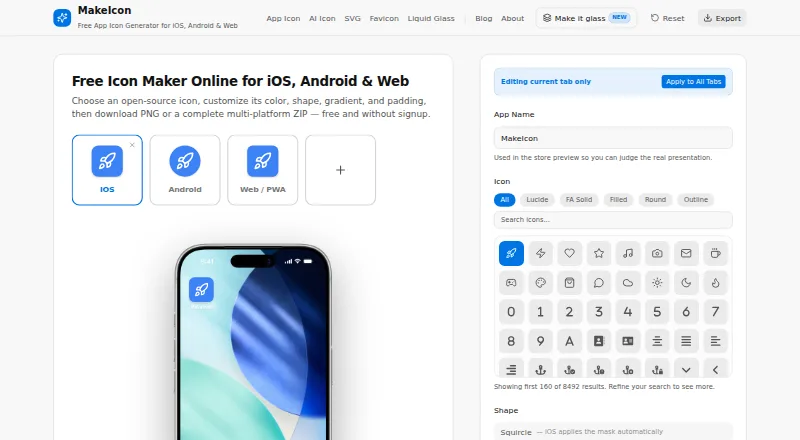
MakeIcon is a free, browser-based icon generator for developers, designers, and indie app makers. One design can produce favicon.ico files with embedded 16 px and 32 px sizes, browser favicon PNG files, a 180 × 180 Apple touch icon, and 192 px and 512 px PWA manifest icons, including maskable variants. The downloaded ZIP also includes HTML link tags and a manifest.json snippet, giving web projects the core files and markup needed for icon setup.
Its strongest fit is for designers who want to see changes before exporting. MakeIcon provides real-time previews across device platforms and lets users adjust icon colors, shapes, gradients, padding, and backgrounds. The wider product also generates iOS, Android, and web app icon sets, while AI-generated SVG and PNG icons add another creation path. Browser processing keeps designs on the device rather than uploading them, which suits users who want a direct web workflow for icon generation.
The main trade-off is breadth within a focused task: MakeIcon covers many favicon and app-icon outputs, but batch icon generation is listed as a future feature rather than a current capability. That makes it a strong choice for individual designs, site launches, and indie app projects that benefit from previews and ready-to-use snippets. Teams producing many icon variations at once may prefer a workflow built around batch processing, while users seeking broader design production tools should look beyond a favicon-focused generator.
MakeIcon pricing
MakeIcon fact sheet
| Free plan | Yes |
|---|---|
| Paid from | None |
| ICO export | Yes |
| PNG export | Yes |
| SVG export | Yes |
| App icon set | Yes |
| Web manifest support | Yes |
| Batch processing | Not verified |
| Deployment | Cloud, Mobile |
| Platforms | Web, Windows, macOS, Linux, iOS, Android |
| Support | |
| Built for | Solo, Small business (editorial estimate) |
| Pricing | Free plan |
| Website | makeicon.online |
| Facts checked | 21 Sep 2026 |
Alternatives to MakeIcon
- favicon.ggA free browser toolkit for complete favicon, PWA, and app-icon packages.9.0
- Favicon.nowA free favicon package generator with previews, validation, and API automation.8.2
- Favicon MakerA free, private browser tool for generating complete favicon and web app icon packages.7.7



See all MakeIcon alternatives →
MakeIcon vs the competition
- MakeIcon vs favicon.gg
- MakeIcon vs Favicon.now
- MakeIcon vs Favicon Maker
- MakeIcon vs RealFaviconGenerator
- MakeIcon vs FaviconOnline
- MakeIcon vs Favicon.one



Compare MakeIcon with any tool side by side →
Used MakeIcon? Be the first to review it
The editor score above is our own research. What this page doesn't have yet is a reader's view — what you used MakeIcon for, what worked and what didn't. No stars are seeded and no review is paid for; an editor reads every one before it appears.
Write a reviewTwo minutes · verified accounts only · read by an editor before it appears
Featured on iTechGuides

MakeIcon is listed in our Favicon Generators directory. Add the badge to your site — it links back to this page.
<a href="https://www.itechguides.com/products/makeicon/"><img src="https://www.itechguides.com/best/badge/makeicon.svg" alt="Featured on iTechGuides" width="230" height="46"></a>
Guides on favicon generators
Reviewed by iTechGuides Editors · Editorial team · Updated Sep 2026
Advertiser disclosure: iTechGuides is reader-supported. We may earn a commission when you click some links. How we rank.
Last updated · How we research and update