Logr
Logr: A focused, free time-billing tool for simple project invoicing and self-hosting. Ranked #26 of 31 in Time Billing Software by our editors (6.5/10); pricing: Free plan; best for open-source users wanting simple project billing.
At a glance
- Editor score6.5 / 10
- PricingFree plan
- Best forOpen-source users wanting simple project billing
- Free planYes
- Paid fromFree
- Invoice generationYes
- Facts checked20 Sep 2026
Where it wins
- Free hosted service with no paid tier
- Combines timers, manual entries, rates, and invoicing
- Web, API, and self-hosted deployment options
Where it doesn't
- Billing is centered on time and fixed project budgets
- Client sharing uses public invoice and report links
- Workflow depth beyond core billing is limited
Our verdict on Logr
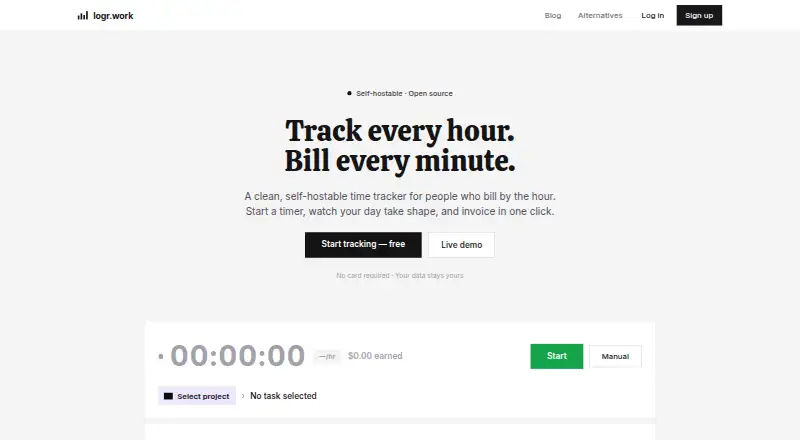
Logr is an open-source time tracker and invoicing product for freelancers and agencies that bill by the hour. It supports one-click timers and manual time entries, with clients and projects organized in the same workspace. Billing can use hourly or fixed-budget models, with per-session and per-project rates and separate billable and non-billable tracking. The hosted service at logr.work is free, and users can also deploy Logr on infrastructure they manage themselves. This makes it a practical fit for individuals and small teams that want straightforward project billing without a paid subscription.
Its strongest area is the path from captured time to client-ready billing. Users can generate invoices from unbilled sessions, share public invoice and report links, and review activity through dashboards, reports, goals, and an activity heatmap. CSV import supports existing time entries, including imports from Toggl. The product also offers Google OAuth, an MCP server, an in-app AI assistant, and compatibility with Claude and other MCP-compatible AI assistants. Together, these features give Logr useful coverage across manual tracking, reporting, invoicing, and AI-assisted workflows without moving away from its core time-billing focus.
Logr is a good choice for open-source users, freelancers, and agencies that need simple rates, time capture, reports, and invoice generation in a free hosted or self-hosted package. Its fit is less clear for organizations that need a broader billing operation around the timer, such as expense handling, recurring invoices, approval workflows, or client portals. Teams with those requirements should consider a product designed around those processes instead. For focused project billing, however, Logr keeps the workflow direct while offering both hosted access and user-managed deployment.
Your product? Our editors can test Logr in depth and publish a review, labelled as paid · from $149/mo →
Logr pricing
Logr fact sheet
| Free plan | Yes |
|---|---|
| Paid from | Free |
| Invoice generation | Yes |
| Time capture | Mixed |
| Billable rates | Yes |
| Time approval | Not verified |
| Expense billing | Not verified |
| Recurring invoices | Not verified |
| Client portal | Not verified |
| Deployment | Cloud, Self-hosted |
| Platforms | Web |
| Support | Docs, Community |
| Built for | Solo, Small business (editorial estimate) |
| Integrations | 4 integrations: Google OAuth, Claude, MCP-compatible AI assistants, Toggl CSV import |
| Pricing | Free plan |
| Website | logr.work |
| Facts checked | 20 Sep 2026 |
Logr integrations
Logr lists 4 integrations on its own site.
- Google OAuth
- Claude
- MCP-compatible AI assistants
- Toggl CSV import
Alternatives to Logr
- ScoroA broad time-billing and professional services suite for end-to-end financial control.9.2
- FreshBooksA strong invoicing-led choice with time tracking, payments, and client collaboration.9.0
- HarvestA focused time-billing suite with broad tracking, reporting, and invoicing coverage.8.8



Used Logr? Be the first to review it
The editor score above is our own research. What this page doesn't have yet is a reader's view — what you used Logr for, what worked and what didn't. No stars are seeded and no review is paid for; an editor reads every one before it appears.
Write a reviewTwo minutes · verified accounts only · read by an editor before it appears
Featured on iTechGuides

Logr is listed in our Time Billing Software directory. Add the badge to your site — it links back to this page.
<a href="https://www.itechguides.com/products/logr/"><img src="https://www.itechguides.com/best/badge/logr.svg" alt="Featured on iTechGuides" width="230" height="46"></a>
Reviewed by iTechGuides Editors · Editorial team · Updated Oct 2026
Advertiser disclosure: iTechGuides is reader-supported. Vendors can pay for top positions in our rankings and for a place on other products' pages, and we may earn a commission when you click some links. Bought places stand at the number bought; this page and our disclosure say so. Paying vendors may get a fuller, more detailed review from our editors, and that review can change their score. How we rank.
Last updated · How we research and update